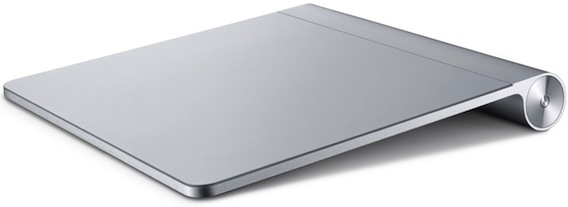
The Apple Magic Trackpad is the second product from Apple that has the word “Magic” in it. Unfortunately, like the Magic Mouse that came before it, the Magic Trackpad I got for this review is also lacking in the magic department. Mind you, I do prefer the Magic Trackpad over the Magic Mouse but neither is ever going to replace my Logitech VX Revolution mouse anytime soon.
Anyone who has ever used a current generation Macbook Pro will be instantly familiar with the Magic Trackpad. All the gestures are pretty much the same. The big advantage is the tracking surface. It’s over 50% bigger than the already large surface found on the Macbook Pro trackpad. This allowed a great range of movement and I had no problems going from one end to the other on my 30″ monitor.
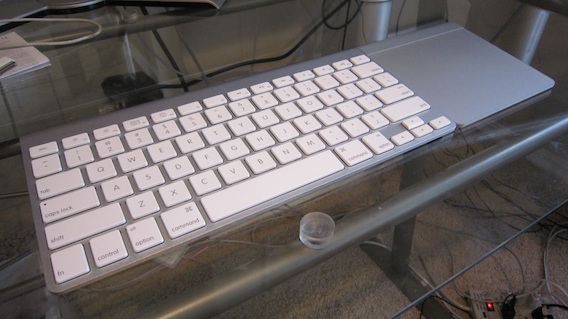
The Magic Trackpad allows you to do stuff on your Mac that you can’t do with mouse. Stuff like pinch/zoom or rotate a photo. All the gestures can be accomplished by tapping on the surface. You can push down on the surface and get a click like the Macbook trackpad. The trackpad looks extremely nice when docked next to the Apple bluetooth keyboard. It looks so nice that I’m wondering why Apple doesn’t sell the keyboard and trackpad as single combined device (they can call it the Magic Keyboard). It would be ideal for use in a home media setup.

It takes a while to get use to the Magic Trackpad. It’s not as intuitive as a normal mouse. It’s also not as accurate. Many times, I missed the text I wanted to highlight and had to try again. With time, I think one will improve but there’s also a reason why most people buy a mouse to use with their notebooks instead of using its trackpad.
For the Mac user who just wants to be different, and you know who you are, the Magic Trackpad is a great way to stand out from all the other Apple fan boys. However, once the novelty and magic wears off, you’ll be reaching for your tried and true mouse again.
Did you enjoy this post? Get John Chow Dot Com updates via email...
Stay up to date with all of John Chow’s tips for making money online and blog posts by subscribing via email. Your email will be kept private and never shared with anyone.


One of the most common complaint (or excuse) I hear from potential new bloggers is they don’t know how to install WordPress. Terms like FTP and CPanel are like a foreign language and setting up a database might as well be setting up the space shuttle for a launch. Because of the technology barrier, many would-be bloggers never start their blogs...
{ 44 comments }
I’ve heard quite a bit about the trackpad; would like to give it a try
maybe it takes some time getting used to ?
I might have to get this for my Macbook. I’m a bit too aggressive with the trackpad on my laptop and it doesn’t work too well these days!
I prefer to use a mouse over trackpads. I’ve never used a magic trackpad though.
Right, I am also more comfortable with mouse than trackpads.
so you used track pad earlier as well. Which one ?
how much does the magic trackpad cost? I recently got the ErgoMotion mouse http://bit.ly/cIcDTQ which is pretty awesome tbh.
It cost $69.
$69 for a oversized trackpad, no thanks. Maybe with the keyboard.
Too high.. just like other iPad accessories..
I think it is value for money product because it is very cool looking device.
its quite possible’that you have not used it efficiently. Used it full and than you will realise the difference.
The price is OK if it works for you. If it doesn’t work for you then any price is too high.
I like John’s suggestion that the pad should come with the keyboard.
I purchased a magic trackpad and it’s sitting on a desk completely unused. For day-to-day work nothing beats a normal ergonomic mouse.
You should sell it or give it away
That’s what happens when you rush for something.
You can sell it.
Interesting, it sure does look good next to the Bluetooth keyboard. I actually have the Bluetooth keyboard but am having trouble getting it to pair with my iPad these days.
Anyone know the price of this?
John said it costs $69.
I definitely need to get one of these for my Mac computer
Not a fan of the magic…
Waste of money… at least thats what i think
i have been holding back on the magic track pad, until now, i think i have given up. i can live without it. and yes right, magic mouse is no magic at all. i have that with my macbook but for my imac, it’s just my trusty mighty mouse
thanks for the honest review John, and a magic keyboard does sound like a better idea
Really For those who are Mac user and who just wants to be different, and you know who you are, the Magic Trackpad is a great way to stand out from all the other Apple fan boys.
Yes you are absolutely correct this is for only those who love to live in style.
Such a lame review John, not expected from you. How can you use something for 2 hours and say its not that good. I have personally used the magic track pad and after using it you cant use any mouse, its so good. I request you to kindly spend adequate time with a product before giving your important verdict.
I spent two days with it. And I’ve been using it since this review was posted. My opinion has not changed.
Just give it more time. For me it was easy, cause I always used my macbook pro’s trackpad. As of me, I’ll never go back to my Logitech mouse.
Fas,
It just shows that the only way to really find out if something is good for you or not is to try it yourself.
John doesn’t like it and he is stating his opinion on his blog. Accusing him of not doing his job well reviewing the product is not cool.
Why not just disagree with his opinion? You like it he doesn’t. Disagree respectfully and be happy.
You either like it or you don’t. 2 days is plenty of time to make a decision on something. Especially when it’s directly related to what he does for living.
IDK… I’ve been using a Macbook for almost 2 years and I haven’t felt the need to get a mouse yet. I love the trackpad and love the idea of it on Mac desktop.
I think I actually like the Magic Trackpad more than the Magic Mouse. The mouse is annoying.
But maybe they could come out with an all in one keyboard/trackpad for the desktops that would have the trackpad in the same location as in the laptops.
I guess it all comes down to personal preference. Glad we can choose what we like! : )
This looks very great but unluckily not for me because I don’t have a MAC book.
despite everything , I prefer to use a mouse over track pads , still i don’t mind give it a try !!!!! ThanX
Totally depends on person to person, few people will simply like it and i do think that this one is useful because this have many useful features. Lets see how normal users react on it.
It might be pretty lame in snow leopard but with Lion there are a lot more gestures and full screen mode apps as well as Mission Control.
I am more comfortable with a mouse than a track pad.
I’ve never liked trackpads so giving us the option of a seperate trackpad for a computer doesn’t appeal to me at all.
That being said, the trackpad on my macbook pro is the best I’ve used and much better than any PC one that I have tried.
I don’t think this is meant as a mouse replacement, but for my home entertainment system Mac Mini it’s a great addition to the living room as it doesn’t require a surface to work with and can just sit on the coffee table.
Means you made it with the no magic tag, anyway I am also not going to give it a try because it is looking uncomfortable for me to work with.
sorry im loyal to pc
Hey John,
Thanks for the review. It’s good to learn that not everything that has the word magic in it is actually magical.
I would like to try this good looking track pad and would even like to have one as an alternative to the mouse.
In the end I think that a mouse is better though.
so every one is preferring mouse here. Though without using trackpad. Would love to comments after they used it
Some of the brands of wireless mouse cost just about that, so it’s not really out of price range