CLICK HERE: 100 New Affiliates Who Want to Make $100,000+ Per Year!
 

Ban Those Blog Comment Spammers!

written by John Chow on December 23rd, 2008

If your blog achieve even a hint of popularity, you’re going to get hit by comment spammers. These bots go all over the blogsphere to spam blog after blog. Spam filters like Askimet does a great job preventing the comments from showing up.

Akismet has protected your site from 873,646 spam comments already, but there’s nothing in your spam queue at the moment.

The main problem with Askimet is it places all the spam comments in the spam folder for you to check out. Because Askimet is not perfect, you need to check the spam folder to see if any legit comments got caught. This isn’t a problem when you get a few spams per day. However, when you wake up to 200+ comments in the spam folder each day, it can be a real time waster to check through it.

Most of the time, the spams are sent from the same person/site. When I see the same IP show up in Askimet over and over again, I would ban that IP by editing my htaccess file. The main problem with this setup is I need to fire up my FTP program every time I need to ban an IP and I really don’t like editing my htaccess file. There had to be a better way!

Twitter To The Rescue

@JohnChowDotCom (John Chow) says:
Is there a wordpress plugin to ban the IP of spammers from commenting?

Twitter has proven to be an awesome business tool for me. I sent out the above tweet this afternoon and got a bunch of answers. Three Twitter users replied with the exact plugin I was looking for. Shout outs to
@simpso1ja, @askbillmitchell and @krystyl for the heads up on WP-Ban.

WP-Ban Wordpress Plugin

WP-Ban

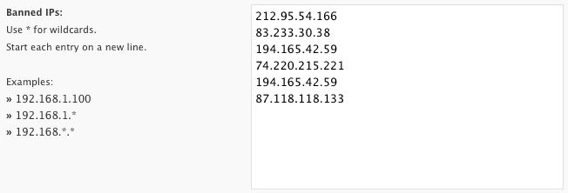
WP-Ban by Lester Chan allows you to ban users by IP, IP Range, host name and referer URL. Banned IPs are prevented from visiting your blog. If they can’t visit, they can’t leave any spam. The plugin will display a custom ban message when the banned IP attempts to visit and leave a comment. My message reads:

Die Spammer! Die!!

You can exclude certain IPs from being banned. There are also statistics to show how many times a banned IP attempts to visit your blog. WP-Ban allows wildcard matching too.

Since activating WP-Ban two hours ago, the above banned IPs have attempted to access my blog 126 times. That would have added another 126 comments to my spam folder if the plugin wasn’t installed. If you’re getting a bunch of spam comments from the same IPs over and over again, WP-Ban is a great way to lock them out!

Download WP-Ban from Lester Chan

Tweet This Tweet This Post!
English flagItalian flagKorean flagChinese (Simplified) flagChinese (Traditional) flagPortuguese flagGerman flagFrench flagSpanish flagJapanese flagArabic flagRussian flagGreek flagDutch flagBulgarian flagCzech flagCroat flagDanish flagFinnish flagHindi flagPolish flagRumanian flagSwedish flagNorwegian flagCatalan flagFilipino flagHebrew flagIndonesian flagLatvian flagLithuanian flagSerbian flagSlovak flagSlovenian flagUkrainian flagVietnamese flag
  1. That is really handy! Im definately gonna be using this one!

  2. My blog isn’t quite at that point, but down the line this will surely help.

    Actually, I think I might install it now. Hopefully I can get rid of some of the people who spam my contact form. Those always get spammed to hell.

  3. I use a great plugin I learned about from ProBlogger called Robots Meta, which is great for controlling bots/spiders, but also works for editing .htaccess. That’s what I would have recommended – totally overlooking the specific IP issue.

  4. When I began writing my web log, I had no idea what spam was. To my chagrin, it only took them three weeks to find me and make my writing life so unhappy. I moved my blog to wordpress, where I am protected by Askemit.

    Merry Christmas to you and your family.

  5. Yeah. I’m already using it and I really love it. Though everyday new spammer is born.

  6. Thanks for the mention in your post. I love your message, also. Keep up the good work.

  7. ahh, great plugin, thankyou!!

    trisha
    momdot.com

  8. Wow this tools really comes in handy, i’d like to give it qa try but right now i just need to convert my blog into Wordpress first

  9. I saw that post you put on Twitter! It’s amazing you not only got an answer – but to get a solution like this is incredible!

    This is a must have WordPress Plug-In!

    My Blogs don’t have near the traffic you have – but I still get hammered by these idiots (Or USE to thanks to this plug-in)!

    You’ve come through again!

    Now if you can figure out a way to get some snow down here to Ohio for Christmas you’d be my hero!

  10. Yeah! That’s great plugin. I will try it because there are much spam comments in my blog. Thanks for sharing!

  11. While a ban function is a big help, the spammers seem to go away if you detect the spam and serve them an error message or 403 response. I have a custom written site that uses a moderation queue and was getting the same sort of issue. I was having to moderate a never ending stream of spam with maybe one legit comment a week. So I lowered the spam threshold and served up 403s for obvious spam (calculated based on a number of factors that is not likely to be a legit comment).

  12. Yep, I’ve had WP-Ban for a while now. A little surprised that you didn’t know about it because it’s by the same guy that created the poll plugin on your blog!]

    It is a great plugin though. Saves me so much time.

  13. That’s bad news for spammers. So! Don’t be spammers

  14. John, thanks for sharing this wonderful WP plugin. This is the tool i am looking for sometime. When i recently launched my love blog – Cupid Blogger Dot Com since 1 December, i have been consistently hit by all these spammers till today. And i have to clear and delete them manually. I got about average 10 spams per day. That is bad rite?

    Well i have a question, it seems that this tool. We have to key in manually to the console. Just like what i did which i add all the IP into IP deny manager in my Cpanel server. I think it would be great when the comment is classified as spam and the plugin able to auto-capture the IP address and put into the ban list. What do you think John?

  15. Wow, this is awesome. I’m getting about 1,000 spam comments a day…most from the same 4 or 5 IP’s. This will make like a LOT easier.

  16. Thanks for the good writeup!! Someone told me a clever way to do it is to actually disable akismet, and simply set the Wordpress to ask you to moderate any comments that have links in them

    I have switched to this method and so far so good!!!

  17. Awesome, I’m going to go download it right now. As a side note – I’ve been on the fence about Twitter, couldn’t seem to get my head around its popularity. I’ve been using for a while but never got into a groove with it. This post points out how it can be very useful, thanks for that.

    Bruce

  18. lol… spammers won’t like this plugin. haha

  19. John, no shout out for me???

    I was the first person to suggest it on your Facebook page… :-(

  20. But how does this plugin handle situations where IP addresses are assigned dynamically via DHCP? What about situations where people use a single IP address such that all local PCs have private IP addresses?

    • Looks like that’s something you’re going to have to ask the creator.

      • Users of this plugin ought to know this issue as well otherwise using this plugin blindly will end up hurting their blog’s traffic. I am thinking of a situation where only one public address is used and some 1000 people in that network use private addresses and it happens that one of them submits spammy comments to your blog. Banning the IP address in this case will make you lose 999 readers.

  21. My blog is fairly new and I’ve already gotten over 300 or so spammers daily, I will try this plugin and see the results but also have the same questions when it comes to the specific protocals being used as the above mentioned, dhcp and private ip’s

  22. My blog got its first spam comment. Its growing up so fast.

  23. I like the idea.

    When you block at the IP level, how do you verify it’s not a proxy (in other words, blocking a bunch of legitimate users in addition to the spammer)? … or is it a pretty safe bet?

    • Most of those IP addresses are IPs that I know for the same reason: spam. They load tons of comments in my comment queue and then some. Some are really repugnant, too. The only effective way to stop this kind of malignancy is too Ban them with a plugin like Lester’s or use htaccess.

      Lester’s plugin makes things easier. Much!

      Kenneth

  24. What about spammers on variable IP’s? And of course, they usually use proxies to spam. This plugin would not fix it, so its useless…

  25. This is cool, twitter rocks lol………how convenient and efficient that is to use twitter

  26. There are a number of problems with IP banning:

    1) If the spammers are using trojans sitting on everyday man’s computers to spam you, your ban will affect those users much more than the spammers you’re trying to defend against

    2) Programmatically it’s very easy to detect a if a site is banning my IP and reroute the spam attack through a different one until it gets through.

    3) Using a tool like WP-Ban is another regular moderation task (but with no ROI) for your blog. Automating bans with a system of rules might be better, but how would you be able to recognize false positives? So forget that.

    Just start using Bad Behaviour- http://www.bad-behavior.ioerror.us/. It will automatically protect your blog from bad bots on the fly, and requires no moderation whatsoever. Best used in tandem with Akismet or my preference – SpamKarma2

  27. “Die Spammer! Die!!”
    hahahahaha that’s so funny and enjoyable when you see them defeated! :D :D :D

  28. I am getting weekly spam’s askismet is doing a great job protecting me from those but I do know the feeling of having to go through 200+ comments. It’s not a nice experience at all!

  29. great plugin there.
    I was in search of the same to prevent spam.

    Thanks for sharing… :D

  30. Thank you for the plug-in. John showing the power of Twitter, I guess I am out of excuses, must start using my Twitter accounts..

  31. I got paid $1000 for telling a company to install Askimet … its always about what you know, not how hard it is to do things :p

  32. Al

    To really breath fire into WP-Ban, someone should write a separate plugin which collects statistics from the Akismet spam queue. As soon as a certain IP or IP block reaches a certain threshold – it is automatically added into WP-Ban.

  33. Great plugin, going to download now.

    Most of the spam I get are not even words just random letters ! wtf ?!

  34. I learn something new here everyday! I’m going to check right now to see if I have a specific IP address or addresses that I keep showing up in my spam folder If so, I will install this plugin.

    Thanks for sharing the info!

  35. I have not experienced so many spam comments yet but I will be happy as it shows that my blog has achieved a certain level of success.

  36. I don’t know why anyone else hasn’t mentioned it but WordPress already has the ability to ban IPs.

    How does this plugin differ from the built-in blacklist that you can add IPs, Words or Phrases too?

    WP 2.7 -> Tools -> Discussion -> Comment Blacklist

    Can put wildcard emails addresses, IP addresses and words…

  37. i haven’t prove it yet, because my blog is new, currently i just have two commenters,

  38. I use WP-SpamFree along with Akismet. WP-SpamFree allows only human being for commenting. Together they have blocked millions of comments from spam bots on my blog and save a lot of time for me by that way.

  39. why do you use the math riddle comment filter plugin?

  40. Useful plugin, worth trying it out. But still wondering about the dynamic ip and static ip, if the spammer use static, then it would be ban for good, but if dynamic, somehow I fear some other user within the spammer area would actually get banned without knowing why… will try this plugin see whether it could help on my blogs.

  41. Damn I wish i was running wordpress instead of blogengine, im hoping one day blogengine has more plugins and extensions

  42. ATTN john – your spam blocker has blocked my ip address!! I am your top commentator and always post relevant comments!! Why did I get blocked?? Please unblock my ip address as I am posting this from my mobile to let you know there is a problem with your plugin – I hope you didn’t block me on purpose as I am a big supporter and send many people your way by word of mouth and thru my blog :(

    • Hey John!! Whether it was a glitch or what not, I am able to access your blog again!!

      Is there some auto-block feature of the new plugin that your users might need to know about?? Or do I simply just have too much time on my hands and I should just comment less lol (didn’t think that that commenting TOO much would do me in lol)

      anyways whatever it was, I’m glad I’m able to access your blog again – being booted was certainly NOT something I wanted for Christmas :)

      Hope that Santa was good to you – I’ll be posting my loot on my blog later on if you’re curious – I actually got a nintendo WII and WII fit as one of my gifts – and here i thought these things were impossible to find!! :)

  43. Would wishing you (John) Merry Christmas make me a spammer? :P
    Good post anyway. (Un)fortunately I am yet to become so popular to draw attention of SPAMMERS on my blog!

  44. Yes, the built in ip filter in wordpress just doesn’t work. I enter in an IP to ban, and they still are able to pingback and comment! Great post John. I am glad it wasn’t a picture of your lunch.

  45. this tool seem good, gonna try on my few blog, thank for share man

  46. I agree with you. Spam is way to much nowadays.

  47. agree with you john,
    its really hard sometimes i get comments from unwated site as porn which i mostly don’t visit but to check the comments i need to visit those sites,
    thanks for the plugin will giv it a try soon

  48. Is there a way that not only the IP address of the spamer is banned by blogger and at the same time a complain is sent to the service provider of the spammer?

  49. Thanks so much, I really needed this for my blog I wake up to about 10 or more comments each day of spam. Good job twitter users!

  50. WP-Ban is a must for popular blogs. Btw, sometime those spammers use a script and randomly pick proxy ip before they act. No protection for that yet.

  51. Hi John,

    There is a WP plugin called Spamfree. It virtually iliminates spam comment without the hassle of the commentor having to fill out a captcha form. I agree that it´s a dammed nuisance and the culprits should be banned for life !

    Have a great holiday,

    Paull

  52. I heard that the new WP 2.7 gives a whole lot more spam comments than the previous versions.

    -Mike

  53. it has never occurred to me to check my spam folder — i just let akismet delete it all. i had no idea that this was a bad move. thank you, john, for the insight (and also for the extra work, lol).

  54. Thank you, John! I run a couple of popular blogs and I receive some 100-200 spams per day. Last month I had a single day with 1100+ spam messages only in one of my blogs.

    I will definitely try the anti-spam plugin.

  55. thanks for the tip. just got my blog started but what the heck, I am going to get ready for volume and the spam boys now anyway!

    Rob

  56. Good plugin for WP, just need one for Blogger. I’ve just started to see some increasingly volume of spam posts on my site — getting annoying rejecting all of them!

  57. John would you be so kind as to tell me what plugin your using for that How do I change my avatar and pic posted next to this add a comment section. I have seen this on but a few blogs and would like it on mine. Great post BTW, I just added WP- Ban to my blog after reading this, Thanks for sharing John

    Bob

  58. WP-Ban is a cool plugin, i just checked it out and thinking of implementing it on my blog.. :)

  59. I hate spammers and this plugin is very useful for all. I have used several plugins of Lester Chan but this one is amazing one. Thanks for sharing

  60. That’s awesome.I can’t stand to browse through spam comments, anymore than I can stand to browse through my junk mail folder. How is the performance? I’d think this method would be slower than .htaccess, but 126 hits isn’t that much (in terms of traffic) so probably doesn’t matter.

  61. Jon

    I never even thought of going through my spammed comments to find stuff that was wrongly placed. Good idea!

    Jon
    http://WoodMarvels.com – Create Unique Memories

  62. I’ve tried to ban IPs in the cpanel before. I had this one spammer that seemed to be toying with me. Maybe I’m just paranoid but he seemed to be ’showing me’ it wasn’t working. He came back every day with a different IP address. Even a different range sometimes. Very frustrating.

  63. Thanks for that plugin John. I was looking for something like that. I don’t know how these find my email address but I get a load of spam every day so I know how you feel.

    I thing the best solution is to ban the IPs. And I know… it’s kinda hard to edit your htaccess every time. Anyhow, thanks again for the article and for the plugin.

    All the best,

    Remi Vladuceanu
    http://www.remivladuceanu.com

  64. I don’t get this kind of comments each day. But, I have installed it just for future use. Thanks for sharing this plugin details with us.

  65. Seems to me that my blogs also got some eye and now I am also receiving spam comments. But thanks to my filtration they never come on surface live …

Trackbacks

  1. Ban IP to Stop WordPress Comment Spam Forever - December 29, 2008 at 4:18 am
  2. Dö spammare, dö! | Webmastern.se - December 29, 2008 at 11:58 pm
  3. Ban IP to Stop WordPress Comment Spam Forever | Online Money Earning Tips, Tricks, Info & Magic - January 1, 2009 at 6:30 am
  4. Ban IP to Stop WordPress Comment Spam Forever | Social Media Smack Talk - January 2, 2009 at 5:54 pm