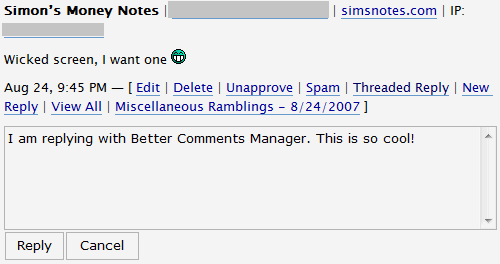
This blog gets tons of comments everyday. Managing them can be a lot of work. A few months ago, Keith Dsouza from Techie Buzz emailed me saying he created a Wordpress plugin that will allow me to better managed my comments.
The plugin allows you to reply to comments from within the Wordpress admin panel. There was only one problem - it didn’t work with Brian’s threaded comments. I told Keith to give me a shout once he gets the plugin working with threaded comments.
Not only did Keith did as I requested but he added a bunch of other features to the new Better Comments Manager. Among the new features of Better Comments Manager are:
- Removed scrolling effect on adding a new comment
- Compatible to store threaded replies
- Added functionality to edit comments from within the same page
- You can either add a threaded reply or create a new reply
- Accessible from the Wordpress main menu

Installation of the plugin is a simple download, unzip, upload and activate. The plugin works really well and is a pleasure to use. The ability to quickly reply to comments from within the Wordpress admin panel is a real time saver. I highly recommend this plugin for any Wordpress blog that gets even a handful of comments.
Find out what I am doing right now by following me on Twitter! If you like this post then please consider subscribing to my full feed RSS. You can also subscribe by Email and have new posts sent directly to your inbox.


(9 votes, average: 4.11 out of 5)
Here's A Few More Related Posts
Looks like something we can use!
Only for WP user
why not move to wordpress?
I did an I totally love it.
I will as soon as my friend sorts out my hosting. cool comment picture John
don’t have so much comments.
Yep, something to use if you get many comments.
Please someone answer this question:
How do you get the Brian’s Threaded Comment Plug-in to function
I only brought this up because john mentioned it in his post and I remember I never was able to get it to work.
About the Comment Manager… It’s very good if you have a lot of post and lot of comments, but if you have a couple of posts, then it’s useless o waste of time if you ask me.
I will be installing it though!
Please answer my question John! I did search the Internet but nothing!
I had no trouble getting it to work and you never said what problems you experience. Need more details.
I’ve made replies to both ‘Reply’ and ‘Threaded’ and all I’m getting is a blank white screen once I hit ‘reply’. I hit refresh nothing. I arrow back and there is not reply.
Does this really work John?
What browser are you using? I had no problems with Firefox.
Firefox has problems displaying all of the comments when there are many posted. I’m not sure at what point it fails. IE7 works perfectly for any number of comments.
That problem has been fixed with the new theme. You can now see all posts with both Firefox and IE.
I had huge problems with Brian’s Threaded comments on my specific theme and had to remove it. It just did NOT function with IE7, but did with IE6. For Firefox it did some wacky overlay thing.
I haven’t seen the issue anywhere else…so I guess it’s the theme.
But I might try it again and look at Better Comments Manager. Looks interesting.
Looks like a good plugin for blogs who get a lot of comments like this site.
yes its a great plugin
nice work
Hey pretty cool plugin. I certainly don’t get enough comments to utilize it though.
John wrote in his e-book that not replying to the comments that you do get will kill a blog. You have to build relationships with your readers no matter how many or how few.
yea i sorta felt the same way as well. sometimes replying to the same and only person that replys to my blog gets old though…
WordPress Gets better every day. I just wish a lot of this would get integrated into the core program already. Every time WordPress updates the software, plugin developers need to fix bugs and blog owners need to spend money to repair the systems.
“Spend money to repair the system”
Wordpress and 98% of plugins are free. To update you usually just replace the old with the new, very easy.
Plus you get the added advantage of the plugins being thoroughly tested by all the other gazillions of Wordpress users before you install / update them which makes it pretty bulletproof and even easier to upgrade.
I opened a new blog last night and spent quite some time trying to decide if Word Press was for me. Yahoo offer their customers Yahoo 360, Word Press and Movable Type. The first was too simple, but Word Press is way above the level that I need at the moment.
Eventually I went along to Blogger and found that I could use their tools and still host the site on my own domain - so I did that.
I’m curious as to how Wordpress was above the level you need? I use it and personally I find the way it scales is fantastic.
It’s incredibly easy to use and you can leave it as simple as you like or alternatively customise it hugely and choose from the hundreds of great plugins that are available to add in.
Yeah, i am really curious about that too. WordPress is easier to use than eating a iceCream. All it takes you is chose the permalink you want to use, chose the name/description of your site…and add your categories, there you go. Of course if you want further customization you can do that, but by time, no need to rush.
Using blogger is a big mistake if you’re hoping to make money. Trust me - I mistakenly used it for six months and my earnings quadrupled once I went to wordpress. It looks more professional and you can do a lot more with it.
If you think that WordPress is above you, you should seriously consider how dedicated you are to making money online. If you’re not prepared to put the time in to learn wordpress, you’re not prepared for the effort required to make money online.
very true. blogger is more for people who just want to speak their minds. Wordpress gives way more features in terms of making money online. and oh yea.. it’s way more professional.
Why are you not on Wordpress? Don’t you want to get to the level where you need wordpress?
I manage blogs that have 2/3 posts per year, all are on Wordpress. It gives you a level of control that Blogger cannot offer.
There are two types of blogger on the Internet: Those who use Wordpress, and those who wish they use Wordpress.
Amen brotha! I used blogger for two months. BIG MISTAKE! Switch to wordpress now and save yourself the headache of realizing later and losing readers when you do the swith later. Because you will be swithcing when you see what limitations there really are with bogger.
I guess I wish I used WP
What platform is simnotes
I would get it before you get reviewed by JC. How is that fundraiser going?
wow
its a geat thanks
thanks john
Replying to a comment without starting another comment will be great. I don’t quite like Brian’s threaded comments since it does not match with my blog color scheme and I am not that good with codes.
Will try this out now!
yes its nice work

Sounds good John - now you just need that Ajax comment system!
Another one in the “I don’t get enough comments” gang, but if I ever get more than 3 a day I’ll consider it!
Thanks for posting about this John. I’m definitely lazy so this’ll be one that comes in handy for me. I’m going to use it on my blog as well.
If one blog needs it, I suppose it is this one!
Nice plugin, I’ll give it a try.
BTW, I’m looking for a plugin that will allow to devide post comments into multimple pages.. There are some posts on my blog with 400+ comments, it takes time to load that pages. I thought it would be nice to make it 50 comments on page for example..
John, maybe you know any solutions?
Looks ugly D:
I would suggest a plugin that would paginate the comments
that would be great.
Sounds as a good plugin, will give it a try even tho the amount of comments on my blog are not much.
Looks like an awesome plugin! I may give it a spin in a few weeks (I’m in the crowd that gets quite a lot of comments and have trouble managing them)
Thanks for sharing, John.
You may want to filter that screenshot, your input form states “E-mail (required - never shown publicly)”, but the screenshot show’s a live user’s email address and IP.
I am well aware this means not shown to crawlers which can easily read it, but it may still be professional to honour the email suppression to the general public unless the user indicated otherwise or was made aware it would be leaked (be it text, in visual or audio form).
I can be in such a rush sometimes. Thanks.
Not that I mind that much
but thanks anyway
So does this plugin replace the old threaded comments plugin or would I still need to install that as well?
This works with Brian’s Threader Comments. It doesn’t replace it.
Bingo, now I know the problem I was having. I need to upload the Brian’s Threader Comments. I only have the origianal comments loaded.
I could never get the threaded comments plugin to work. gave up on it in the end, luckily I don’t get enough comments for it to be a problem.