Cracking The Crazy Egg
written by John Chow
Blog reader Greg Morgan told me about a new web stat service call Crazy Egg that allows you to get a more visual interpretation of your visitor behavior than standard Analytics programs. Crazy Egg allows you to test new designs and contents to discover which version works better. You can also test various layouts or placement of key elements such as ads or action buttons. Crazy Egg will track where on your website your visitors are clicking. With this information, you can find the right spot for your ads, the right layout for a page and the right place to put everything.
Crazy Egg offers four plan levels ranging from free to the $99 per month Pro plan. I tested the system with the free plan that tracks up to 5,000 visitors per month. Stats are updated every hour (you get live updates with the pay plans). After waiting an hour, I went to check the stats and this was what I got.
Not a good start. At this point I decided to leave the Egg and take the family to see the Millionaire Designer Home. When I got back, I found that I had exhausted my 5,000-visitor limit. Unless I upgrade, Crazy Egg will not track any more visitors until next month. However, I now have a good idea on the information Crazy Egg offers.

The Overlay
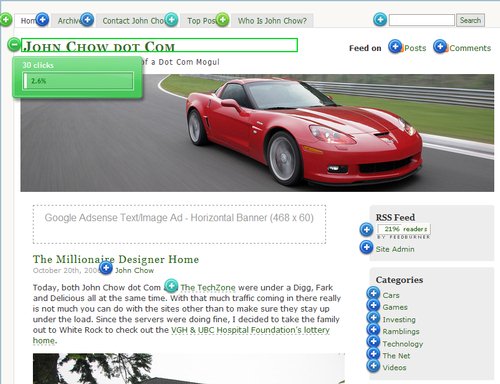
The overlay gives details on each individual element of the site. Not only does it show which links were clicked but it also tells how many clicks there were. The dots are color coded from blue to green - the more green the dot, the more clicks on that element. Clicking the dot’s plus sign will give you the exact number of clicks done to that link. In the above screenshot, you can see that there were 30 clicks to the John Chow dot Com link.
The List View
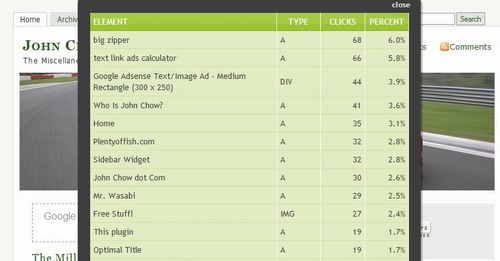
The list gives you a full summary of raw click data. You can see the most popular links among the 5,000 tracked visitors were the link to the big zipper, followed closely by the text link ads calculator. I also found out that the most popular link in my “Friends & Family” section is my daughter’s blog – it gets more than the twice the clicks of any of the other links there.
The Heat Map

The heat Map allows you to see what is hot and what is not on your site. Notice there is no heat around the 468 Google ad? That’s because not one of the 5,000 visitors clicked on it.
The information Crazy Egg gives you can be invaluable when tweaking your site and I recommend everyone who haven’t use this service to give it a try. Crazy Egg is free if you have less than 5,000 visitors a month. However, you can only track four pages at once. I think the pricing on the pay plans are a bit on the high side. Even with the $99 a month Pro plan I wouldn’t be able to track all the visitors that visit The TechZone. However, using the free plan is a good way to test the effectiveness of your site layout. If you need more than 5,000 visitors to do your test, then you can always upgrade to a pay plan.
Find out what I am doing right now by following me on Twitter! If you like this post then please consider subscribing to my full feed RSS. You can also subscribe by Email and have new posts sent directly to your inbox.
Make Money Online with John Chow's Ad Network - Join TTZ Media Now!


Here's A Few More Related Posts


Looks like a good stat software, but i still prefer http://w3counter.com tho.
I have checked out Crazy Egg before, but haven’t tried it yet myself. I agree about the plans. I would like to try ClickTale (http://www.clicktale.com/) at some point in the future, too. There are some really neat testing and tracking tools out there right now (or coming out).
@Moses: This would not replace a traditional counter like WC3. It serves an entirely different purpose.
Best,
Laura
I’m trying it out right now but I do not like the way it treats my blog.
The script get added to the template and appears on every page of my blog but…
Only clicks that are made on my index page show up in the Dashboard area of CrayEgg.
My total number of clicks is far higher then the number I ma getting data on.
If, for this service to work, I need to configure a test for every single page on my blog then it is not worth it. i’d rather download my server logs and use Grep to find out what people are doing.
In regards to tracking Adv clicks, I can use Google’s “channel” feature. In fact I do! Using that feature I know that I get more clicks on the image adv at the “top of the fold” on my entries then I do on the bottom text advs.
Is this similiar to the site overlay feature that Google Analytics offers for free?
https://www.google.com/analytics
In terms of testing page layouts, cant we use the new webmaster tools that are offered? i forgot the url…anyone?
Crazy Egg is a promising service/site, but in my experience they still have a few bugs to work out. For instance, using the heat map I’m able to see a great number of ‘clicks’ occurring in the margins (where there isn’t anything to click on). I imagine that they’ll get this worked out sooner or later. In general I’m a fan and have learned a fair deal of valuable information from using the service.
John, Thanks for the writeup.
We have some major system upgrades coming in the near future that will fix a lot of the issues, especially the cracking eggs.
Calvin, We track clicks on certain things that are not clickable, that is probably why you are sseing some of those clicks within your margins.
Either way, we do respond to all support and any other inquiries as quick as we can and would love to hear any bugs / issues and / or feedback anyone has for us.
I gotta question for you John. Is your daughter Ashley born from same mother as Sally?
Ryan - No.
this service is great but have one missing feature — it can’t detect clicks on flash ads !
the main reason i signup to this service was so i can give feedback to advertisers about the clicks their getting in a graphical way, but it doesnt work.. probably to due javascript limitation regarding mouse events on objects.
I like this service, but as a paid service I think it’s somewhat doomed. Plenty of companies like Google and SiteMeter offer good products for free. While they don’t have the nifty graphics, they have everything else that is useful.
Sounds interesting to try but I dont see myself paying for it. Im cheap..
Oh and your links in the wording you should make them open up to a new page. Just my .02
~Jason
> Notice there is no heat around the 468 Google ad?
> That’s because not one of the 5,000 visitors clicked on it.
That’s because they’re not able to track the Google AdSense clicks.
I find it really interesting that at the bottom of the source of their front page is this little snippet:
_uacct = “UA-30841-9″;
urchinTracker();
Doesn’t really show much faith in their product, does it?
I guess I can’t post html… here’s what’s at the bototm of their page…
script src=”https://ssl.google-analytics.com/urchin.js” type=”text/javascript”
I didn’t even know there WAS a google ad on this site. Thank you Firefox w/ AdBlock
Just a quick question - there appears to be a bug in your wordpress installation - all links on your site go to index.php/link.
It’s likely you have entered a url with index.php at the end, under the following wordpress config option
Blog address (URI):
If you remove the index.php it should return to normal
(i.e. it probably now says http://www.johnchow.com/index.php when it should just say http://www.johnchow.com/)
I apologise for being off topic here
Cracking The Crazy Egg « John Chow dot Com
John Chow has an interesting post about measuring user behavior on your website. I was particularly intrigued because I’ve been playing with Google Analytics lately to get a feel for how my site can b…
Calvin,
Let me first state that I am not familiar with CrazyEgg’s particular tracking methods but..
It is possible that people are clicking on sections outside your margin in order to activate your page in their browser. This happens when people want to use their down arrows on there keybord in order to scroll on a page.
For instance on this site one of the first things I did was click on the far right side of the screen. This allows me to then use the arrow keys on my keyboard.
A lot of people do this without even realizing it.
The heat map looks interesting. I’m gonna give this a try.
[...] John Chow has a very interesting link on his blog recently. He reviewed the website crazyegg whose tagline is ‘visualize your visitors’. This service lets you track, with great detail, what visitors view and where they go when they visit your site. Especially cool is the HEATMAP feature which lets you easily visualize the hot (and the cold) areas of your website. They have a free version if your traffic is under 5000 hits a month. Give it a try, I think you’ll like it. [...]
I wonder how big the hot spot is over my link? LOL
There are a number of sites which do this - in fact speedtrap have been providing heatmap-type overlays for ages. If you want a hosted and perhaps more commercially focused offering, try clickdensity.com. They’ve also recently added A/B testing which I haven’t yet tried out but looks astonishing.
[...] Cracking The Crazy Egg: 10,897 [...]
[...] A couple of weeks ago it was John’s post about Crazy Egg, an interesting analytics tool. [...]
Shoemoney also had a good interview on his radio show with the creators of Crazyegg too.
I believe as well as having the paid stats, they also mean to mine the anonymous user data as part of the their business model.
I think at the time of the interview (Oct 06?) they had over 30,000 paid subscriptions or so.
i’m trying this service … the free one
[...] visiting John Chow dot Com I read about an interesting service that tracks what visitors do on your [...]