Fixing The Threaded Comments Tab Issue
Brian’s Threaded Comments is one of the best Wordpress Plugin every made. It has really helped to increase the comment level on this blog. However, there is an issue with it for those who like to use their tab key when going from field to field.
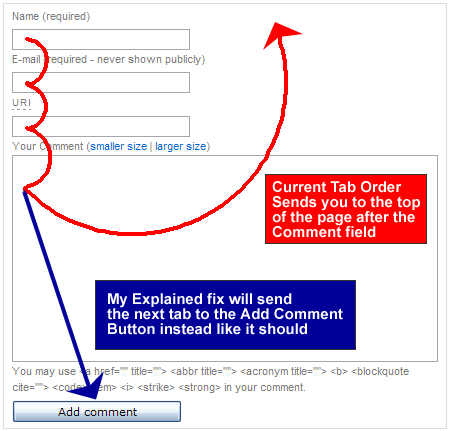
People who like to tab have no problem until they get to the comment itself. After writing the comment and hitting the tab, they find that they’re taken to the top of the page instead of highlighting the add comment button.
I was never aware of this problem until Reformat This told me about it (I don’t use the tab key). Luckily, there is a simple fix for this problem and I want to thank Reformat This for coming up with it. All you tabbers can now tab your heart out. ![]()
- Posted in The Net, Wordpress
- 46 comments what's your take?
Sorry, the comment form is closed at this time.


Thank you John!
Reply to this commentYes… I agree thanks for give me this information John
Reply to this commentDoesn’t ReformatThis deserve some of your thanks?
Reply to this commentDamn Bobs! You got a linkback from a major site! Nice!!
Reply to this commentI know - the Evil one himself! I have already been seduced my the darkside!
Reply to this commentHaha nicely done Bobs.
Reply to this comment..You only have to enter your details once so it doesn’t seem like much of a big deal to me… am I missing somthing?
Reply to this commentIt’s not your details…it’s after you finish typing the comment. Instead of clicking on post comment with the mouse, just press tab and then enter.
It didn’t work before, but now it does!
Reply to this commentNot that I used the tab button often here because of the problem, I may just have to start using it. It’s a really minor detail, but it’s so simple to click the tab as opposed to the mouse control. Great job Reformat This!
Reply to this commentMy mouse is really twitchy and tab makes my work a lot easier (amongst other useful keys)..
Reply to this commenttell that mouse to lay off the crack!
Reply to this commentI’ll let him know..
Reply to this commentpuff puff….what man….twitch twich, hey give me that back man.
Reply to this commentoops i mean snort snort
Reply to this commentWow Jake! Sounds like there’s some experience behind those comments… a little graphic
Reply to this commentooooh! this is great. Thanks! The tab button makes forms a lot faster and this just made commenting(with brians plugin) even faster.
Reply to this commentI would never know about this, I don’t tab either.
Reply to this commentme neither
Reply to this commentI tab only when I’m filling out those long boring sign-up forms
Reply to this commentIt’s natural for me. So before it took more effort not to tab.
Reply to this commentawesome.. now I can tab my way around
Reply to this comment
Reply to this commentI am testing it now. I noticed that after the Add Comment button if you wanna check the Notify Me of the Followup comments via e-mail, it won’t let you do it. It will take you right way to the top of the page. So either use your tab key or not get the followup comments via email.
Reply to this commentI think I like that it doesn’t go to the check box. That way there is no room for error. I’ve gotten some people angerly email me because they accidentaly checked that box. Bad experience.
Reply to this commentSimple fix - just have to give it the next place in the tabindex (tabindex=”6″).
Reply to this commentNever cared for Tab. Hate diet drinks.
Reply to this commentGood for your usability index, although I don’t tab at all
Reply to this commentyay, glad you fixed it
Reply to this commenti tabbed all the way down.
Tab or not to tab that is the question
Reply to this commentVery useful! I am going to install this asap!
Reply to this commentAt least someone was finally able to bring this to your attention. :p
Reply to this commentThis is good to know, John — might come in handy when my mouse feels a bit under the weather.
Reply to this commenttesting?
Reply to this commentwhats a usability index?
Reply to this commentI’m a mad tabber, I tab and alt-tab and cntrl-tab in EVERYTHING. Let me tell you, it was driving me nuts to write out my comment and then by habit press tab and go all the way to the top of the post!
Thanks for fixing this, my comment whoring efficiency just went up by 20%!
Reply to this commentI love the tab key. Without all the tab shortcuts I would be lost! “Alt+Tab” is the only way I navigate on my screens.
If you are running Windows XP - check into the plugin for “Alt-Tab” - its pretty nice!
Reply to this commentI had never noticed this. Maybe its because I always click the button. I will have to fix this on my blog.
Reply to this commentNo one notices these things because John is always a few steps ahead of everybody!
Reply to this commentThats actually a really good tip thanx!
Reply to this commentworlds ultimate easiest found by google world’s most google’d
Reply to this commentI never even noticed this problem until you pointed it out. Now it’s going to bother me.
Reply to this commentAgreed. Now I find myself trying to do it on other sites, and usually failing miserably.
blabEditor
Reply to this commentgreat fix! … i love this plugin too!!
my comments are more interactive & more frequent now
Reply to this commentThis is a Great fix for an issue i did not even know was there, thanks for the heads up.
Reply to this comment