John Chow dot Com Free WordPress Installation - Start Your Blog Today!
 

How To Create a Paperless Office with ScanSnap and Evernote

written by John Chow on November 24, 2010

Make Money!

For the past few years, I’ve been trying to achieve a paperless office and a paperless life. I try to get companies I deal with to send me electronics bills. When I buy something from the Apple store, I have them email me the receipt. I try to do all my reading online or in eBook format. However, not every book or document is available in a digital format. As much as I’ve tried, I still get a ton of paper that I need to organize.

The idea of the paperless office was established some 30 years ago when the first PC was born. However, the tools to achieve a life without paper didn’t fully materialized until recently. Thanks to advances in scanning technology and cloud services, the true paperless office can finally be achieved. A paperless office offers many advantages such as increased productivity, improved client services, reduced operating cost, better security, good for the environment, etc.

I’ve created a paperless office and paperless life using two core technologies.

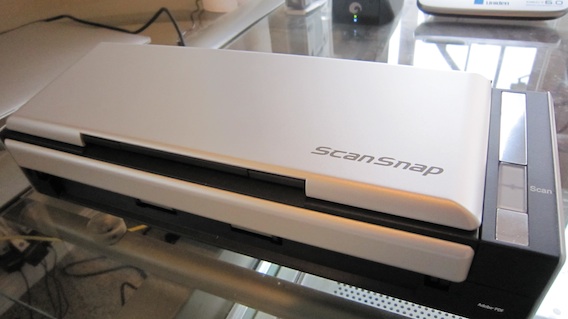
The ScanSnap S1300 Instant PDF Mobile Scanner

ScanSnap S1300

The ScanSnap S1300 by Fujitsu is a mobile sheet-feed scanner that turns any scanned document into a searchable PDF file. The keyword here is searchable. Scanning a document doesn’t improve your productivity over just putting it into a filing cabinet. By turning the file into a searchable PDF, it makes a it lot easier to retrieve at a later date. You can also use a colored highlighter pen on a black and white document to create searchable keywords automatically.

With dimensions of 11.18 in. x 3.90 in. x 3.03 in. and weighing only 3.08 pounds, the ScanSnap S1300 is extremely mobile and can easily fit into my travel bag. Speed wise, the S1300 is extremely quick, able to scan at up to 16 images per minute. Resolution can be set as high as 600 dpi. Other features include:

  • Scan up to 8 double-sided pages per minute
  • Holds up to 10 pages in the automatic document feeder
  • Cross-platform compatibility for PC and Mac
  • One button Searchable PDF creation, PDF, and JPEG
  • Scan to editable Word and Excel files
  • Create searchable keywords from highlighter text
  • Business card scanning software
  • USB or AC powered

While the S1300 can run on USB power, I recommend you plug it into a wall outlet if you’re near one. Scanning speed is cut in half when the S1300 is powered by USB. Everything is operated by a single button. Push it and the 10 page automatic document feeder scans both sides of each page. The S1300 automatically recognizes the size of each document, detects and corrects for skew, and shows images in their proper orientation with blank pages removed.

So the Fujitsu ScanSnap S1300 is what I use to kill the paper. The next question is how do I organize all those PDFs and more importantly, how can I access them from anywhere in the world so I can maintain The Dot Com Lifestyle?

Remember Everything with Evernote
The Paperless Office

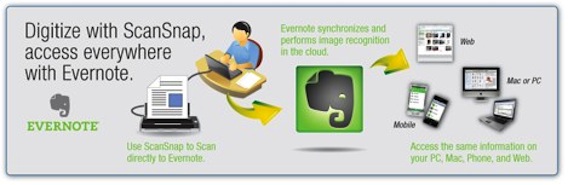
Evernote is a free cloud service for storing all your notes, or in this case, scanned PDF files. Evernote integrates seamlessly with ScanSnap to free you from the paper monster. Evernote allows you to easily search and tag all your documents so you can retrieve them whenever you like. By combining Evernote with ScanSnap, you’ll be able to digitalize all your paper documents and access them from any computer or mobile device, anywhere in the world.

Using Evernote doesn’t cost anything. The free plan gives you 40MB of uploads per month. Depending on the quality setting on the ScanSnap S1300, you can upload hundreds of documents every month before hitting the limit. The premium plan cost $5 per month or $45 per year and gives you 500MB of upload per month.

Even if you don’t plan on scanning more than 40MB worth of documents a month, I would still recommend the premium plan because it offers SSL encryption syncing. If you’re scanning sensitive documents and putting them on Evernote, this extra layer of security is well worth the $45 cost. It’s really a no brianer.

It might have been a dream 30 years ago but the true paperless office is here and it’s real. It felt so good to send those filing cabinets and paper to the recycling center. Watch the video below to see Sally and I give a demonstration on using Evernote with the Fujitsu ScanSnap S1300.

Download Evernote | Get The Fujitsu ScanSnap S1300

Did you enjoy this post? Get John Chow Dot Com updates via email...

Stay up to date with all of John Chow’s tips for making money online and blog posts by subscribing via email. Your email will be kept private and never shared with anyone.

Comments have been disabled for this post.
Sort: Newest | Oldest

John, Have you tried to scan many photos? I have stacks of printed photos from back in the day of film cameras. Mostly 3x5 and 4x6. None are precious but I would love to get rid of the hard copy and not pay a fortune at a scan shop. I was wondering how efficient the scansnap was at loading in and scanning a stack of photos? I heard stories of damage or pinstriped scans with the s1500m and wondered about the 1300. BTW - Nice video. Thanks.

Going paperless in an office makes work life much simpler and it minimizes the risks of misfiling important paperwork. Document management software is key if you want to get control over all the papers piling up in your office or home.

Hey John, LOVE the post and the video. I use both of those products and couldn't live without them. Just curious, what camera are you using to record your videos. Great quality! Take care!

HI John,
You have loads of hardrives in your office according to the video :s which is the best one to use.

Awesome! I do believe I'll be getting one of these. I'm so tired of all the paper.

John, what is your preferred method of storing passwords on the cloud?

I use 1Password and Dropbox.

Same here. I've tried to digitize as much of documents as possible. but the process seems to be very slow. thanks for the ideas.

How crazy is this...... I just bought one of these (the S1500) less than 12 hours before I got your newsletter!

For Canadians, the S1500 is on sale at Costco.ca til Dec 6.

I'm looking forward to a paperless office. Going to get the shredder warmed up!

And here's a really great comparison of the S1300 vs the S1500:
http://www.youtube.com/watch?v=W5_gOQ9zU7g

We need those information JC, we're educated by your post, I'm a follower of your blog, and keep reading all your tips, whooah I hope someday i can meet you and talk about blogging and anythings.

Very informative! i'm a fanatic of John chow i hope we'll meet someday. Thanks

Cool stuff John. I use Try Neat Scanner and Dropbox to pretty much do the same thing. DropBox gives you 2GB free and you can pay 20 bucks a months for 50 to 100 GB I believe.

Once you set up a system like this, the hardest part is just remembering to use it. I have my assistant pay my bills for me with this. I scan all my bills into this in about 60 seconds, once per month, then she pays them.

I also save all my tax docs too. If you do business online, trust me, this is a huge time saver. Great find John!

Hi, John,
Congratulations to you and your family on such beautiful efforts and results in saving our planet by creating a paperless office. The idea is great, although I don't think that 100% implementation is possible or even justified (you need paper trail for certain important things). For those who are not ready yet to be paperless, I'd like to share my experience on saving on paper and ink. For years already I've been using fineprint.com, which allows me to print on both sides. Moreover, with fineprint I like to minimize and print 4 pages on one side! With double-side printing I have 8 pages on a sheet of paper. It's easy to read (great to print ebooks!) and savings are substantial.
Best regards.
Mary

LOL@ people jumping all over you to try and "prove you wrong" saying that you HAVE to have things like birth certificate, etc.

Come one guys, I'm pretty sure John and everyone else is aware that there'll be a few things that still need to be kept. *rolls eyes*

Thanks so much John, I've been actually looking for a way to make this happen in a simple fashion as I've been working on minimilising everything in my life for a more simple existince.

The video helped a great deal, and I appreciate the tips.

One thing I'm not sure if you mentioned (maybe I missed it?). If I receive electronic bills via email, do I just add "send those" to evernote easily somehow as well?

Cheers
Jay

Yes you can send those to Evernote as well. :)

It's really amazing to learn about this technology that will clean our working enviroment, free from distractions and simplified.

so great! i am thinking about to get one! My office is always a mess becasue of so many kinds of papers. thanks for sharing this great tecnology with us!

This is great because you will not have to carry your heavy documents wherever you go and safe too from other people.

I recently jumped in too after years of wanting too. I use a very fast Xerox DocuMate162. That takes the place of all the boxes and file cabinates. Now all of those docs can fit in a tiny usb drive.

HUGE TIP: If you need to rename tons of scanned PDF's quickly and efficiently try this program I found. http://www.cogit.net/pmwiki/NeoBook/ViewAndRenameP... It is even free! Deserves a donation for sure.

It lets you view the file while you name it. The guy who made this deserves a sainthood.

FYI - I'm not affiliated in any way with viewAndRename, but I sure use it.

Good Idea John for paperless office.But there must be some kind of security and data protection in place.

Yes, of course there are data protection in place. I have the copies of the data on multiple locations. There's a copy on the 2TB network drive, a copy on Evernote and a copy on every computer on which Evernote is installed.

Having a paperless office sounds like a sweet idea! Less waste, more efficiency, and less clutter. A triple win situation!

I've been a VERY HAPPY person since I got the scansnap scanner. Best piece of hardware I've ever purchased!

Very nice scanner, this is exactly what im looking for

i've been using evernote for a while and wont do without it, but thanks for the reccomendation on the scansnap. looks and sounds great and will check it out.

I love this idea, however I am concerned about security and storing these documents (especially statements with account numbers) in Evernote. I know the premium version does encryption but still nothing is hack proof.

I'm willing to bet that Evernote is more secured than whatever security you have set up on your home comp. Assuming you even set up security. It's amazing how so many people worry about security in the cloud yet they leave their home system wide open.

You'd lose that bet. My network, data is very secure at home. My private data is encrypted. I am not saying its 100% but it would take a hacker quite some time to get in. Reading the Evernote security policy it doesn't say that the data is stored encrypted, the password is but not the data. In fact they state they reserve the right to read the data stored. The only security besides physical security to their data farm seems to be the SSL that is used to transfer it to their servers (premium users only) and your password. I am not meaning to get into a debate. I like their service and use it for stuff I clip from the web but I am concerned as everyone should be about cloud services security.

Is your data store on multiple location to prevent a sign point failure? Does you have house have battery and diesel generator back up in case of power outrage? Is your house monitored 24/7 with key card and live security personals on at all times? The easiest way to break into any system is to just take the whole system. Then you have all the time in the world to break though the encryption.

From personal experience, I can tell you that I lost data that was store on a home comp due to hardware failure or forgetting to back something up before reformatting. I have never lost one single item from stuff in the cloud.

Your missing my point... a hacker is going to go for the biggest payout. Do you think a hacker would rather try to hack into my single system or one that is used all over the world by millions of people? I will however answer your questions. Yes my data stored at multiple locations. Yes, I have a UPS and a laptop so even if the power goes out I have quite a few hours of access. From the looks of the video unless you have all those things you wouldn't even be able to turn on your iMac or access the internet, much less access your cloud. Also if my power is out for any extended period of time the last thing I would be worrying about is do I have access to a paper copy of a business card or bank statement. No my house isn't monitored 24/7 with key card and live security personals on at all times, unless you count my nosy neighbor :-) I agree, that the easiest way to break into any system is to just take the whole system, however not too many hackers break into houses to get data. A common criminal that breaks into your house isn't breaking into to steal your statements on a computer. They want the goods to resell.

Again, I love Evernote, and regret that my initial statement was mi-interpreted. I for one am simply concerned about keeping statements and private files on their servers.

I guess the key is how safe do you feel. Yes, if you concerns over the level of security, you should upload sensitive documents to it. However, I feel the security concern over cloud service are overblown. I think the biggest threat to security is having humans in the chain. I always wonder if that gas jockey processing my credit card is copying the number.

Thank you John.

Nice video - makes it look easy to move towards eliminating all my stacks of paper. I know of both the ScanSnap and Evernote - awesome tools. The missing link was using them together to create a paperless office. Thanks again.

Yeah I was also looking here to say the same words as you have submitted already. No doubt it's a best review I red this week.

Hi John,
I use drop box at the moment, will check out Evernote see what the benefits are.
It amazes me with companies especially banks, you sign up for their paperless services, then they send you a letter explaining how it works. I thought I had signed up for paperless.
Pete

I think this is a very good solution to go paperless. A+ on that John. Thanks Greg Ellison

Very good post John, I got Evernote when I bought my iPhone 4, and used it for a little in the beginning, but then got in the habit of using the iPhone's own notepad, I also regularly take snapshots of things for later, but these just end up cluttering up my photo albums.

After reading this post I decided to copy and paste all my random iPhone notes to evernote. Making it searchable is great! it even makes the text in snapshots searchable - amazing!

I use Dropbox for suncing my files and documents between my computers and my iPhone.

I dont think evernote has that functionality of seamless integration with your documents, you still need to log on through your browser to access the docs, so I don't think I'll give up Dropbox, it's free and you have all your documents at your fingertips, I don't even carry flash drives around anymore.

You don't need to log on with a browser to access evernote.It has an app for the PC, Mac, iPhone, iPad, Blackberry, etc. It has more app support than Dropbox, which I still use.

Oh, well that's cool, I've got the iphone app, but not the PC one, in that case it sounds like a pretty cool tool indeed!

Thanks John.

I Just tried to install Evernote for Windows on my Sony Vaio Laptop, only to realize it's already installed, came with my Sony.

Sweet!

How do you like Evernote for the PC so far?

I'm loving evernote, I use it almost everyday. I have managed to go almost totally paperless.

I have scanned all my documents to evernote and shredded them. I only have a handful left.

I discovered a really cool iPhone app (also on android) called docscanner, I can scan all my documents with my phone, the quality is top notch, and it uploads straight to evernote or dropbox - really cool! paperless life, here I come!

That's very nice, but unfortunately I don't think the Romanian Government or shops, stores and so on, accept the digital version of a document. And I think there is another issue here, documents signed by hand.

For the signature we have the option of digital signature.

But unless and until we all have computer set up for all requirements this is not possible.

But however you can imply this for your own office and for your own convenience.

All governments and shops will accept digital versions of a document because a digital version can be turned into a paper version. Should someone need to see a paper version, you should print it out. As for signed documents, you can scan them and shred the original. If someone needs to see a paper copy, you just print it out.

Hey John,

You are wrong on this one. If you want to take a course or apply for a job all certificates they require are the original ones. Period. They do not accept copies of documents, electronic or otherwise.

I'm not talking about Romania. This is in Vancouver,Canada.

Yes there are some stuff you can not shred, like birth certificates or passports. But 99% of the other stuff can go in the shredder. The number of stuff you can't isn't very many. I bet you can't name more than a dozen.

However I think this is good option and I would love to give it a try.

it might be easier for you, but still... it's more work for the ones who should send you electronic bills