How To Embed An Ad Into A Blog Post
You see that 300×250 banner to the right of this post? Ever wonder how I got it there? Also, notice the post below this one no longer have the 300×250 ad? When this post moves to the second spot, the ad will disappear as well. Yet, when you click on the post to read it, the ad comes back. Pretty cool, huh? Here’s how to do this on your blog.
The AdSense Deluxe Plugin
The first thing you need is a Wordpress plugin call AdSense Deluxe. The plugin is designed to serve Google AdSense ads on your blog but it can be used to serve any ads from any other network. I use it to serve ads I sold privately.
The plugin is very easy to use and gives you complete control over your ads. I use AdSense Deluxe to serve the 300×250, the 468×60 at the top of the blog and the 468×60 at the end of this post. Because Google allows only three ads on a page at anyone time, AdSense Deluxe keeps track of the number of ads running on a page to keep the limit at three. This is why you don’t see a 300×250 ad on any other posts except the top one. If you click on any of the lower posts, the 300×250 ad will come back in order to maintain the three ad limit.

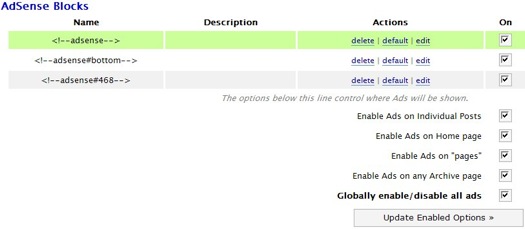
In the above screen shot, you can see I have three ad units listed; 468, bottom and default (which the 300×250). The easiest way to integrate AdSense Deluxe into Wordpress is by editing your theme template. To make the 468 ad show up at the top of every page on the blog, I add <!–adsense#468–> to the part of the template where I want the ad to appear. I do the same thing for the bottom by using <!–adsense#bottom–>.
Embedding The Ad
To get the ad to show up inside a blog post I insert <!–adsense–> at the spot where I want the ad to show up. To align the ad to the right and make the text wrap around the ad, I use the following div command:
<div style="float: right; margin: 5px;"><!–adsense–></div>
The margin adds a bit space around the ad unit. You can adjust it to match your blog. If you wish to align your ad to the left side of the post, then change the float to left.
You can insert this code into your blog template or inside the post itself. I like to enter the code inside each post. This allows me better control over where the ad shows up. Most of the time, I will want the ad at the start of the post. However, there are times when I want to start a post with a picture. In those cases, I would start the 300×250 ad under the pic.
The other advantage of placing the code into each blog post is the ad will show up in the RSS feed. That increases the value of the ad spot which will make you more money. Making more money is what it’s all about, right? ![]()

- Posted in Make Money Online, The Net, Wordpress
- 58 comments what's your take?
Sorry, the comment form is closed at this time.


i still prefer oiopublisher, although i have to admit that adsense deluxe wins oio in this aspect
Reply to this commentI love adsense deluxe - it’s such a useful plugin!
Thanks for sharing all of your secrets. *=)

Reply to this commentDamn, I’m so jealous, since I’m not using wordpress and I use blogger, blogger does not has such cool plugins, I have to use scripting knowledge to work such things out!
Reply to this commentBut oh well!
Wordpress is the only way to go. You need to switch over!
Reply to this commentWhen you use floats isn’t it proper to supply the width too? Or am I just being ultra picky with XHTML strict standards?
I too use this method though for embedding ads in posts. I use to automate it but found it better to manually insert them to ensure the overall look was the same. It also allows you to place them anywhere within the content for better uniformity too.
Reply to this commentWhen I had google adsense I used to do manually without problem. Then one day then banned for no reason, so I sent an email to them and they reply saying that they suspect the activities of my blog.
Reply to this commentI had the same experience with them only that it hapened just yesterday. My account has been blocked. I sent them an e-mail and now just waiting for the response to come. Still I don’t get my hopes too high.
Reply to this commentEvery single time somebody has been banned from Adsense, I’ve found that they have good reason for it. They just never expected to get caught.
Reply to this commentThe problem is that I didn’t have made any money when they blocked me. So I don’t know how can I be hurting the advertiser if I’m not making money out of the system

Reply to this commentThe blocked my accoutn when I made about $90 or something through clicks which my readers generated, Adsense is pretty unfair on the publishers part!
Reply to this commentThis is nice, I might try it. I’m using googmonify right now. It seems to work pretty well. Something my friend Gary at Gara Systems made. They also have bookmarkify and amazonify. I like using these because Gary will respond immediatly if you have technical problems. Check it out. http://www.gara.com/projects/googmonify/
Reply to this commentThanks for sharing plugin John,
Reply to this commentwill use it!
Actually Iam using “Adsense Manager plugin”, Does it still wotk in this plugin?
Reply to this commentActually Iam using “Adsense Manager plugin”, Does it still wotk in this plugin?
Reply to this commentThanks, I was wondering about that actually. I once accidentally Copy and pasted the adsense code into a post and it worked fine. In essence i guess thats what your doing also.
Reply to this commentJohn;
FYI - I use Outlook 2007 to view your RSS feed and the ads never come through when I’m viewing your posts that way.
Reply to this commentI find that it won’t embed in the ad by default. I think there is something you have to do to enable it. Though if you look at John’s pervious stats he gets crap for AdSense earnings and none of it came from this RSS embedded adsense or something. *shrug*
Reply to this commentThat is the tool of trade that you have been using? Great ! Thanks
Reply to this commentThanks.. i love your site..
Reply to this commentAdsense Deluxe is great for embedding any sort of Javascript into a post. Not just Adsense!
Reply to this commentreally i’m not yet using adsense plugin in my blog. I place my ads via theme editor. It’s look easy to use plugin. I will use it as soon as possible.
Reply to this commentUseful post, I have been needing this solution posted here for like over a year.
Reply to this commentThanks for this post John. For us VERY new bloggers out there, we rely on the folks that have already walked the walk to show us the way. You are a great blogger and I personally appreciate the information you put out like this. Thanks
Reply to this commentYou can also use Oiopublisher which you can set up in exactly the same way and it automatically does all the paypal interaction for you so all you have to do is enable the ad and voila!
Reply to this commentAdsense Deluxe is a nice plugin
Reply to this commentAdsense Deluxe is pretty cool, but the 3 linit Adsense capability didn’t work on a couple of blogs I had. Even though I det it to only show 3 blocks I had a 4th empty block in my 4th post down the page. Kinda weird.
Reply to this commentJeez, I shouldn’t try to type so fast…
Reply to this commentIt doesn’t work for me too. I would still have codes for the 4th block popping up. :/ I don’t think there’s a newer version of Adsense Deluxe either.
Reply to this commentGuess it doesn’t work for everyone!
Reply to this commentI always wondered how you did that. Thanks for the info. I don’t use that adsense plugin as much as I should, but it seems like the perfect tool to accomplish this.
Reply to this commentActually, a pretty helpful post! I always have seemed to have a problem with using Adsense Deluxe.
Reply to this commentI thought usually u publish ur ads by typing the code manually everytime…how silly i am…
Reply to this commentNow even a kid would know that it is not manually done, what I usually do is that I know most of internet usable languages however, even if i dont know it then I try to get the logic behind it to fill my curiousness, knowing how the thing is working!
Reply to this commentThat was great! I’ve already do some experiment on this plugom. However is there any Adsense Deluxe for blogger.com ?
Reply to this commentWhat’s up
Useful plugin. Thanks for the information.
Reply to this commenterk..sorry..i mean plugin not plugom.
Reply to this commentSend my regards to sally the cutey! Thanks for the info anyway john.
For almost 3 years, i still support adsense deluxe, its still the best in my opinion. Easy to add and maintain.
Reply to this commentDavid –> Agreed. hehe
Reply to this commentThanks for the great information..
Reply to this commenti read your ebook but i never use it. may be i will try in near future. Thanks for suggestion.
Reply to this commentThanks for the tip JC. Just in time too, since I’m about to launch a new blog in the next couple days. I had a programmer hard-code the ads in a previous blog, but that meant that after the 3rd ad, the rest of my posts didn’t have an ad. Just blank freaking space.
Reply to this commentNice pluging. I use WhyDoWork plugin for adsense but I have modified it to show adsense only for search engine visitors and with a php session. I don’t sell ads for the moment but Adsense Deluxe seems to be one of the most useful for it.
Reply to this commenti have a Blogger Blog , is there any plugin for it ?
….
Reply to this commentThanks for the info but its also in your money making pdf guide
Reply to this commentThanks, I have been wondering how to get Adsense placed where I want it.
Reply to this commenti got problem with this plugin..when i add my adsense code..it appear error page..=.=”
i try to add other advertisement also cant..aih..
Reply to this commentI normally use blogger but have a blog on wordpress now and find it extremely complicated. Although it is more flexible and has more features I am not sure whether the extra time it takes me to figure everything out is worth it!
Reply to this commentThanks for this tip. Will definetely use.
Reply to this commentThanks for your Tipp. I use this on my Blog. The Plugin work great. Sorry for my not perfekt English.
Reply to this commentI remember you mentioning this plugin a while back. It’s wicked. Way better than using a clogged up advertising script.
Reply to this commentThanks The Real John Chow - It looks beautiful on my WatchFreeEpisodes.com site.
For some reason the Adsense Deluxe gave me errors — but I was able to use the Adsense plug-in by Phil Hord to do the same thing, and thanks to your div tag float code, I know how to float it right!
Reply to this commentWorked great on my Watch Free Episodes dot com.
Thanks!
Reply to this commentI was testing WPAds (http://thesandbox.wordpress.com/wpads/) when I came across OpenX (http://www.openx.org) which is free, open source ad serving software used by more than 30,000 publishers in more than 100 countries! So after tested it on my localhost, I finally decided to stick to it and use it.
Reply to this commentI was just wondering how to do this, when BAM! you post on it. Thanks!
Reply to this commentVery useful, but my Ecpm is very low :S
Reply to this commentThanks for the tip. I might just give this a try on my new blog.
Reply to this comment