Watch John Chow on the latest episode of MarketLeverageTV!
 

How To Find The RSS Readership of Any Site

written by John Chow on August 16th, 2008

This post was guest blogged by Trevor Mauch of REI Brain, a blog that focuses on real estate investing and education.

Okay, I’ve heard a ton of people writing about the importance of gathering RSS subscribers on your blog in addition to email subscribers. I agree… both are hugely important and each have their own pros and cons.

However, have you ever wondered how many RSS subscribers a website has? Yes, of course many sites have the Feeburner icon that shows you exactly how many people are subscribed to their feed.

For instance, here are some popular RSS feed counts from bloggers you know that list their RSS feed stats on their websites (as of 8/16):

  • John Chow: 28,102
  • Shoemoney: 16,585
  • Problogger: 50,590
  • Tyler Cruz: 1,679
  • Zac Johnson: 3,623

However, for those of us who are curious… we tend to want to know even more when a website hides their RSS reader count from the world. It’s that whole thing that we feel cooler when we know something that most other poeple don’t know.

Here’s How To Find Hidden Feedburner RSS Readerships

Want to find out what the RSS readership is for ANY website using Feedburner? Simple… head over to Feedcompare.com and give it a go.

For instance, I’ve always been curious (as have a ton of other people) about how many RSS readers Seth Godin has. Seth doesn’t openly publish his feed count… why, I’m not sure. Maybe he wants to be the “purple cow” and stand out by going against the grain (which is a good strategy). Or… maybe it’s the idea that if he doesn’t publish it that people (like me) will wonder… and come to conclusions on how many RSS readers they THINK he has. Who knows… maybe he really doesn’t care about it and hasn’t given it much thought. Anyhow, I was curious so I headed over to feedcompare.com and typed in Seths RSS feed address… here’s what I got:
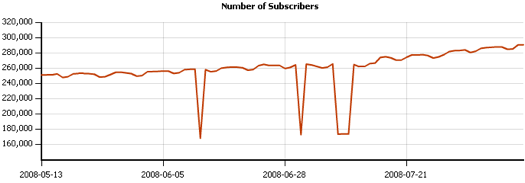
As of 8/13, Seth has 290,440 RSS subscribers… not too shabby at all… especially for a marketing blog. You’ll see tech, celebrity, or political blogs well up into the high 6 or low 7 figures… but for a marketing blog that is stellar.

However, I was somewhat disappointed because for some reason I was thinking that Seth has much more RSS readers than that… I was expecting upwards of 400k. That’s one reason leaving it a mystery can be a good thing… people will often estimate higher than the actual number giving you a “boost” in the mind of the reader.

How You Can Use This Tool For Your Online Biz

While looking at peoples RSS readership stats is fun (for about 5 minutes)… it’s really just a novelty unless you use it to help you build your own business. Here are a few ways you can use feedcompare.com for good… rather than from a voyeuristic standpoint:

  • Track the RSS readership trend of your competitors:
    From this you can see if your competition is growing, staying stagnant, or declining. Then, you can head over to their website and match up the content they post with spikes and valleys in the RSS trend line. Also, if your competition is on a heavy upward trend… study their website to see why… and also leave comments on their blog to drive traffic back to your site.
  • Compare your feed and/or the feeds of your competitors:
    With feedcompare.com you can compare up to 4 feeds on the same graph. This is pretty cool if you want to see right there on the screen how you are doing against your competitors. If you both have spikes and/or valleys in readership at the same time… you should then look at the news/market to find out why. Sometimes the spikes/valleys can simply be a glitch in Feedburner… but often you can get great market intelligence out of these anomalies so you can better prepare for the future.
  • See what days people are reading your content via RSS the most:
    I think this one is huge… and it is pretty darn interesting too. Just like with email, people tend to read RSS more on some days of the week than others. In email marketing Tuesdays and Thursdays have traditionally been the best times to send out emails because email open rates are better. There are several reasons for this… but in essence, on Tuesday people have had a chance to get back in “work mode” and cleared out their inbox from the weekend… on Thursday people try to get their email inbox cleared out before they head off for the weekend on Friday.

Looking for Trends
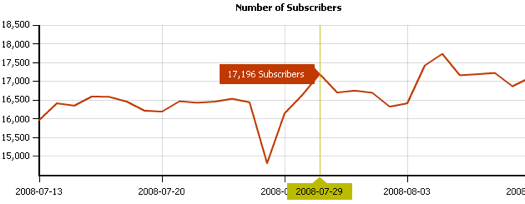
I was looking at the RSS stats for Shoemoney and he has the highest RSS readership on Tuesdays and Thursdays as well… with Friday and Saturday being the lowest days. You can see that he has a spike on 7/29 which is a Tuesday. The next spike is on 8/5 which is also a Tuesday, and yet the last spike on the chart (actually it’s not on this one… I accidentally cut it off), is on 8/12… yet another Tuesday. As for the huge valley in the middle… that’s on a Friday.

By reading this you can see that the most important content should be posted on Tuesdays to increase the readership of the content. Knowing your market is a vital part of running a successful blog or website. Head over to feedcompare.com and check out your chart and the charts of your competitors. Then, use that information to get more mileage with your articles and to see what your competitors are doing right. A bit of legwork does magic!

Wilson said on August 16th, 2008 at 9:21 am

Very nice feature. Thanks for the information. I´m going to link to it from my site feedcounts.com, where you can find lists of feed counts of popular blogs in different niches.
Wilson

Reply to this comment
albachtimi - online information said on August 16th, 2008 at 11:23 pm

Yup, very nice information. Thanks John!

Reply to this comment
Online Dividends said on August 18th, 2008 at 6:23 am

Thanks for the information John. I have also found out that people tend to read more articles during weekdays and not a lot during weekends. Thus it pays to write on weekdays and take your time off on weekends.
http://onlinedividends.blogspot.com/

Reply to this comment
Shanker Bakshi said on August 16th, 2008 at 9:35 am

Great Tool Indeed.

Reply to this comment
Tyler Ingram said on August 16th, 2008 at 10:13 am

It is a neat tool. I compared a bunch of sites and everyone took a hit on August 14 2008 and then recovered. I guess it’s nice to see when Feedburner breaks ;)

Reply to this comment
Shanker Bakshi said on August 16th, 2008 at 10:32 am

Who has won contest with Bic Promo Pen BTW. Do i have the right to know john. Sorry I missed the result and can’t find it anywhere. Sorry forgive going off topic.

Reply to this comment
Zac Johnson said on August 16th, 2008 at 10:36 am

Aw, my RSS count was 4,498 yesterday…

Reply to this comment
Missy said on August 16th, 2008 at 10:39 am

Good find. Will use it, bookmark it, and find out what my comp is up to.

Reply to this comment
Missy said on August 16th, 2008 at 10:47 am

FYI- Bloggers must have Awareness API set as active in Feedburner for this to work.

See here:
http://www.blogperfume.com/feed-analysis/index.php?months=6&uri=google

Reply to this comment
Neil Duckett said on August 17th, 2008 at 12:16 am

Correct so really and blogperfume delivers much more than this if you want to be poking around the place …. nothing new here at all.

Reply to this comment
Bonie said on August 16th, 2008 at 12:29 pm

nice info, thanks john, i’ll try this one…

Reply to this comment
Start Blogging said on August 16th, 2008 at 1:10 pm

Never heard of the site, but thanks for the tip! I’ll check it out. Wow, Seth has a lot of subscribers!

Reply to this comment
pacman247 said on August 16th, 2008 at 3:13 pm

Nice hack . Thanks alot for sharing . To play pacman online click on my name. (pacman247) :twisted: :twisted: :twisted: :twisted:

Reply to this comment
WebTrafficROI said on August 16th, 2008 at 3:20 pm

amazing tool

Reply to this comment
John Doro said on August 16th, 2008 at 4:10 pm

I just try it, it’s cool. Thanks… :idea:

Reply to this comment
Dan Grossman said on August 16th, 2008 at 4:22 pm

This only works for sites using FeedBurner that have eplicitly turned on the Awareness API. It’s automatically turned on if you turn on the feed count badge/chicklet. For blogs that have never turned that on, and haven’t turned on the API in their account settings, sites like this have no way of knowing the feed count. FeedBurner won’t tell you, it’s private information.

Reply to this comment
MoneyMingle said on August 16th, 2008 at 4:51 pm

Great tip on rss Feeds a great tool I use for Social Bookmark websites and viral marketing to set up a network back to the money site.

Reply to this comment
Big Ben Patton said on August 16th, 2008 at 5:01 pm

Their seems to be a trend and this tool can show it plainly about how feedburner since being taken over by google has been unable to keep an accurate feedcount. Many rumors around about the why behind it, the most popular being that google is transfering rather slowly all feeds over to googles servers. Who knows. I know Id like to see a post about that!

Reply to this comment
Mitch said on August 16th, 2008 at 7:01 pm

I can’t get it working, but the other side of this is that not everyone subscribes to feeds through Feedburner, so it’s still hard to actually know who and how many folks are really subscribing.

Reply to this comment
Shanker Bakshi said on August 16th, 2008 at 8:29 pm

John I asked Shoemoney about that famous you & Shoemoney Oct 2007 RSS contest in which on the very last he surpass you. In his latest post “ROund 12 ShoeMoney Answers” he clarifies the thing - hope you would like to have a look at it here
http://www.shoemoney.com/2008/08/13/round-12-shoemoney-answers/

Reply to this comment
Rajaie AlKorani said on August 17th, 2008 at 3:23 am

Too bad you need to have to enable the subscribers number by default, otherwise this tool would’ve been great

Reply to this comment
Typhoon said on August 17th, 2008 at 6:28 am

WOW!Nice Tool man…Now i will have a strict watch over all site .ha ha ha

Reply to this comment
Chris Jacobson said on August 17th, 2008 at 10:04 am

Where’s your Entrecard, John?

Reply to this comment
Clement said on August 17th, 2008 at 5:47 pm

This is an amazing tool.But one thing that I do not like about it is that one has to remember the FeedBurner Feed Names. It would be great if they can work on it so that the site’s URL should instead be used.

Reply to this comment
O. Messaoud said on August 17th, 2008 at 11:17 pm

This is a great post Trevor. Very informative and useful. Thanks for sharing. And thanks go to John, too. :cool:

Reply to this comment
Mark Nelson said on August 18th, 2008 at 3:58 am

Thanks for the post. Pretty amazing tool to look at.

Reply to this comment
Ganesh said on August 18th, 2008 at 6:59 am

Good way to find out the RSS count. But Feedburner is not doing its job nowadays. The feed count doesn’t show up properly, there are problems, etc. etc. Its time they should look into this matter. You know, it really doesn’t look nice for a blog to have 0 subscribers when it really has a few subscribers. :sad:

Reply to this comment
Vigceo said on August 18th, 2008 at 9:35 am

I alsways wondered how Feeds worked and their advantages! Great article and will ensure to use some of your tips.

Reply to this comment
Trevor Mauch said on August 18th, 2008 at 10:57 am

Hey John, it was a pleasure guest posting on your site… thanks man!
For all of the comments…
Yes, it’s a cool tool and good for what you pay for it (it’s free). However, as some people point out (and as I pointed out in the article)… it does only work for feedburner stats… which is a drawback… but better than nothing.

As I mentioned, the biggest thing that I rediscovered is the trends of viewership for my own feeds and the feeds of my competitors. Tuesdays and Thursdays still trump all other days if you’re looking to maximize the eyeballs you get (on that day) for an article (or email).

On last thing… I did test out the tool w/ a few of my sites and it was pretty darn accurate according to my admin panel in Feedburner. However, it didn’t jive w/ the Feedburner feed count button on my sites… so to me is seems there’s a problem w/ the Feedburner feed count buttons… but I could be wrong.

Also… correct me if I’m wrong (which I may be)… would the API have to be on in order for the feedburner plugin in Wordpress to be functional? I.E. - I use a feedburner plugin that automatically redirects ALL of my default wordpress feeds to my feedburner feed (everyone should have this if you’re using Feedburner… otherwise Feedburner is somewhat worthless)… the API must be on… correct?

Thanks again!

Cheers,

- Trevor
Trevor Mauch
http://www.trevormauch.com

Reply to this comment
earncent said on August 18th, 2008 at 11:53 am

i know RSS is important for bloggers. I hope i will have many subsribers at my blog soon. :mrgreen:

Still try my hard to attract more people to come to my site everyday.

Reply to this comment
Jeff from Craziest Gadgets said on August 18th, 2008 at 12:26 pm

another quick and dirty way is if you are already subscribed to a feed and use google reader- click the feed and then “show details” on the top right and it will give you the # of google reader subscribers for that feed which is usually approx 1/2 to 1/3 of a feed’s total readership.

Reply to this comment
Pay Your Mortgage Off by Blogging said on August 18th, 2008 at 2:55 pm

Excellent tool thanks John. Especially for snooping on the competition. :mrgreen:

Reply to this comment
Dan Grossman said on August 19th, 2008 at 10:58 pm

@Trevor: No, you would not need the Awareness API enabled to use the WordPress plugin.

All the plugin does is redirect the request to the FeedBurner URL. You do not need any communication with FeedBurner to do that.

Reply to this comment
nakatoo said on August 20th, 2008 at 2:10 am

very good feature . thanks for the information .

Reply to this comment

Sorry, the comment form is closed at this time.