The Make Money Online with John Chow dot Com e book was created using MS Word 2007. I went through my entire blog to copy and paste all the posts I wanted to include in the book. After copying all the posts, it was time to organize them into chapters. This was the most time consuming part because some posts could work with more than one chapter.
After I got all the posts in the proper order, I updated those posts that needed updating. Most of the time, it was just some stats that needed updating. For example, an older post would state my RSS count during the time the post was made. I changed the number to reflect the current count.
When everything was the way I wanted it, I used MS Word to auto create the table of content, header, footer and cover page.
Producing The PDF File

Making a PDF out of a Word document is suppose to be very simple but I ran into a few problems. My first attempt was to use free software call CutePDF Writer. The program is very easy to use - hit print, but instead of printing to your printer, you print to the PDF creator. Creating a PDF file with CutePDF didn’t work as planned. The software outputted the file, but all the links got lost.
This was when Justin of My PC Rig told me to try OpenOffice.org. OpenOffice.org is a an open-source multiplatform office suite. Compatible with all other major office suites, the product is free to download, use, and distribute. It also have a built in PDF creator.
In order to use Open Office, I had to save my Word 2007 document as a doc file. Word 2007 uses a new docx extension that Open Office can’t open. Once the book was loaded into Open Office, I just hit File and choose Export as PDF.
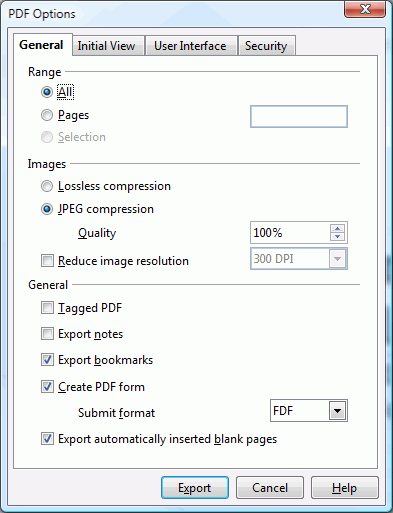
The above PDF options screen pops up. Be default, the image output quality is set to 90%. I changed to 100% because I wanted the highest quality possible.
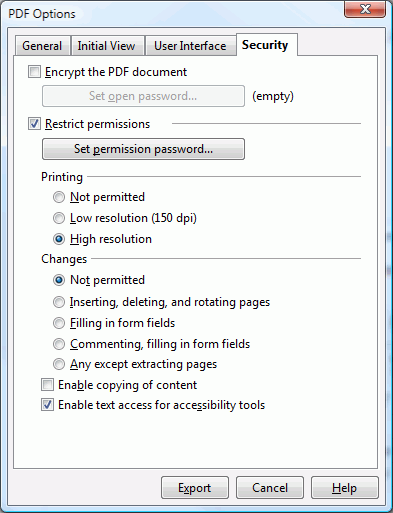
The last thing I needed to do before outputting the e book into a PDF file is to set the security. I turn off the ability to modify the file and disable copying of content. When everything was to my liking, I hit the Export button and five seconds later, I had a brand new e book ready to people to download.
Looking back on it, I should have done everything in Open Office, but this is my first e book and it was a good learning experience.
Find out what I am doing right now by following me on Twitter! If you like this post then please consider subscribing to my full feed RSS. You can also subscribe by Email and have new posts sent directly to your inbox.
Make Money Online with John Chow's Ad Network - Join TTZ Media Now!


Here's A Few More Related Posts
Thanks for sharing! Opensource is the way to go
hhhh… still curious, what’s mr. chow’s big plan with this free ebook download except the keyword it self
When I saw this post title, I thought he was going to release a “how to write an ebook” ebook!!
Kumiko,
this is also an exposee for some of us who are novice in the area of transforming a MS Word doc into Pdf.
With this, I could go ahead and create my own free e-book.
It is still a blow to the E-Jerks and pyramid moguls.
great post JC.
i guess it’s an indirect way of marketing. If this e-book is passed on to others then John’s site will spread by the word of mouth. I could be wrong but it looks as if it could happen.
Very good post !
There is also PDF creator another open source PDF creator than can be downloaded free online.
Opensurce is the
way to go!
One question:
Are images also converted to PDF document?
Yes they are
John did you used to create the content table with font styles ?
That’s so easy! guess i am the next ‘Rich Jerk’!!
No, the next “E-Jerk”
.
Very impressive. I’m planning to make an e-book that contains guaranteed links to over $4000 worth of Photoshop files, graphics, templates, and web scripts.
I’m sure the next ebook will have a chapter on How To Make Ebooks…
Your teaching people how to fish!
Your filling the void that should have been exposed a long time ago.
Thanks for sharing.
I use primo pdf which is free of cost and works very well.
Off topic - Your blog does not rank high on “make money online”…I saw it rank 2 on Google a couple of days ago. Some of my sites ranking high have gone down as well :sad:. What is Google upto now?
I think John’s blog has been penalized for the keyword make money online.
I read some where about Google Bomb, where people artificially rise up in the positioning of certain keywords, by using the technique that John uses.
Oh dear. You are in trouble John. You are going to lose all the free visitors. Do something John!
Don’t tell me nivola’s prophecy is coming true?
I am in no way related to him before anyone start shooting me down.
Nivola again! Abeg, let him rest or keep sulking.
sure, here´s the url in Google, where says the bad practices to make your rank grow can be penalized.
http://www.google.com/support/webmasters/bin/answer.py?answer=35665&topic=8510
Nivola, your stupid crap is utter nonsense. Have you ever ranked on the first spot the way John did, without spending a buck
Stop Cry baby, i pity you 
In 6 months, you will be able to offer v2.0 with all new affiliates, the follow up to chapter 9 and a chapter with the result of the first ebook.
Glad for you that it was not a lot of work.
Recycling is good and not
I’m re-reading your eBook as I type this. A little slower this time. It’s better than 99% of those $97 eBooks!
I’m glad you gave us the heads up on CutePDF. I use it all the time in my Office. We don’t deal with links in our documents though. When my eBook comes out, I’ll be sure that the links are live after rendering the PDF.
Wow! This site is great!! I love your ebook, I’m reading it right now
Thanks for you help! Hope to meet one day
Good ebook, thanks for taking the time to compiled it
Your site is good great that i learn from it. Yesterday i downloaded your ebook on make money online. and then i spent one night to read it. it is so important for me.
The beauty of this is that all of the information was already available on your site yet you have now condensed that all into one handy resource for people.
There are a handful of other PDF generation tools available but using OpenOffice.org is probably the easiest way to go and produces great results.
A good one! Thanks for all your effort in compileing it.
Thanks for sharing it too.
there was alot of freeware that able to make PDF file out there, try to googling…
Open source is good, but the best PDF writer and reader is Adobe Acrobat. PDF’s created with the Adobe product work better and print better. The problem with other software is that fonts may get substituted or dropped out entirely and images may not render properly.
For instance, in your e-book, the Symbol font wasn’t embedded (press Ctrl-D in Acrobat to view Document Properties). It happens to display correctly on my computer because I have the font installed, but what about Mac or Linux users who open it? They may not have the font and a little square could appear where the symbol character should be.
Well, would you want to pay $100 or more for the Adobe software? I know I wouldn’t unless I produce A LOT of PDF files.
I haven’t read your e-book yet. I just bought Aaron Walls book today. His is over 300 pages…. I didn’t expect it to be that big. I look forward to your book.
If you’ve been reading the blog for a while you’ve likely read it all. If you haven’t, it’s a great summary of John’s make money posts.
Wow. Can’t believe this is your first ebook John +P.
Can’t believe you haven’t made one or lots of people don’t know how to ;).
Hmn…(Maybe I should create a product creation category in my new blog).
There are better pdf file generator out there, but, yep, it costs a spare change
.
Also, forgot to mention did you hear about the LiveJournal Revolt? Hehehe, where’re all the Diggers!!! Let’s go help-out LJ users =P. (And of course you can help by digging my post :). Please, don’t let LJ gets away with DELETING your accounts with no warning whatsoever
What is so great about Open Office is that you can use it on any platform. Rather than familiarize yourself with one piece of software, and then have to learn something new when/if you change platforms, you can take a system with you.
- Mike
Kostenlose eBooks - Geld verdienen mit Blogs
Gleich zwei kostenlose eBooks zum Thema “Geld verdienen mit Blogs” wurden in den letzten Tagen veröffentlicht. Dazu gibt es noch ein kostenloses Bonus PDF zum Thema Guerilla Marketing.
Mit dem eigenen Blog Geld verdienen - John Chow
D…
[...] recent feed items and read them while not connected to the fire hose of information. I can now read John Chow’s latest post offline.So go, right now to Google Reader and get the capability to use it offline. Which is what we have [...]
Nice. Very helpful, thanks John.
Has anyone else noticed that John is no longer 2nd for “make money online” or 3rd or even 20th for that matter? I wonder what happened. Gonna send John and email and maybe convince him to post about it lol
As stated above, I think he may have been penalized for the term “make money online” due to all the links “suddenly” appearing.
Time for new anchor text!
He’ll do okay though, plenty of links coming in aren’t all that bad!
Actually I think it has something to do with the new robots.txt file he started using.
I used the same file he provided on one of my websites and the exact same thing has happened to my website. Basically the index page has been dropped from Google all together.
John, let me know if you figure it out. What i did is remove:
# Disallow all files ending with these extensions
Disallow: /*.php
Thinking that maybe Google was seeing mysite.com as mysite.com/index.php ?
His Supplemental Index number has increased: 2030 now.
I use a program call Win2PDF which does what your CutePDF was supposed to do. Its nice to have the PDF of files, email it to kinkos and they’ll print it out.
Did the “Save as PDF and XPS” addon for Office 2007 not do the job? Some people don’t realize it’s an addon due to the ruckus Adobe raised when Microsoft was going to include it by default.
Linkage: http://www.microsoft.com/downloads/details.aspx?FamilyId=4D951911-3E7E-4AE6-B059-A2E79ED87041&displaylang=en
I was about to post this very same thing since the official MS “Save as PDF” add-on works great for me when converting Office documents to PDF’s.
Thanks for the tutorial by the way John!
Agreed. My first thought was why not just save it as a pdf file directly in Word 2007. My version has it as standard, not as an add-on. Hmm…
[...] el hombre piensa en los demás y ha dejado un ebook en pdf para aprender a ganar dinero en los blogs. Esta en ingles, pero seguro que en breve aparece una traduccion al [...]
I use Adobe Acrobat distiller. For me I think it is simple. It over rides my print function, but I have no printer anyway. I can even print a web page to a PDF file. I can save it to PDF Writer or Acrobat Distiller. If I save it to Writer, I can than immediately start to modify it. Ad encryption and all that good stuff. I love Adobe. Even more now that they got Macromedia. Now all my software comes from the same place. Makes it much easier to update and go shopping for new stuff. Just got Adobe Premiere Pro CS3. So nice but now I need to get the other 2 GB of RAM.
Been running on only 2 GB for the last couple months. 
You should use lulu.com and make a softcover copy of your book and sell it
OpenOffice, I’ll keep that in mind. I could definitely use something like it in my line of work, thanks, John! And kudos on the ebook — it’s doing so well and it hasn’t been out that long yet.
John, thanks for putting the ebook together. Now you just need to post about 20 more additional blogs about your ebook, so google can spider “ebook” on your blogs. Let me help you out.. e-book ebook e book. Take care.
Thought you were about to sell an ebook for a second there.
Very gentlemanly of you provide a guide for us internet marketing NOOBS