How To Perfectly Blend Google AdSense Ads
One of the biggest tips for optimizing Google AdSense performance is by blending the ad units into the background of your site or blog. Google’s own optimization page recommends doing this. This technique makes the ad unit look like it’s part of your site content.
While Google allows you to control the colors of the ad unit, it does not allow you to control the font style or font size. If the font style you are using is radically different from what Google use, then getting the ad to blend with your site becomes harder. This tutorial will show you how to perfectly blend a Google ad, fonts and all.
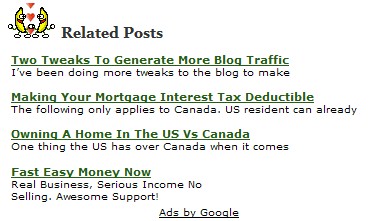
The above screen shot was taken from the Related Posts that is seen at the bottom of each blog post. The first three links are related posts. The last link is a Google 234×60 AdSense ad. Notice that the font style and size matched the Google ad perfectly. Here is how you do it.

- Using Firefox, right click on the Google ad you wish to copy.
- Select “This Frame” from the choices.
- Then select “View Frame Source”.
- A screen will pop up showing the exact style and size of fonts Google is using for the ad.
Now you can match your text perfectly to the Google ad by adding the font perimeters to your CSS. In the above example, not only did we match the font, but we also matched the line and paragraph spacing as well. BTW – a big thanks goes out to Justin for helping with the CSS.
I will report on how the perfectly blended AdSense ad does in a few days.
*Update - Google has ruled that while making your fonts to match the ad is fine, presenting the ad like the above example is a violation of the following part of the TOS: Publishers are not permitted to display Google ads in a manner that may mislead users, causing them to mistake Google ads for site content.

- Posted in The Net
- 23 comments what's your take?
Sorry, the comment form is closed at this time.


Do you think it’s an honest thing to do though? I’m not really sure.. It seems 50/50 to me.
Reply to this commentWhether is it honest is open to the debate. However, it is allowed by the Google TOS.
Reply to this commentSince the links match Google and nothing else, it makes the entire collection of links look like one big ad.
Reply to this commentYes it does but then if it was one big ad (say the 300×250) I would not be allowed to add the “Here’s A Few More Related Posts” label to it. The dancing bananas help to draw attention to the links as well.
Reply to this commentWhere on AdSense does it say it is ok to manipulate the Ads more than what is done from the setup page?
Reply to this commentWe are not manipulating the Google ad in any way. Instead we’re making the site text perfectly match the ad. The Google ad codes has not been touch.
Reply to this commentIf I’m not mistaken, the TOS says that the only lables you are allowed to use above the ad block are very specific. I think the ones you can use are “Sponsored Links” and one other.
Reply to this commentYes, you are correct. However, there is no label above the ad. The label is above the related links.
This is set up the same way as most blog posts. You have the title (label) of the post, the body of the post and a Google ad under the post.
Reply to this commentGotcha. I was just wondering how you got four Google Ads on the front page. And I almost started to say, hey, how can I get a fourth one on mine.
Thanks John.
Need to retweak again.
Reply to this commentJohn, you are a genius!!!!!!
Reply to this commentYea, he’s pretty good.
Reply to this commentHi John. Your adsense is so great. But have you email Google about this format and they allowed you to do this?
Thanks a bunch and gud lak
Reply to this commentActually this approach is against the TOS as you are mimicking Google’s ads with your posts/links and that is against the TOS.
Reply to this commentI’ll just say this. When in doubt, email Google and ask. It really doesn’t matter if I or you say it’s within the TOS or against the TOS.
Email Google and let them decide.
Reply to this commentthis is just cheap! just a shame how low one can fall for some cents.
Reply to this commenthowdy.
i saw this technique being used on this site:
http://www.dualscreenwallpaper.com/
it seems kinda shady.
i am interested to hear what google would really say about it.
-dave
Reply to this commentWhat worries me is the header. Would google classify it as appearing too close to the google ad and misleading. I got a funny feeling they would really want you to slap “Sponsored Links” at the top.
John any chance you ask them and give us a response, if you ask them directly there very unlikely to punish you for it.
Reply to this commentIf people would read before they click, instead of blindly pulling the trigger, they wouldn’t get ‘tricked’. They would then be well-informed consumers.
Reply to this commentI have received an official ruling from Google. Blending and matching the fonts is not against the TOS. However, the way I have the ad set up is.
Publishers are not permitted to display Google ads in a manner that may mislead users, causing them to mistake Google ads for site content.
Reply to this commentI’ve read about this before but i’ve lost this site. Thanks for remind me!
Reply to this commentHay jon this is a great post!!!
Reply to this commentI’ll try it on my blog:)
I’m trying to decide if my links are too faint, or if I should be using a more visible color. Thoughts?
Reply to this commentawesome post..!
Reply to this comment