John Chow dot Com Online Investment Review - Make Money Online Investing in Businesses
 

How To Secure, Manage And Sync All Your Passwords

written by John Chow on April 1, 2010

How to make $593 in less than one hour

Ever since my post about running my business from a web browser, I’ve been getting comments and emails about security. In addition to using cloud powered apps to run my online business, I store my files on Dropbox so I can have access to them from any computer.

The security concerns people have about running their online business from the cloud are legit. Therefore, I’ve decided to do a post on the number 1 way to protect yourself online and that is to make sure no one can figure out your passwords.

It’s a sad fact that the most powerful thing standing between a hacker and your information is the most overlooked – the password. Too many people use the same password for everything and their passwords are so weak, a hacker can break through it in a matter of minutes. How weak is your password? Take the MS Password Strength Tester and find out.

Have a Separate Password for Everything

I have over 100 sites that I have online access to. That means I have over 100 different passwords. These passwords range from 15 to 50 characters in length, having upper and lower case, letters, symbols, numbers and don’t form any real words. How do I remember all those passwords? I don’t. Instead, an awesome piece of software call 1Password does it for me.

How To Sync Your Passwords with Dropbox

If you’re like me and run more than one computer (plus an iPhone), keeping all the passwords synced can be a problem. While 1Password does have an import and export feature, I’ve found the best thing to do is to combine 1Password with Dropbox.

By moving the 1Password.agilekeychain file to my Dropbox, it becomes usable to the 1Password programs installed on my other Macs. All you need to do is go to the 1Password Preferences and under the General tab, click Move on the Data File. Select Dropbox as your new 1Password.agilekeychain location and you’re set.
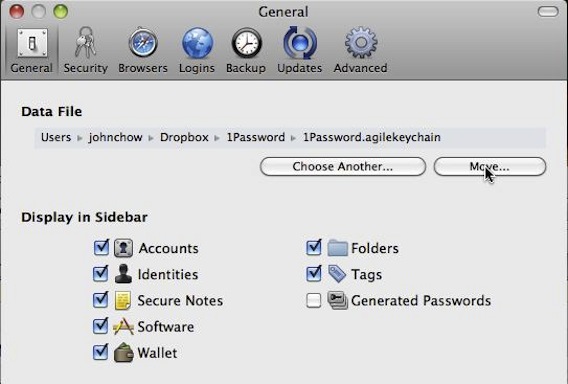
Syncing 1Password with Dropbox

Now install 1Password on the other Macs. Go to the shared Dropbox and double click on the 1Password.agilekeychain file. 1Password will ask if you wish to use this file. Click yes and you’re done. Now, any updates to the password files from any computer will auto update all the other computers. Your passwords will always be synced.

Accessing Passwords From a Public Computer

If you’re on a public computer and need access to your passwords, then you’ll love the 1PasswordAnywhere feature. Just save the 1Password.agilekeychain onto a flash drive and you’ll able to access all your passwords from any comp you have the flash drive plugged into. If you save the 1Password.agilekeychain file in your Dropbox like I do, then you can access it from any computer in the world by logging into Dropbox.com.

Because passwords are entered using copy and paste, keyloggers can’t record them. This provides an extra layer of security when working from a public comp.

Sounds Great But What About The Poor PC People?

While Dropbox will work with PCs and Macs, 1Password is a Mac only program. PC users looking to duplicate the same user experience can look at Roboform. Roboform does most of the same stuff that 1Password does but you can’t sync it using Dropbox. Instead, you have to use the Roboform Online service. Creating an account is free but I think using it cost money. Roboform is not as eloquent or as pretty as 1Password but it should get the job done for the poor deprived PC users.

Dropbox | 1Password | Roboform

Did you enjoy this post? Get John Chow Dot Com updates via email...

Stay up to date with all of John Chow’s tips for making money online and blog posts by subscribing via email. Your email will be kept private and never shared with anyone.

{ 44 comments }

JackNguyen.com April 1, 2010 at 9:03 pm

$40 for a single license is very reasonable considering how much more secure your sites will be.

Profit Addiction April 1, 2010 at 10:07 pm

Too bad PC users have to pay to use Roboform. That’s no fun!

Net Age | Web Design April 6, 2010 at 4:39 am

It will change, I assure you! There are too many of us to ignore for very long. If the demand is there, the product will be created / adapted soon enough. Such is the nature of the internet world…..

Entrepreneur Key - Your Key To Success April 1, 2010 at 9:35 pm

Nice, interesting idea. I just use my computer and google chrome.. it saves all my passwords automatically..

John Chow April 1, 2010 at 10:33 pm

That is not smart at all. If anyone has access to your comp, they can just fire up your Google Chrome, look at the security preferences and view all your passwords! And usernames as well.

Ben Collins April 2, 2010 at 9:56 am

Erm……. Agreed! Especially if you use a laptop. What if you loose it. I would change that pronto. Consider the fact you just told the world your secret as well and your website address.

Hope you listen to John at least..!

40% OFF Offer April 4, 2010 at 1:20 am

@ Entrepreneur Key – Your Key To Success

Just few clicks and other people will enjoy your passwords.

I never recommend this for laptop users but if you are desktop user than you are bit secure but not full.

AffiliatePaying April 1, 2010 at 9:48 pm

Dropbox is a cool product. I’ve been using it for several months now and absolutely love it. Nice post John.

WebpageLottery April 1, 2010 at 9:50 pm

I like the Graphic User Interface. It’s simple and elegant =)

Samuel April 1, 2010 at 11:20 pm

Nice post john! I guess google chrome is vulnerable well i wil need to try dropbox lol

WebpageLottery April 2, 2010 at 1:25 am

If Google chrome is vulnerable than I don’t know what Microsoft IE is. =)

Danny @ aCommunityForBloggers.com April 2, 2010 at 5:13 am

Lol windows creates all those vulnerabilities on purpose so it keeps on sending patches after patches on a weekly basis to justify the price it charges for it’s OSes and applications.

College To Careers April 7, 2010 at 9:36 pm

seriously…i’m def thinking of changing for that exact reason…such a pain in the ass…!!

Dana @ Blogging Tips Blog April 2, 2010 at 4:58 am

So, the question now is how strong 1passwordanywhere from hacker attack.

John Chow April 2, 2010 at 9:43 am

It’s stronger than what you’re using right now.

College To Careers April 5, 2010 at 7:24 pm

lol, and just use 20+ character pw’s like john and you’ll be set!!!

Danny @ aCommunityForBloggers.com April 2, 2010 at 5:15 am

Its a shame us PC users get left behind lol

Bustor April 2, 2010 at 6:33 am

Wow ! I didn’t thought this to be of so much importance. Moreover I use around a dozen passwords and never considered using a software to manage them.
Now I am considering trying this seemingly nice software.

Sheriff Sales April 2, 2010 at 7:38 am

Ha Ha I love it “The Poor PC people” Oh John that is so snobbish. Anyway very good app for whoever!

Diabetis April 2, 2010 at 7:49 am

I would just settle for a robo form since I am a pc user.

College To Careers April 7, 2010 at 9:37 pm

What exactly is a robo form…I’m a PC user and am looking for somethign that might come in handy….

fas April 2, 2010 at 8:06 am

MOral of the story? Get a mac

John Chow April 2, 2010 at 11:38 am

That’s pretty much it. :)

College To Careers April 7, 2010 at 9:38 pm

after 20 years of a PC…I think i now may have to make the change!

Danny @ aCommunityForBloggers.com April 2, 2010 at 6:25 pm

Yup that’s the next thing on the list dw lol

Pogul April 2, 2010 at 9:15 am

Great post. Being a Mac-Challenged person myself I did some checking on LifeHacker and it looks like KeePass might be another (free) alternative for us PC only folks:

http://lifehacker.com/5042616/five-best-password-managers

1Password got the nod from the crowd for OSX

Entrepreneur Key - Your Key To Success April 2, 2010 at 10:30 am

I got a mac laptop recently…. wow is it hard to use! Wheres the right click folks?

Besides that, it has no user capabilites like the PC does, and sorry, but if your computer literate, a MAC is not for you!

John Chow April 2, 2010 at 11:25 am

It has a right click. You just can’t see it. Are you sure you really have a Mac or was just using one in the store because Macs had right clicks for years now.

College To Careers April 5, 2010 at 7:26 pm

We all haven’t converted to Macs yet, but as time goes on…it’s sure getting tempting.

Mathew Day April 2, 2010 at 11:08 am

Thanks for the tutorial and references. This will help me save time and be more secure. :)

Logan April 2, 2010 at 11:54 am

Hey John,

Check out LastPass for password management. It works on any operating system and syncs between all computers without the use of DropBox.

https://lastpass.com/

Regards,

Logan

John Chow April 2, 2010 at 12:02 pm

I like Roboform better than LastPass and I like 1Password way more than Roboform. In other words, LastPass would be the last pass I use. :)

benwaynet April 4, 2010 at 5:49 pm

+1 for lastpass,
If John could get off his Mac high horse he might see how sweet LastPass is.

John Chow April 4, 2010 at 7:29 pm

I admit I haven’t tried Lastpass yet but based on the sale copy, Roboform looks better.

TYCP Magazine April 2, 2010 at 9:07 pm

I keep my passwords in a software program. It’s on my computer but it’s still secure because one would need to know the password to get in, as well as the security question.

Luke Etheridge April 3, 2010 at 9:37 am

Great Post John…

…I’ve always wondered how easy it is for a hacker to work out your passwords. Norton offer a great toolbar which sits in your browser which remembers all of them for you which can save so much time ;)

Thanks John – An important issue that shouldn’t be overlooked.

Luke Etheridge

Gary April 3, 2010 at 11:30 pm

Thanks for giving me credit after I recommended you use 1Password for your Mac. ;)

Dadedidodu April 5, 2010 at 12:42 am

This is what I really need. I have so many blogs and my worst fear is forgetting their passwords.

Free Picks April 5, 2010 at 3:10 am

$40 for a single license is expensive for newbies

College To Careers April 7, 2010 at 9:39 pm

well worth the investment :-)

Net Age | Web Design April 6, 2010 at 4:15 am

Hahahahahahahahah – Us poor deprived pc users get the message, masterrrr. Jokes aside, it will not be exclusive to Mac for long, as the market for pc users is just soooo much bigger.

College To Careers April 7, 2010 at 9:58 pm

well, at this point, Mac users will only be ahead of the curve from what I have seen…

Romantic Room April 9, 2010 at 1:50 pm

Yeah, I think the demand is out there so services like these will improve over the next year.

Bryan

Mark@Seattle attorneys April 22, 2010 at 2:08 am

This is cool. Great tip for people who have a hard time memorizing their passwords. I for one am one of those said people, and most of the time, I use the same usernames and passwords on the sites that I am registered to. I don’t even remember my password, google chrome does that for me.