John Chow dot Com Free WordPress Installation - Start Your Blog Today!
 

How To Show Your Traffic Stats In Your WordPress Dashboard

written by John Chow on June 15, 2011

How to make $593 in less than one hour

Many people have asked me what stat software I used to show my charts in my real life on page SEO case study post. The software is WordPress.com Stats and it’s one of the best stats plugin ever made for WordPress.

There are hundreds of plugins and services which can provide statistics about your blog visitors. A tool like Google Analytics provides an incredible depth of information. However, it can be overwhelming and doesn’t really highlight what’s most interesting to me as a blogger. That’s why Automattic, the creators of WordPress, created its own WordPress.com Stats to focus on just the most popular metrics a blogger wants to track and provide them in a clear and concise interface. Best of all, it makes all that information available right in the WordPress dashboard. There’s no need to load another browser window or a piece of software to view your stats.

Installing this stats plugin is much like installing the Akismet anti-spam plugin. All you need is to put in your API Key and the rest is automatic. To get an API key for WordPress.com Stats, you need to sign up for a free WordPress.com account and WordPress will email you a key.
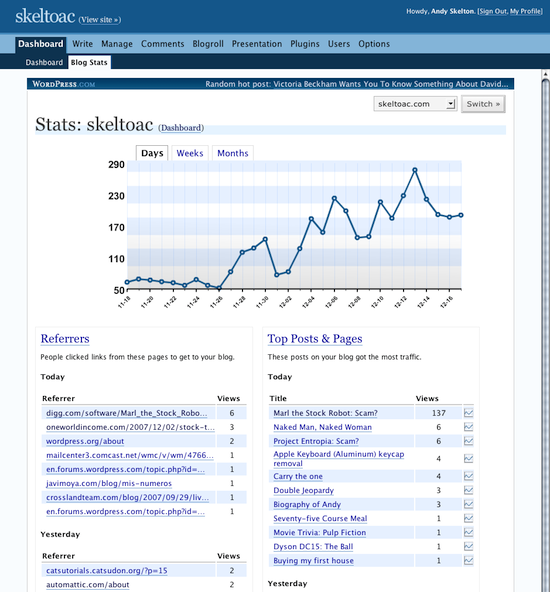

Once it’s running, WordPress.com Stats will begin collecting information about your pageviews, which posts and pages are the most popular, where your traffic is coming from, and what people click on when they leave.

A small chart will appear in your admin bar if you are running WordPress 3.1 or later. Each line in the chart represents the traffic for the hour in relation to the previous hours. Clicking the chart will bring up the full WordPress.com Stats page.

Because all the processing and collection runs on WordPress.com servers and not yours, it doesn’t cause any additional load on your hosting account. In fact, it’s one of the fastest stats system, hosted or not hosted, that you can use. WordPress.com stats report new visits typically within ten seconds.

Get WordPress.com Stats and six other plugins with my Free WordPress installation Service.

Did you enjoy this post? Get John Chow Dot Com updates via email...

Stay up to date with all of John Chow’s tips for making money online and blog posts by subscribing via email. Your email will be kept private and never shared with anyone.

{ 65 comments }

Nettgründer June 15, 2011 at 11:17 am

This is my preferred stats plugin as well John, and i have been implementing it to all my blogs in the last few months.
And i`m very pleased with it so far :-)

Kevin Kimes June 15, 2011 at 1:44 pm

I implemented this a few days ago after seeing it in the chopper seo performance posts. Great so far, just wish the numbers were bigger. :)

John appears to use three or four different stats measurement tools, as this page loads a script from Google Analytics, Sitemeter, (and some others which might be stats related) and then WP.com stats as we see in this video.

I do wonder why so many different stats trackers though…

Penny Bid Auction Sites June 15, 2011 at 7:50 pm

Wordpress stats is a pretty cool plugin. Been using it for some time now.

Abhik June 19, 2011 at 6:08 am

The best part is this plugin is developed by the developers of wordpress. :)

Rajib @ SEO for Blog July 26, 2011 at 9:36 pm

WOW.. that means it will be an high quality plugin.

Louie Sison June 15, 2011 at 10:11 pm

@John and @Nettgründer, I 100% agree with your suggested plugin. I use it on my site as well.

zk @ web marketing tips June 16, 2011 at 12:58 am

Earlier to this one which one you were using for stats ?

Tikyd June 15, 2011 at 12:18 pm

thanks for sharing this plugin. I did not know about it. The presentation of the stats looks nice.

Penny Bid Auction Sites June 16, 2011 at 4:29 am

I think I must have used another similar plugin, this one looks slightly different.

PPC Ian June 15, 2011 at 12:41 pm

I was looking for a good, simple stats program. Thanks for sharing, John!

zk @ web marketing tips June 16, 2011 at 1:00 am

Hey Ian except of keywords and location details … What other information you look for ?

Penny Bid Auction Sites June 16, 2011 at 11:55 am

I think he just wants a simple stats program. Visitors, keywords, content and traffic sources.

Andrew @ Blogging Guide June 27, 2011 at 2:18 am

I’d been using it for sometime not on my blog and it is the best…. There are so many benefits and I just enjoy it so much.

Chris June 15, 2011 at 1:53 pm

Looks cool John, but does it show the keywords bringing you traffic?

John Chow June 15, 2011 at 2:15 pm

Yes, it shows the search terms people are using to find your blog.

zk @ web marketing tips June 16, 2011 at 1:04 am

That is the main purpose of every stats showing software. But will this effect your loading time as well ?

Penny Bid Auction Sites June 16, 2011 at 11:55 am

It doesn’t slow things down hardly at all.

ZK @ Web Marketing Tips June 16, 2011 at 9:12 pm

So you have used it or this is your assumption only.

Kevin Kimes June 17, 2011 at 6:05 pm

I use it, doesn’t seem to cause any slowdown.

Abhik June 19, 2011 at 6:09 am

I don’t think so.. This loads at dashboard, so no slowness for your visitors.

Email List Building June 16, 2011 at 3:21 am

Hey John,

Thank you for sharing another good plugin.I*m not using it but will consider it. The only thing I always ponder before installing any plugin is the possible problems it may cause, whether it*s slowing down of my blog or how it may negatively interact with other plugins that I already have.

fazal mayar June 15, 2011 at 2:12 pm

good plugin, i need a good stats analyzer as well. I have statspress.

zk @ web marketing tips June 16, 2011 at 1:05 am

I think flippa recommends google analytics …

Penny Bid Auction Sites June 16, 2011 at 11:56 am

Whatever works. I’ve started to use StatCounter on some fo my sites to get away from Google and their prying eyes.

Abhik June 19, 2011 at 6:11 am

Statcounter is definitly a cool analytic software.
It’s not only lighter than google analytics, but also provides some in depth data.

Kashif@Work Online Ways June 23, 2011 at 11:05 am

yeah.. thats the point main thing is that we should avoid google analytics, its a spy of google.

Graham Lutz June 15, 2011 at 3:39 pm

Isn’t this is same one that comes in the “Jetpack” plugin?

Penny Bid Auction Sites June 16, 2011 at 11:56 am

Can you fly with the jetpack plugin?

Deneil Merritt June 15, 2011 at 4:15 pm

Awesome, I am going to install it right now. Thanks John.

WPRank June 15, 2011 at 6:10 pm

I’ve been using Wordpress.com Stats on each of my blogs and find it to be an invaluable tool. I find using this + Google Analytics helps to retrieve very detailed and important information on what’s going on within your site. Highly suggest that if you aren’t currently using it, to get it asap. It’s simple to install and quite useful.

Tom June 15, 2011 at 6:53 pm

I have the WordPress stats but mine crashed a month ago. Now it works every now and then but the numbers are lower than my Google analytics. As a back-up I set up additional trackers with Google and Clicky.

Penny Bid Auction Sites June 16, 2011 at 11:57 am

It is interesting that no 2 stats programs will show the exact same thing.

Matt June 15, 2011 at 7:19 pm

Great plugin to get an idea of how my blogs are doing with traffic. Thanks for sharing.

Ed June 15, 2011 at 8:54 pm

Great to know there are options like these especially for those who do not want to use Google Analytics.

Penny Bid Auction Sites June 16, 2011 at 11:58 am

Anything to get away from Google!

Abhik June 19, 2011 at 6:13 am

There are few other standalone analytic software available in market.
Some of them are in fact equal to google in terms of features.

Andy June 15, 2011 at 10:21 pm

Still using anylytics,anyway good sharing john,maybe i will try on my other blog

rakesh kumar June 15, 2011 at 11:56 pm

I am not sure whether it will increase the page loading time or not but i am sure it will increase extra load on your server. So i will again go with Google Analytics.

Email List Building June 16, 2011 at 3:25 am

Hey Rakesh,

You are kind of reflecting my sentiments about installing new plugins. I think it*s good to think long and hard before getting any plugin. Only a small number of them is really worth it. It*s up to everybody do decide which plugins they can*t live without.

zk @ web marketing tips June 16, 2011 at 12:56 am

Right and correct details are always useful to take the relevant steps.

Would love to give it a try ….

john what do you think of Google analytics and this one … Which one is better.

Penny Bid Auction Sites June 16, 2011 at 11:58 am

Google is way more comprehensive, but sometimes all you need are the basics.

Kashif@Work Online Ways June 23, 2011 at 11:12 am

If you are satisfied with analtyics even then you should try these plugins..

Abhik June 16, 2011 at 3:45 am

Yes, it is one of the must have plugins.
Thanks to Automattic for developing such a nice tool.

Penny Bid Auction Sites June 16, 2011 at 11:59 am

Yea, and it’s free too.

Abhik June 19, 2011 at 6:15 am

All the plugins from Automattic are free except VaultPress :)

Akil June 16, 2011 at 5:45 am

Hi john, great info on the wordpress stat I have heard of it before but never really used it. I am currently using statpress and getclicky which are two useful tool especially getclicky. Not sure how reliable the statpress is because it doesn’t show the same results as google analytic. I think you should check out getclicky also and let me know what you think about it. It offers affiliate so a mogul like you its another income source if you like it

Samuel June 16, 2011 at 6:13 am

Hi John! I am Samuel from HK. Nice to meet you at your website John Chow dot com. It is a great place for me to browse and learn the tips from you about blogging and how to make money online. I had downloaded all your four e-books. When I just read the first few pages of your first e-book “Make Money Online With John Chow dot com”, I woke up and thought that “I can do it”. I had created my own blog and started to write right now. Please feel free to visit my site and give me some advices. Thanks a lot!!

Flyer Templates June 21, 2011 at 3:43 am

No doubt dear and i like your attention here went too far….

fas June 16, 2011 at 6:13 am

John how do you sign up for a free account? If I put in my domain, it says already taken. If I put in other free one, it says API key of another user. Put yours.

Penny Bid Auction Sites June 16, 2011 at 12:00 pm

You just sign up and get an account, I don’t think you need a domain. If you do, just make one up.

Kailas chozhan June 16, 2011 at 7:42 am

It is an interesting blog which is helping to get the traffic status for our wordpress blog and thanks John.

Tilen Hrovatic June 16, 2011 at 8:08 am

This plugin is really awesome and it gives all the stats you need right to your WordPress dashboard. :)

PPC Ian June 16, 2011 at 8:29 am

I agree! It’s really nice to have everything in one place. You can gain a lot of efficiency by staying in WordPress and not having to toggle between multiple apps.

Penny Bid Auction Sites June 16, 2011 at 12:01 pm

It’s all right in your dashboard. That’s nice.

Favourite Hobbies June 17, 2011 at 12:16 am

I am ok with my wordpress dashboard

Flyer Templates June 18, 2011 at 2:55 am

Impressive plugin indeed, Very interesting post indeed thanks for all the useful info…

Flyer Templates June 18, 2011 at 2:57 am

In my observation i agree to your this point a tool like Google Analytics provides an incredible depth of information.

Weber q320 June 20, 2011 at 2:06 am

Love finding new plugins like this for my wordpress blog, saves me going over to Webmaster tools all the time to check on my stats. Wordpress rules.

Numbers For the Lottery June 20, 2011 at 1:06 pm

great plugin, thanks for sharing!

Michael Laurin June 21, 2011 at 11:48 am

lol, I just started putting Google Analytics everywhere….. Guess I’ll have to switch…. :-)

Great post, John. Cheers.

Flyer Templates June 22, 2011 at 2:48 am

Very interesting post and awesome plugin indeed thanks for all the useful info…

Whitney June 22, 2011 at 11:54 am

This is a very intersesting looking plugin…..I’ve seen you do other posts about these types of plugins for Wordpress….tracking visitor stats is a very important part of internet marketing, don’t you agree? One of the many other reasons why I would like to switch to Wordpress….(i’m on Blogger right now). Thanks for the post John .

Aditya Darmawan July 4, 2011 at 7:42 am

Nice useful plugin. I’ll try.

Forex News July 16, 2011 at 10:51 am

Hey John,

Thank you for sharing another good plugin.I*m not using it but will consider it. The only thing I always ponder before installing any plugin is the possible problems it may cause, whether it*s slowing down of my blog or how it may negatively interact with other plugins that I already have.

Rajib @ SEO for Blog July 26, 2011 at 9:34 pm

Great plugin. I will try this for my new wordpress blog.