Watch John Chow on the latest episode of MarketLeverageTV!
 

How To Timestamp Your Twitter Tweets

written by John Chow on November 19th, 2008

Most bloggers know about the WordPress timestamp that allows you to publish posts at a later date. This is a very handy feature if you’re going to be away for a few days but would like new posts to keep flowing. The timestamp allows you to write a bunch of posts in advance and then have them go live at a predetermined time. Thanks to a site call Tweet Later, you can now do that with your Twitter tweets.

Timestamp Your Tweets

Tweet Later allows you to keep the tweets flowing even if you’re not in front of your computer or iPhone. If you know you’re going to be stuck on an airplane that doesn’t have Net access, you can timestamp a tweet that say “Stuck on an airplane that doesn’t have Net access” and have it go live at the time you’re on the plane. Alternatively, you can use Tweet Later to send yourself auto reminders. Want to remember that date with Bambi on Friday? Timestamp a tweet to say, “You’re getting some tonight! You wish anyway.” and have it go live on date night. Timestamped tweets can go out at a specific time or set to go evenly throughout the day.
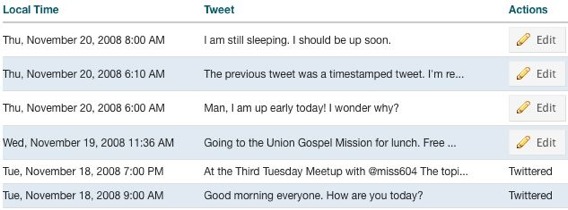
Twitter Timestamp

Auto Send Welcome Messages To New Followers

Another cool feature of Tweet Later is it can auto send a welcome message to all new followers. If you’ve recently followed me on Twitter, you would have received back a direct message from me saying thanks for the follow. It makes the follower on the other end think I’m such a nice guy for sending him/her a personal thank you tweet. :twisted:

In addition to the auto welcome, you can set Tweet Later to follow anyone who follows you. There’s also a keyword alert service that track keywords in the public Twitter stream. Tweet Later will monitor the stream and periodically email you a digest of the tweets that contain those keywords.

So far, Tweet Later is one of the coolest Twitter service I’ve found. Keep an eye out for the above timestamped tweets and follow me on Twitter to receive a very personal thank you tweet.

AffiliateObsession said on November 19th, 2008 at 10:22 am

That’s cool. Thanks for the heads up John Chow!

Reply to this comment
atlanta wedding photographer said on November 19th, 2008 at 11:06 am

yup…thanks sir….really like the fact that you can welcome people as followers…this way more interaction may just equal ….loyal subjects

Reply to this comment
Writers Needed- No Experience Required- Make $250/hr said on November 21st, 2008 at 10:35 am

I am still getting use to using Twitter. When I first started using their website, I thought it was dumb and didn’t have any value or substance to it. But you can really get a lot of visitors with this thing. Pretty cool :)

Reply to this comment
Affiliate Confession said on November 19th, 2008 at 12:48 pm

Pretty cool, I’ll have to check that out and send my tweets out when I want to.

Reply to this comment
ZK@Internet Marketing Blog said on November 20th, 2008 at 11:55 am

Looks like a cool app…never used it yet

Reply to this comment
Ben Pei said on November 21st, 2008 at 3:23 pm

Wooo.. just needed this post…

Reply to this comment
Money Is Everywhere said on November 19th, 2008 at 10:52 am

Thanks for this info. I use the Wordpress timestamp all the time. This will be useful.

Reply to this comment
atlanta wedding photographer said on November 20th, 2008 at 11:55 am

USEFUL IS RIGHT Question: what keeps this from being used as spam. Since it is more used for time stamping how will this effect the “what are you doing question?” I signed up for it and started to think that you can create an alternate life. Just write things that you are doing with the appropriate time intervals. MAybe I should just create a tweet entitled, Nosleepforme and create a alt ego…and an evil to boot.

Reply to this comment
DollarDevil said on November 19th, 2008 at 10:59 am

Twitter offers tracking? Keyword tracking? Definitely going to install the app.

PS. I recently followed you John, despite your auto response, I still think your a cool guy.

Regards

Reply to this comment
JBagley said on November 19th, 2008 at 11:14 am

Haha! And here I was thinking you took the time out to send a direct message to me on Twitter! http://www.Twitter.com/jbagley

Sharp one John. ;-)

Reply to this comment
Önder said on November 19th, 2008 at 11:15 am

REALLY cool. Great job.

Reply to this comment
Josten said on November 19th, 2008 at 11:29 am

i wonder if i could switch from blogger to wordpress an keep my domain name

Reply to this comment
Chris Jacobson said on November 19th, 2008 at 12:17 pm

Of course. Just export your Blogger posts into WordPress and upload them to your server.

Reply to this comment
Tony Chung said on November 19th, 2008 at 2:49 pm

Wordpress only imports from blogspot (blogger-hosted), but not if you publish to your own site by http://ftp. This is something to do with the change between “old” blogger and “new” blogger.

Reply to this comment
Sohail said on November 19th, 2008 at 6:56 pm

yeah its always good idea to move. Wordpress is much better

Reply to this comment
BusinessX said on November 20th, 2008 at 7:48 am

I cannot imagine anyone using any other CMS, Wordpress has so many plugins and community help is everywhere. When I started I installed Joomla, Mambo, DotNetNuke, and a couple of others. Some had more functionality out of the box, but looking for themes, customization, and help, it wasn’t there. Plus with more functionality comes more complexity. Wordpress has been a dream, and that is all I use. Simple out of the box, and with plug-ins I can add just the bells and whistles I want.

Reply to this comment
ZK@Internet Marketing Blog said on November 20th, 2008 at 11:58 am

You ll love wordpress

Reply to this comment
Jason said on November 19th, 2008 at 11:58 am

Nice, I wondered how that was done. I’ve since signed up and all is working great. Cheers!

Reply to this comment
Adrian said on November 19th, 2008 at 12:37 pm

Twitter offers tracking that’s great

Reply to this comment
Bryn Youngblut said on November 19th, 2008 at 12:42 pm

There’s some great Apps out there but this one is just rediculous.

Reply to this comment
MLRebecca said on November 19th, 2008 at 12:50 pm

I had no idea something like this existed. I think Twitter is most fun when you’re able to tweet on demand. However, as you pointed out, something like this would be great if you were on a plane. Thanks for sharing this!

Reply to this comment
Li Weng said on November 21st, 2008 at 3:03 am

It’s also good if you’re lazy, so you can just write a bunch of tweets in 20 minutes and schedule them for a couple of days.

Reply to this comment
BusinessX said on November 19th, 2008 at 12:57 pm

I have been trying to figure how I can use Twitter. Had an idea and this will make it real easy, this is the last piece to the puzzle. Thanks!

Reply to this comment
Trevor said on November 19th, 2008 at 4:16 pm

Awesome tips.

I always want to know something before hand.

Reply to this comment
Google Conquest said on November 19th, 2008 at 4:30 pm

May be the only one on the whole planet, but, I have not used Twitter yet. Seems I need to check it out. Thanks for this info.

Reply to this comment
Make money online said on November 19th, 2008 at 6:00 pm

Thats a nice tutorial, i was looking for the same..
keep sharing such gr8 things :D

Reply to this comment
Seo Creations said on November 19th, 2008 at 6:01 pm

Pretty cool. Just signed up and all is working great.

Reply to this comment
Joe Tech said on November 19th, 2008 at 6:06 pm

Glad to see you liked it. Their last email update about the new features had me thinking that I really need to update TwitterTech.com and add some similar features. Let me know what else would be cool and I’ll make it.

Reply to this comment
Sohail said on November 19th, 2008 at 6:58 pm

Great tip. Twitter is getting huge i mean it is huge ;)

Reply to this comment
Diana Rupert said on November 20th, 2008 at 6:35 am

Ye you could follow me too. http://www.Twitter.com/rupertdiana. Be my friends!

Reply to this comment
Club Blogger said on November 20th, 2008 at 8:59 am

I have tweetlater but only had it setup to welcome new followers, I guess I need to go back and se what all the feaures are.

Reply to this comment
donsanchez said on November 20th, 2008 at 9:22 am

John, thank you, my friend! This is a kind of service I’ve been looking for. Away - for checkin it out!

Reply to this comment
Dfunda said on November 20th, 2008 at 9:51 am

this really cool :D .interested to try it out

Reply to this comment
Play Games Win Prizes said on November 20th, 2008 at 5:10 pm

A very very great tool to use. It’s just like Wordpress all over again :D

-Mike

Reply to this comment
Hay said on November 20th, 2008 at 11:28 pm

Perserverance & hard work. Don’t wuss out just because you’ve had a bad day or two.

Reply to this comment
Li Weng said on November 21st, 2008 at 2:08 am

This is a good tool. I use it also to send automated welcome msgs whenever someone follows me. That way you can increase your traffic more. Although it’s getting less effective since everyone has these automated thanks for follow messages, they get read less often.

Reply to this comment
Keg of Wisdom said on November 22nd, 2008 at 1:45 am

AWESOME….that is exactly what I need for my site…

Reply to this comment
shun2u said on November 22nd, 2008 at 4:16 am

Twitter is really a good tool! Every bloggers should use it.

Reply to this comment
Takumi86 said on November 22nd, 2008 at 7:05 am

True, i agree with you :)

Reply to this comment
gendut said on November 23rd, 2008 at 2:20 am

great sharing……thanks

Reply to this comment
Steven-Sanders said on November 30th, 2008 at 8:44 pm

I’ve actually been looking into this tool. Lorelle on WP uses it I’m sure. The thank you message made me feel all warm and fuzzy inside, so I can only imagine what it would do for my followers.

Just need to make sure not to use it to send a link or sell something. That’s a turn-off!

Reply to this comment

Sorry, the comment form is closed at this time.