
Do you have a YouTube conversion tracking strategy?
If you’re like me, then you’re probably uploading product reviews, screen capture tutorials and other short videos on YouTube to promote your affiliate website or affiliate links. But how are your YouTube promotions really impacting your profits? Is YouTube really worth your time?
There’s no real way to know unless you implement a systematic way of tracking your YouTube clicks and conversions. And of course, you can do this easily with LinkTrackr.
The easiest way to do it is to embed your LinkTrackr tracking link right on the video page. On your video editing page, you can actually insert a short description of your video. Put your tracking link right up front followed by a short description as you can see below.

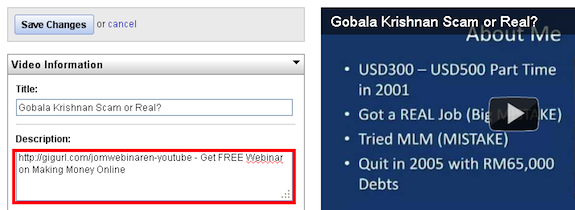
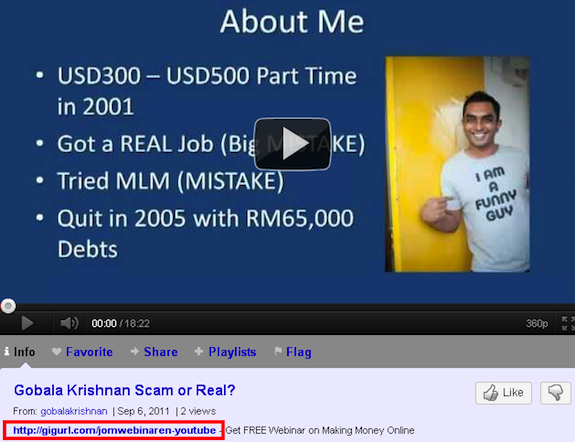
YouTube only makes a portion of your description visible, so make sure you enter the most important text right after the tracking link. Now your video display page will look like this:
When anyone shares your video URL on FaceBook, your YouTube tracking link will also be share and will be clickable (unless they just clicked on “Likeâ€), as you can see below:
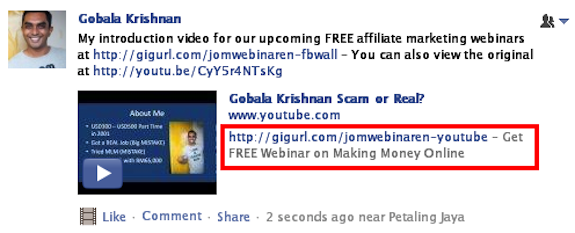
This will go a long way in helping you track clicks from your YouTube videos and shares, and also with your YouTube conversion tracking efforts.
However, this is only useful when someone views your videos on YouTube itself. It doesn’t appear when someone embeds your videos on their website. For that you need to work with “annotationsâ€.
YouTube Conversion Tracking With Annotations
Annotations are another great way to implement YouTube conversion tracking, especially due to the fact that annotations appear on all embedded videos on any website or blog.
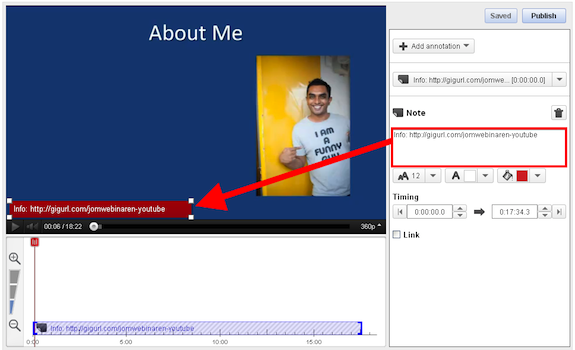
Since YouTube only allows you to link to other YouTube videos or pages, enter the full tracking URL as per the example below. It will not be click-able but at least you get to display the entire link. To make it even more effective you may also want to use domain name cloaking or cPanel link cloaking for shorter, easier to remember links.
Other YouTube Conversion Tracking Ideas
Here are some other ideas to make your YouTube conversion tracking more effective:
- Video Splash Screen – Create a 5-10 second introduction “splash screen†with your tracking link displayed on a plain background with some text, so viewers know where to go to get more information.
- Video Credits – Just like the splash screen, but at the end of your video. Make it play for 5-30 seconds so your viewers can actually remember or write down the URL.
YouTube Conversion Tracking with LinkTrackr
With LinkTrackr’s dynamic campaign feature and TID conversion tracking feature (which is available in all accounts), I can clearly see how may people registered / opted in to my free webinar:
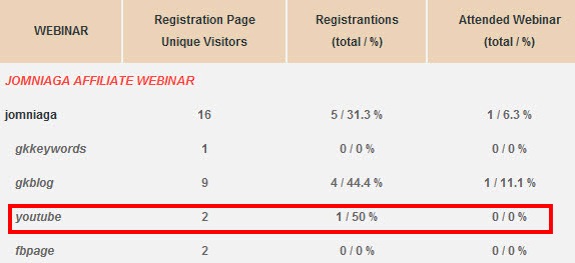
I can also see the conversion rate so I know exactly how effective YouTube is as a traffic source for my webinar. If I find that the traffic is too low quality, I may just decide to stop marketing this product on YouTube and turn my attention to more qualified and responsive traffic sources.
With the correct strategy, you will know for sure if your YouTube efforts are paying off or if your time is better spent elsewhere. So start tracking your YouTube conversion tracking campaign now!
This post was guest blogged by Gobala Krishnan of LinkTrackr. To try LinkTrackr, simply go and create your account. If you’re signing up for any of the paid plans, then be sure to use the coupon code JCROCKS to get 20% off.