
Aweber just keeps getting better and better. They’ve added another new feature to their ever growing list of features. Now, whenever you create a broadcast message in Aweber, you have the option to automatically tweet that email to your followers as well.
The main advantage to being able to tweet your newsletter is many of your Twitter followers may not be subscribed to your mailing list. This is a good way to get your newsletter in front of them. The tweet will include the title of your newsletter and a link to read it. Here are a few examples taken from real Aweber users.
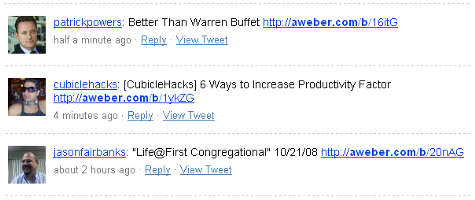
Setting this up in your Aweber control panel is very easy. I’ve made a screen cast on how to do it. I hope you like it. Aweber is the best mailing solution on the web and the ability to tweet your newsletter just made the best even better.
