Two days ago, I did an upgrade on the blog’s Thesis theme, and something went terribly wrong. The blog got completely messed up. I thought I was screwed because I didn’t make a backup of the old theme before updating, and my system admin was out for the night. It looked like my blog would be down until the next morning. This was, of course, completely unacceptable. When you own a money-making blog, you cannot have it go down on you. Luckily, my blog is protected by VaultPress.
VaultPress is the ultimate-disaster recovery solution for WordPress. Made by the creators of WordPress, VaultPress does more than just back up a copy of your WordPress database. It backs up your entire blog. This means your plugins, dashboard, themes, comments, and post revisions are all safeguarded and ready to be restored. Backups are saved to the Automattic grid (over 1,200 servers in three data centers) that serves over 16 million WordPress.com blogs and 270 million monthly visitors.
When my blog went down, I just logged into my VaultPress control panel, and chose a time before I did the upgrade that messed the blog up.
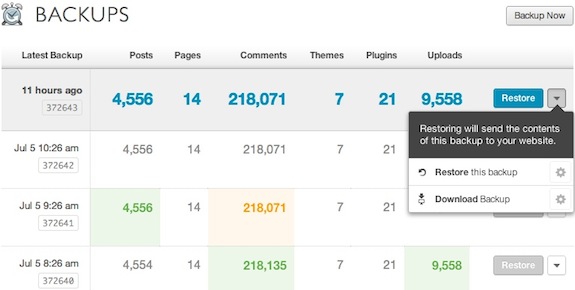
Restoring the blog was as easy as pushing the restore button and then confirming that I actually want to restore. VaultPress did the rest and my blog was fully restored in less than an hour.
I’ve been paying for VaultPress since the service started (pricing starts at $15 per month), but this was the first time I have ever had to use it. I’m happy to report that it worked like a charm. I highly recommend VaultPress as a cheap insurance policy against possible disaster.
Did you enjoy this post? Get John Chow Dot Com updates via email...
Stay up to date with all of John Chow’s tips for making money online and blog posts by subscribing via email. Your email will be kept private and never shared with anyone.


One of the most common complaint (or excuse) I hear from potential new bloggers is they don’t know how to install WordPress. Terms like FTP and CPanel are like a foreign language and setting up a database might as well be setting up the space shuttle for a launch. Because of the technology barrier, many would-be bloggers never start their blogs...
{ 21 comments }
Sometimes we’ve forgot the golden rule of BBB – Backup, Backup,Backup… but BB – big brother VaultPress didn’t
Hopefully you are on.
Just silly question, John: how many sites do you suggest to put in one hosting account?
I didn’t find answer in your fantastic book.
If you’re on shared hosting and have an unlimited plan, then put as many sites on there as you want! If you own the entire server, then the question become a bit more complex. This blog has its own dedicated service all to itself.
So if your Main Domain (Primary) down – your ALL Addon sites down as well. How come?
Any suggestions?
No, only the site effected goes down. The other sites stay up. I have the blog on its own server with no other sites for security reasons and the fact that the blog needs the power of a dedicated server to run.
I never user to be a fan of insurances, but this story is convincing. I think I will get it.
i never used any third party services before,
i wish to use vaultpress,thanks for the review,
John,
Just a question, Have you tried the backup buddy plugin for wordpress? Also is that $15 per month per site?
No, I’ve never tried Backup Buddy before. Yes, VaultPress cost $15 per month per blog.
Thank you for the update. Dave
John, VaultPress is not as fast as it appears, it can take time depending on your database size!
Yes that is true. My database is pretty huge, with over 200K comments in it. Still VaultPress was able to complete restore my blog in less than hour and that’s impressive. I imagine it’ll take only a few minutes on an average sized blog.
I need this plugin…..I wanna have something just in case. It seems like it would be well worth the money. You make it sound like it’s super easy to use too.
It is super easy to use. It’s made by WordPress! LOL
I’ve written a PHP application that backs up all of my databases and web sites daily. WordPress was corrupted on upgrades twice so far and I don’t trust the software. You should be keeping a duplicate copy of your blog on another server (a local one preferably) and do your upgrades there first so you can test the site to be certain that everything works and nothing broke in the upgrade.
I now have a duplicate copy of my site[s] on external hard drives as backup. Once a week I download a copy for backup.
Thanks John I might give them a try.
I don’t know how many times I have wiped out my site[s] without any backups. I found a nice little wordpress plugin that does a backup of your site http://hmn.md/backupwordpress and it’s free. We like free
I found a neat wordpress plugin called backupwordpress at http://wordpress.org/extend/plugins/backupwordpress
It’s free and you can set it to backup daily, weekly etc
“BackUpWordPress will back up your entire site including your database and all your files once every day”
Looks like I posted the same link from 2 different sources
Think I will go back to sleep now…
I have tried VaultPress year back and that time it had few bugs..Specially memory issue on shared hosting.. These days I’m using Managewp to take backup on my Amazon S3 account…!!
The point is…Daily backup of your blog will save in worse case scenario..
Fantastic tool. I try to backup regularly and I think some of the hosting do weekly or backups as well. But it doesn’t hurt having another backup
