John Chow dot Com Online Investment Review - Make Money Online Investing in Businesses
 

Login LockDown – Enhanced WordPress Login Security

written by John Chow on August 31, 2007

Make money with YouTube

Michael VanDeMar, who comes from a bad neighborhood, sent me an email about his latest WordPress plugin call Login LockDown. The security plugin records the IP address and timestamp of every failed WordPress login attempt. If more than a certain number of attempts are detected within a short period of time from the same IP range, then the login function is disabled for all requests from that range. This helps to prevent brute force password discovery.

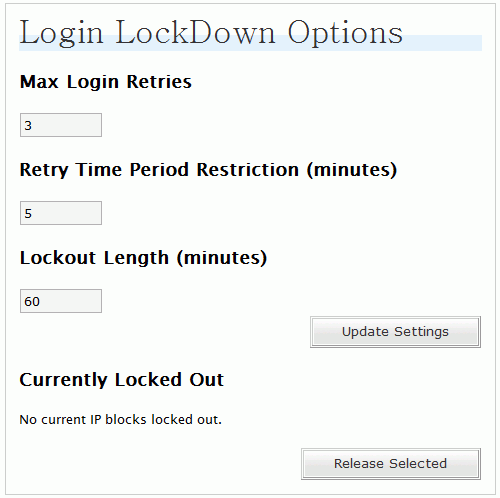
Installation of the plugin is a simple download, unzip, upload and activate. The plugin settings can be customized from the Options panel. Login LockDown defaults to a 1 hour lock out of an IP block after 3 failed login attempts within 5 minutes. You can change those setting to whatever you feel like. You can also manually release locked out IP ranges.
lockdown.png

The control panel also shows all the locked out IP addresses so you can see how many people tried to hack into your WordPress control panel. Overall, a very cool “working in the background” plugin that should provide an extra bit of security for your WordPress blog.

Download Login LockDown here

Did you enjoy this post? Get John Chow Dot Com updates via email...

Stay up to date with all of John Chow’s tips for making money online and blog posts by subscribing via email. Your email will be kept private and never shared with anyone.

{ 42 comments }

Jorge August 31, 2007 at 3:24 pm

Interesting plugin. Much needed I think. Thanks for the heads up sir. Now, can he solve the problem of splogs? :evil:

Steven August 31, 2007 at 4:14 pm

Well lets take this for a test drive…

Anraiki August 31, 2007 at 7:02 pm

Use “Captcha” and Use No-follow.

KingJacob August 31, 2007 at 7:29 pm

No dont use No-Follow, simply using akismet is enough.

Anraiki September 1, 2007 at 3:14 am

Well “nofollow” is an easy solution. Akismet is a differnt story if you don’t use wordpress.

Geedos September 2, 2007 at 4:37 am

Askimet’s great but recently (the last week) there’s been a few bits of spam getting through – more than ever before.

Wahlau.NET September 2, 2007 at 1:10 am

nice little plugin……wordpress.com should have them…i keep getting email from people trying to retreive my password

Terra Andersen August 31, 2007 at 3:30 pm

Great plugin! I wonder how many people have tried to hack into John Chow’s blog in the last few months? Gosh…

:mrgreen:

Geedos September 3, 2007 at 7:31 pm

If they haven’t, they will now – just for the challenge!

Jeff August 31, 2007 at 3:38 pm

Very cool plugin, will diffidently try it out, also there is another plugin that I have that tracks ip who logins in and if it is a new, different one it will email the admin and let them know a new ip just logged into the admin account. I do not have a link for it sorry.

MillionDollarJourney.com August 31, 2007 at 4:02 pm

I’m getting an SQl error when the plugin is activated. Anyone else getting this error?

Michael VanDeMar August 31, 2007 at 7:42 pm

John, thank you for letting people know about this. :)

MDJ, what error are you getting? Can you email me the text of the error, your PHP, MySQL, and Worpress versions please? Contact link is at the bottom of all pages on Bad Neighborhood, thanks. As far as I know no one else has reported any problems with it.

Michael VanDeMar September 1, 2007 at 2:23 pm

Ok, I just released version 1.1. Apparently I utilized a MySQL 4.1.1 function in the plugin, and WordPress only requires MySQL 4.0. My bad, I apologize. The new version is available for download now on the same download page. Anyone who was getting a MySQL error before would need to upgrade in order for the plugin to work. For all others, if it works now, no need to change anything, as the only change made with this release was to insure the compatibility with MySQL 4.0.

Thanks. :D

Geedos September 2, 2007 at 4:40 am

Fantastic! Not only a great plugin but a very well supported one by the looks of things. Great job.

100wordpressplugins.com August 31, 2007 at 4:06 pm

Interesting plugin. Will have to link to it from my own blog! Thanks for the tips.

Better Blogging with Michael Martine August 31, 2007 at 4:42 pm

Even in this day and age, so many female bloggers are harassed and attacked through their blogs it is truly sickening. Something like this has been much needed. Thanks for posting this, John.

Dave August 31, 2007 at 4:51 pm

Thanks mate. I will certainly check this one out for the extra security :D

KingJacob August 31, 2007 at 5:13 pm

I dont know if its the same plugin as the bad-neighborhood websites not working but ever since one of my other sites got hacked Ive been using a lock out plugin on all my blogs.

MyBlogCotest August 31, 2007 at 5:38 pm

Nice WordPress plugin!
Thanks~

YC August 31, 2007 at 6:06 pm

Thanks for posting this! Will be useful since I am getting suspicious.

MONEY BLUE BOOK August 31, 2007 at 6:19 pm

Geez…who would want to hack a peace loving site like mine? But I guess I should install this security device…can’t hurt!
– Raymond (MONEY BLUE BOOK)

Geedos September 3, 2007 at 7:41 pm

Yep definitely – don’t go tempting fate!

Liberty and New Creation August 31, 2007 at 6:27 pm

I’ve actually been looking for something like this.

Since we’re on security, is it simple to put the admin pages on ssl?

bpo August 31, 2007 at 7:19 pm

Will try this in my blog. Thanks, John!

Click Input August 31, 2007 at 11:07 pm

Do you know of many people attempting to hack your blog in this way John?

Max September 1, 2007 at 3:49 am

I think you don’t need to use this unless you are making passwords too easy to crack but I guess it’s useful… :wink:

Geedos September 2, 2007 at 4:49 am

Better safe than sorry – especially if your site tries to get hacked.

bweaver September 1, 2007 at 6:16 am

Interesting plugin, but how much of a need is there? Have you had problems with people trying to hack your login? Good passwords seem like a good preventative measure.

GnomeyNewt September 1, 2007 at 9:48 am

I think extra security on your blog never hurts. It doesn’t affect your load time either since it is backend. If I had as many visitors/eyes on my blog as J.Chow I’d plug that baby in instantly.

SEO Optimization September 1, 2007 at 11:44 am

Will definitively give it a try to this plugin. Prevent instead to cure

Word Hugger September 1, 2007 at 3:09 pm

Are there that many people actually try to randomly guess your wordpress login?

Jeremy Steele September 1, 2007 at 8:38 pm

I’m sure blogs like JohnChow or ProBlogger have that problem. Every once in a while I also see people randomly goto my login page (even though there is no link to it)

Chris Guthrie September 1, 2007 at 3:15 pm

Perhaps I’ll try that out after my blog gets a little larger and more likely to be attacked. A place like JohnChow.com could be a pretty big target.

GnomeyNewt September 1, 2007 at 6:12 pm

Thats how I feel. Not now, but maybe later. But now that I’ve said this maybe I should do it. Maybe we will be targets. :)

Hip Hop September 1, 2007 at 8:29 pm

Meh I don’t really use my wordpress login system that much

Jeremy Steele September 1, 2007 at 8:37 pm

That doesn’t mean someone else isn’t trying to use it.

will September 2, 2007 at 9:25 am

Nice… I will have to look into that myself.

Webmaster Money September 2, 2007 at 10:21 am

Security plugins are always good plugins.

Jeff September 2, 2007 at 5:21 pm

Anyone have a mirror? The site has been down for a couple days now for me.

ryonn September 2, 2007 at 10:46 pm

John,

I no longer can download this plugin :(
Could you please spare me one?

Kind regard,
Ron

Geedos September 3, 2007 at 7:42 pm

Any news on when the site will be back up? It’s a pity as everyone’s keen on here.

Michael VanDeMar September 4, 2007 at 7:49 am

Sorry everyone… I just had the worst hosting experience I have yet had the dis-pleasure to be a part of. The site is now live on it’s new host, and DNS has been propagating since late last night. If anyone cannot get to the new location and wants a copy of the plugin before they can, please let me know and I will email you a copy.