John Chow dot Com Free WordPress Installation - Start Your Blog Today!
 

My Blogging Station Setup

written by John Chow on June 20, 2008

Make Money!

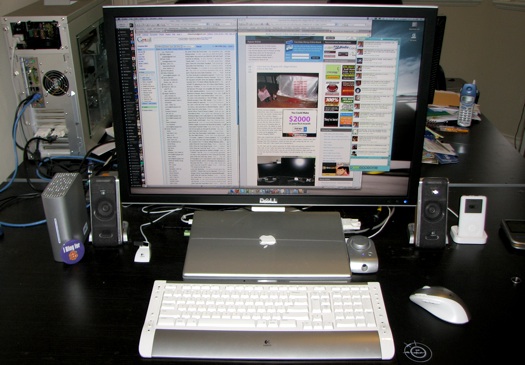
Here’s a look at my current blogging station. Ever since I posted about my new Dell 30″ LCD, I’ve been receiving emails asking to see the rest of the setup.

My current system is a lot different than my old system. Because I travel so much, I wanted a solution that would simplify my work flow. The problem with maintaining both a desktop and laptop is one is always out of date from a data standpoint. And if you forget to sync them before you head out on your trip, you may find some important files were left on the home comp. The video below shows how I got around that problem.

If you wish to create the same setup I use for blogging, expect to spend about $4,000 for it.

Did you enjoy this post? Get John Chow Dot Com updates via email...

Stay up to date with all of John Chow’s tips for making money online and blog posts by subscribing via email. Your email will be kept private and never shared with anyone.

{ 85 comments }

Mostly Lisa June 20, 2008 at 10:03 pm

shizza! that is a looooot of screen real-estate!
hmm. i see you use FF. think you can convince me to make the switch from Safari??? I dare you.
ps. where are all your flips? don’t they get a spot on your blogging station?

John Chow June 20, 2008 at 10:14 pm

How about, switch to Firefox because it’s better? OK, how about switch to Firefox and I’m sponsor you to Blog World? :twisted:

Flips are accessories and not part of the blogging station. I may do a post on all the accessories I run.

ViralKing Dot Com June 21, 2008 at 12:43 am

JC – I use a 42inch LCD TV as my monitor, plug my Mac in there, and use wireless keyboard and mouse from my desk.

When i travel, just disconnect the laptop and im off.

Abdul June 21, 2008 at 3:07 am

I need to get those things too!

Thiago Prado June 21, 2008 at 5:01 am

Firefox most of the time works better than the other ones. however when you have FF opened for a long time the memory used for it increase drastically at the point where you are forced to close it and re-open again.
They should have a process to release memory usage all the time you close the tabs.
I didn’t try FF 3 yet, maybe they have this feature.

Ajith Prasad Edassery June 22, 2008 at 12:24 am

As I keep making changes to my theme once in a while, I test my blog on IE, Firefox and Opera to make sure that the look and feel is consistent. I guess that would cover 90-95% of the audience?

One immediately visible problem that I had with FF3 was about the peal-away ad. It stopped working the way it should be on an FF3 beta, hope they have fixed the div/span issues there in.

Cheers,
Ajith
PS:- Good to see your blogging station (a new concept? like the rigs :smile: )

Chicken Say June 21, 2008 at 3:05 am

Well FF is way better than others…it has a lot of plugins make us easy to use… :razz: (even sponsor to Blog World :lol: )

Reed June 20, 2008 at 10:06 pm

Nice setup. I myself have a 2 monitor setup. I’d like to have a triple monitor setup but sadly my crappy dell doesn’t support it. I like what I’m seeing with your mac, especially what it can do with just one monitor… hmmmm, maybe its time to cross over to the other side :smile: .

Quintin Riis June 20, 2008 at 10:28 pm

Buy another video card?

Ryan June 21, 2008 at 10:26 am

I have a 2 monitor setup on my mac too. Moving windows from one screen to the other is a two step process so getting that much real estate would be awesome. I don’t need a laptop but when I do then that system would be the way to go. Nice to see you haven’t abandoned the Mac, John.

Not JohnChow June 23, 2008 at 3:27 am

I have a Toshiba Satellite laptop with a 250gb My Book. I would love to have the multiple monitor set up. I was thinking it would be nice to have extra monitors that are the same size as the laptop and would fit in my computer bag. Any body have any suggestions?

Quintin Riis June 20, 2008 at 10:27 pm

Good post John.

Dual monitors or a big monitor most definitely increases productivity. I’m using dual 22″ LCDs right now. I’ve got more graphics outputs available though, and more 22″ monitors, so I might add a third..

You can see a picture of my setup (and enter my 22″ monitor giveaway) at this entry on my website.

The monitors also both have dual inputs so I often have more than one machine connected. I also use the left display for full screen virtualization.

Oh, and I run Ubuntu on my main machine. :cool:

Quintin Riis June 20, 2008 at 10:48 pm

My friend Alex Halsey has this monitor and a 24″ Dell monitor in portrait mode. Also powered by a MacBook Pro.

Oh and the “spaces” thing or whatever it’s called… kind of lame. How many years did it take Apple to get that into OSX? :roll: Linux and Unix have had virtual desktops for years and years. And for Windows, there is VirtuaWin, a very useful tool that adds virtual desktops to Windows operating systems.

Ryan Ray June 20, 2008 at 10:54 pm

I thought about using this sort of setup with my MBP, but have decided to trade in for an iMac. From there I am thinking about getting an Macbook Air or if they FINALLY redesign the Macbooks with aluminum I’ll get one of those.

Still this is a nice setup, I love my Macbook Pro. It’ll be hard to part ways with it

Pasquale June 20, 2008 at 11:49 pm

Data sync? uhh that’s why they invented dropbox. http://dropbox.com
;)

hard and soft June 21, 2008 at 12:17 am

Quite inpresive blogging station :smile:

Ronald Su June 21, 2008 at 1:23 am

Nice setup you have there. So you have completed switched from Windows to Mac.

I am trying to do the same, but it’s not that easy since a lot of things I do on PC, I can’t do it on the Mac. For example, RMVB video converting. PC just does that better.

kathi June 21, 2008 at 3:04 am

A very big monitor :shock:

A very big blogging station that you have :)

Abdul June 21, 2008 at 3:10 am

How much of that stuff have you gotten for free?!

Noobpreneur June 21, 2008 at 3:14 am

John,

I want that workstation. But wait… perhaps I need to have $30,000 per month first? :D

Douglas Karr June 21, 2008 at 4:15 am

I’m similar, a MacBookPro 17, but my monitor is only a 22. Love the 30! I also travel with a 250Gb Passport drive – it comes in very handy as an interim backup before I get home. At home I have a BuffaloTech drive off of my network router.

Too cool, John! Thanks for sharing.

John Sullivan June 22, 2008 at 3:59 am

Doug thanks for all the stuff I learn from YOU ;)

tina June 21, 2008 at 5:18 am

hello ¡¡ you are very good equiped , i hope one day , have such a good equipe , and spend more time blogging . i’m a brand new site , here i am : http://thefunnypage.blogspot.com , i have just started one mounth ago , and like you see , i don’t have too much success , my blog is a spansih one , i live and work there . I am a financial consultant , and my idea to have a funny page for joking and laughing , born as a joke . I spent too much time en internet , and that seemed to me a good idea, I like joking , and I have such a kind of work that there is nothing to laugh there … I ‘d would like to have more readers , because laughing ,, i think is a good think and we all need that … I also read your free e-book . impresive ¡¡¡ so , congratulations for your blog , that encourage me in some way to keep blogging .. thank you for that ¡¡

tyna June 21, 2008 at 5:24 am

I going to switch to Mac this summer,it is easier to work with especially if you are are manipulating photos with photo softwares.
btw all the pros use it.

Tom June 22, 2008 at 2:53 pm

I thought that years ago and I went out and bought a top of the line Aluminum Powerbook. Then I went out to Silicon Valley to do some contracting work (around 2005) and realized that the graphic designers were the only one using mac books. There are a few good developers that stick to the mac , but I prefer the T series thinkpads. They are build w/ data integrity, security and portability in mind. Plus, I got sick of waiting for all the cool things to hit the mac platform.

John Chow June 22, 2008 at 3:01 pm

Well, it’s 2008 and there’s nothing a Macbook Pro can’t do that a T series can. And that includes running Windows. :twisted:

Tom June 22, 2008 at 3:07 pm

I wont start that debate… I was speaking more to the hardware: The Shock Mounted Hard Drive, Magnesium Alloy Frame, metal hinges, the security chip, finger print reader, thinkvantage recovery etc. Besides, why buy a mac book to run windows? Parallels sucks and dual booting is a pain in the ass to manage when it comes to file sharing and what you should install where.

Tom Sawyer June 22, 2008 at 3:13 pm

Not to be overly picky, but you are probably talking about a MacBook Pro (MBP), right? I agree with you though about using a Mac in 2008. A MBP does have a drive that stops spinning when it senses it is falling. I’m not sure about the frame, but I’m not taking mine into combat :smile: I also had some experience with a stand-alone fingerprint reader – I will just use a strong password.

Tom June 22, 2008 at 3:18 pm

Guess my only point is that all of the “professionals” aren’t using macs. Or MBP’s for that matter.

Tom Sawyer June 22, 2008 at 3:22 pm

I agree 100%. I still use a dual-monitor PC as well as a MBP and iMac. I honestly think both systems have their strong points.

John Chow June 22, 2008 at 3:26 pm

Depends on the profession. When I’m at the media room at Ad Tech, 50% of the notebooks were Mac. When I’m at a blogging conference, that number goes to 80%.

A Macbook Pro is made for creative professionals. It has things that cater to that. Like a dual link DVI and Firewire 800.

Fingerprint readers are pretty easy bypass.

Tom June 22, 2008 at 3:57 pm

I think a lot of people are enamored by their idols and they think that by purchasing the equipment that they have, they will magically attain the same level of professionalism. I was just trying to dispel that myth.

I agree with Tom Sawyer… both have their ups and downs. Yes, dual DVI and Firewire 800 are nice. They aren’t going to make you a super affiliate, a pro blogger, a developer or a designer though. Switching to a mac will not raise your level of professionalism instantly. In fact, you will be set back while you adapt to the learning curve.

ChrisBlogging.com June 21, 2008 at 6:27 am

Love the setup, John. Im running a 19 inch monitor, and dont think I could handle something that big! But obviously it works well for you. Thanks for the inside look.

tomegun June 21, 2008 at 7:40 am

John, I love the mac – I have a 15″ MBP and a 20″ iMac. Two questions:

1. Does FF have something that allows you to group a set of web pages together like Safari does on the toolbar?
2. Do you plan on getting MobilMe with the ability to change things on an iPhone, Mac or PC and have the change be reflected across all devices?

John Chow June 22, 2008 at 12:30 am

1 – I’m sure there is a plugin for that
2 – No, I don’t plan to get MobileMe.

Tom June 22, 2008 at 4:18 pm

Firefox has a toolbar folder under bookmarks. You can create a subfolder and throw your websites into that. That would allow you to have a dropdown of several sites under one category.

Tom Sawyer June 21, 2008 at 7:47 am

John, what version of FF are you using? I downloaded version 3 the other day, but I’m still not totally in love with it.

John Chow June 22, 2008 at 12:31 am

I’ve been using FF3 for quite a while. I was using the RC before the final came out. I love the gesture feature that allows me to use my Macbook Pro trackpad to move forward and back on pages.

EverythingAboutFacebook June 21, 2008 at 7:51 am

I am using 22″ LCD and I thought it is big enough, well seems that you have a bigger than mine. I thought of getting Macbook but the specs are not sufficient for my needs.

Tom Sawyer June 21, 2008 at 8:48 am

When you say the specs are not sufficient what do you mean? What are you doing on your computer that you think you can’t accomplish with a mac? What specs does your PC have?

juler June 21, 2008 at 8:17 am

That was is really great… but i can’t afford that much for the time being. Maybe someday (that’s the day i beat you in the competition! lol!) i will do greater than that…

Collin - Feed Flare June 21, 2008 at 8:19 am

FireFox is the only one to use, IE, well don’t get me started on that piece of **** but no matter how hard I try and can’t get my GL to make the switch.

Andrew Scotchmer June 21, 2008 at 8:34 am

Wow, got to get myself one of those monitors. I use a laptop all the time and plug in a tiny (in comparison) 19″ LCD with wireless keyboard.

I didn’t know Mac’s have virtual desktops. I use Ubuntu and have five desktops which I switch between all the time just to free up real estate. Couldn’t live without them. Single desktops are just sooo unproductive.

Make Money Talks June 21, 2008 at 11:51 am

That’s nice station John! :grin:

Hip Hop June 21, 2008 at 12:43 pm

Your system looks great. Dell is the best :)

Germz June 21, 2008 at 1:09 pm

Holy!
I want to be just like you when I grow up lmao.

Geiger June 21, 2008 at 1:18 pm

No links to buy via the TTZ Network? :o John. I’m disappointed!

Lyndon June 21, 2008 at 1:21 pm

Sweet setup! Definitely gives me some ideas, when I get my new system.

broalex dot info June 21, 2008 at 1:40 pm

I only have a 20 inch” monitor for now. But I will think about getting a bigger one , working on 20 different firefox windows is definitely a challenge for all webmasters or bloggers. And I would prefer a macbook air , is way more light than the macbook pro. (I don`t travel as much as John Does). The question is how is that 30 inch monitor , isn`t it a bit too big? I bet it`s great ! :)

Go2Wellington June 21, 2008 at 2:14 pm

John, what a cool nice workstation you have! It is definitely more productive to have more screen real estate. :wink:

EyeSoft June 21, 2008 at 2:16 pm

wow…you have a great Blogging Station :shock:

Mr. Javo June 21, 2008 at 3:06 pm

Very nice, I have a very similar keyboard/mouse…

AppleNewsTree June 21, 2008 at 4:30 pm

Vary nice thanks for sharing! :grin:

Balend N June 21, 2008 at 4:34 pm

If you want to keep all your files synced, sign up for Live Mesh. It keeps your files in sync on all devices installed and you can access them through a web interface. Right now its only for Windows, but it’s coming out on both Macs and Mobile Phones.

DAILYMACHO! June 21, 2008 at 4:50 pm

John, I know this is totally unrelated to this post but I was just wondering have you ever graduated from college? If not, what’s you opinion on school and academic education? Does anybody know?

John Chow June 21, 2008 at 5:12 pm

Yes I have a college education.

Brooks Van Norman June 21, 2008 at 4:58 pm

Nice set up you’ve got there JC! You’re fist post inspired me to order a monitor for the laptop I’ve been using. I couldn’t justify the cost of the 30″ you’re rollin…but I did order a 22″ Dell Ultrasharp for $299 and shipping was free…I couldn’t pass it up.
Thanks for sharing. I didn’t know you were a Mac user.

$ Secret Money Blog $ June 21, 2008 at 7:08 pm

Thats just my dream PC..!! :!:

Jeffrey June 21, 2008 at 9:07 pm

Nice blogging Station Setup!!!
Wishing to have this someday!

Eric D June 21, 2008 at 11:12 pm

Very nice setup. As I get older I think a larger monitor would be good for me. I am just in age denial at the current time. I have my standard HP pc that I use for all my web, graphic and blog work. I have a laptop beside me that I use to check what I am doing. I always view my webwork in both FF and MS and recently have been looking at my sites on my Motorola Q phone. I am starting to develop seperate parts of my sites just for smart phones….. whole different set of design rules there. HHHMMMMM maybe that is a topic for future postings at NoviceSEO. Anyway thanks for the insight on what the “master” uses……………..cheers………..eric

Manpreet Singh June 22, 2008 at 3:09 am

Nice setup…their actually amazing..JC rocks! :mrgreen:

John Sullivan June 22, 2008 at 3:58 am

That’s a long way from my Packard Bell 486×33 with the screaming 2400 baud fired up
when I bought a 8 meg chip for 200 cash
kicked it up to 14.4 and had the first copy of win 95
I was KING;)

super blogger June 22, 2008 at 7:53 am

Can’t afford to ger system like yours..
But I hope to earn more money this months to replace some of my equipment..

Dena June 22, 2008 at 8:09 am

That’s awesome. Hopefully one of these days I will be able to upgrade to a better system.

Andy T June 22, 2008 at 10:43 am

I also think of using one system [notebook]. Instead of having desktop [online with firewall -prepared to lost by virus attack], notebook [site report], my mobile [email], and company accounting on another PC.
Very nice setup for a blogger.

Tom June 22, 2008 at 2:49 pm

That is an old school iPod you got there :) . You’ve inspired me to do a post on my “lab”.

investing in stocks June 22, 2008 at 4:16 pm

What are some of the specs of the machines? Do you like your current setup, or what would you ultimately want to have?

John Chow June 22, 2008 at 5:57 pm

The Macbook Pro has an Intel 2.4GHz dual core CPU, 4GB of RAM, 200GB hard drive, NVIDIA Geforce 8600 video card with 256MB of RAM, 15.4″ LED backlit screen, aluminum frame. At 5.4lbs, it’s the lightest 15″ notebook in the world. If they can put all this into a 13″ notebook, it would be perfect.

Affiliate Confession June 22, 2008 at 7:40 pm

Nice setup! When you make $30,000 on your blog per month, you can afford a system like this just to blog.

jatt June 22, 2008 at 8:06 pm

John! You should be thankful to GOD for the comfortness. I just posting my blog using my office desktop. It’s FOC. I had only an old pc on my own which i bought 4 years ago. It was pentium 4, 256RAM, ATI graphic,2.6 processors and a CRT 15″ monitor.

I hope i can make money as much as you are now to buy a new one. Not just pc, but more needs. Wish me luck John!
What’s up
Awsome Photo Blog

jatt June 22, 2008 at 8:18 pm

nice place John.I wish i had one. Now i am posting my blog from office. I had one pc which i bought 4 years ago, and it was far beyond pitiful compared to yours.

dani June 22, 2008 at 9:08 pm

I’ve got the MacBook Pro too. I love it.

Hollywood Encountered June 23, 2008 at 1:35 am

That setup looks insane, but great at the same time.

How come the video doesn’t work anymore?

Brooks Van Norman June 23, 2008 at 11:21 am

Can anyone recommend a good home theater set up or system? My old Panasonic system has finally died. I don’t need a tv – just the speakers and sound. I’ve been looking at the BOSE 3-2-1 system with some interest…any suggestions????

Tom Sawyer June 23, 2008 at 11:26 am

This comment isn’t really relevant to this site, but I would stay away from Bose. I think Bose is heavy on style and light on sound. Also, you should consider if size is an issue for you. There are sooo many good speakers out there and the lesser known brands might actually be the better sounding speakers. If you live in a city with a home stereo store, go in and pick their brains. You never know what you might find out.

Tom Sawyer June 23, 2008 at 11:32 am

Oh, if you are also talking about a receiver, I would suggest Denon. I personally have Onkyo, but that is because it is hard to justify replacing a receiver that is only one year old and working perfectly. Do you want to know a key component to your home theater? Buy the Logitech Harmony One remote. It works great and now I only have to worry about what I want to do – play Xbox, watch DVD, etc. – instead of making sure every component is setup right.

Peter Kalinauckas June 23, 2008 at 11:37 am

haha wow i love your setup its something im going to have to save up for!

Brooks Van Norman June 23, 2008 at 11:49 am

Very cool – thanks Tom. I’ve decided to go with IN WALL speakers too and am looking at the NXG speaker line. Apparently they are pretty good. What do you think about Pioneer receivers?

Tom Sawyer June 23, 2008 at 12:03 pm

Brooks, hold on! Make sure you put some baffles or whatever you call them behind those in-wall speakers unless they are on an exterior wall. I have in-wall speakers in my house and if this was a long-term residence, I would change some things up. The family room wall just so happens to be the master bedroom wall on the other side. With just the speakers in the wall, sound can be heard in the bedroom when the system is turned up.
It is funny, I like Pioneer for car stereos and don’t mess with them in the house. Sony is opposite, but the same. I would think Pioneer makes some decent stuff though. If budget allows, I would go with Denon, then Onkyo and finally Sony. I think Sony may offer the most HDMI inputs for the money right now.

kk June 23, 2008 at 11:33 pm

HI!
Sir ! your blogworkstation is good ,and i think before seeing this post u will post through laptop when u r in/on? tours but now iwas wrong,actually i like dell laptop bcz i have seen it first @ my professors blessing(teaching) hands and many also told dell gives best fit to the price we invested .

Regards’
kk
India
‘mobile secret codes in india’
http://cellphonebiz.blogspot.com

Eric Pena June 24, 2008 at 3:38 am

Hi, nice setup you have especially with the huge monitor.

I also have a MBP 15″ connected to a 19″ LCD monitor. However, what I like most is my PC that I turned into a Hackintosh. It dual boots Vista and Leopard 10.5.3. So I can easily run something on Windows or OS X without activating Parallels on my MBP and eat a lot of precious resources. Check my blog if you need to create your own Hackintosh–easily! :mrgreen:

http://menoob.com

Forumistan June 24, 2008 at 7:20 am

You are lucky. And your system is great…

12 Year Old Blogger June 24, 2008 at 11:57 am

Man you are so lucky your office looks great cant wait till i own my office one day too :wink:

Austin June 24, 2008 at 9:53 pm

My mom thought the 20 inch CRT I got was big as far as screen area. I wish I could have a nice thin and bigger monitor like this.
4000 is over my budged though, care to donate? ha ha

Start Blogging June 29, 2008 at 8:34 am

So… pretty… must…. have! :drools: