John Chow dot Com Online Investment Review - Make Money Online Investing in Businesses
 

Protecting WordPress with VaultPress

written by John Chow on February 16, 2011

Make money with YouTube

Backup and disaster protection is something that most bloggers don’t do enough of it. They think it will never happen to them. However, we all know better. Disaster happens and it’s something you should prepare for. This is especially true if your blog makes money. There are many ways to backup and protect your WordPress blog and I’ve tried most of them. Out of all of them, the best solution by far is VaultPress.

Made By The Makers of WordPress

Why is VaultPress the ultimate WordPress protection tool? For one, it’s made by the makers of WordPress. Who better understand the needs of WordPress than WordPress itself? VaultPress does more than just backup a copy of your WordPress database. It backs up your entire blog. This means your plugins, dashboard, themes, comments, and post revisions are all safeguarded and ready to be restored. Backups are saved to the Automattic grid (over 1,200 servers in three data centers) that serves over 16 million WordPress.com blogs and 270 million monthly visitors.
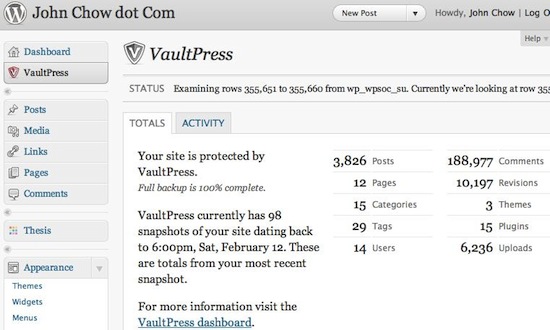

VaultPress

As you would expect from WordPress, setting up VaultPress is super easy. Simply install the VaultPress plugin and you’re pretty much ready to go. VaultPress works in the background and will give you peace of mind knowing that your blog has the best protection available. Unlike other backup tools that use a schedule backup, VaultPress is always working. Whenever I write a new blog post or a reader writes a new comment, VaultPress will back it up on the fly. There is a real-time status display that shows what VaultPress is doing at all times.

The Bad News – It’s Not Free

VaultPress is a WordPress premium service. Currently, there are two plans available: Basic and Premium. They cost $15 a month and $40 a month respectively. The only difference between the plans is the premium plan has security monitoring, which scans your files every night for potential threats or exploits.

If your blog makes no money, playing for a backup service, no matter how good, can be hard to justify. However, if you have a money-making blog, paying $15 or $40 a month is cheap insurance. The price includes a concierge service. The concierge can assist you with initial setup, restoring your files, and any needs in between.

More Bad News – Even If You Want To Pay, You Still May Not Get It

VaultPress is in beta right now and open only to approved beta testers. Even if you want to pay for the service, you can’t. You need to apply for a “Golden Ticket.” If VaultPress thinks you are worthy, they will give you the privilege to pay them. If they deem you not worthy, then you’ll have to wait until VaultPress comes out of beta, at which time, the price will go up to $20 and $50 per month. Only WordPress and Apple can get away with this kind of pricing scheme!

I’m not going to get into a debate over charging bloggers to be beta testers (if you want to get into it in the comments, go for it). If VaultPress can get away with it, I say more power to them. What I can tell you is VaultPress is an extremely powerful backup solution, the best I’ve used. If you really care about protecting your WordPress blog from disaster, then good luck getting your Golden Ticket.

Did you enjoy this post? Get John Chow Dot Com updates via email...

Stay up to date with all of John Chow’s tips for making money online and blog posts by subscribing via email. Your email will be kept private and never shared with anyone.

{ 108 comments }

Jordy February 16, 2011 at 9:52 pm

I got hacked once about two years ago. It was a nightmare for a couple of days. I literally lost about two thirds of my traffic when the spammy links were injected. The thing about it though is the links were put in all of my blogs and forums I was hosting through Godaddy.

My computer specialist that fixed the mess said that the hackers accessed everything through Godaddy.

I wonder if Vaultpress could protect against that happening again.

Since the incident, I regularly backup my blogs.

ZK @ Web Marketing Blog February 17, 2011 at 2:06 am

John had terrible experince with godaddy.

For hosting John always recommend hostgator.

Kirk Taylor February 17, 2011 at 4:48 am

GoDaddy’s hosting is far from the best, but John’s experience with GoDaddy was a domain name issue and not a hosting or backup issue. You’re comparing apples to oranges.

Penny Bid Auction Sites February 17, 2011 at 12:30 pm

I’ve heard some pretty nightmarish stories about GoDaddy too. I’d never host with them.

Email List Building February 18, 2011 at 11:04 am

I heard from several people warning me about them saying they can do evil things to you. They didn’t go into details but I’m glad I stayed away.

Abhik February 18, 2011 at 8:59 pm

That’s a wise decision. I was with GoDaddy and I got hacked twice.

opp February 17, 2011 at 8:44 pm

They both fruits…lol

ikki February 17, 2011 at 4:39 pm

:O, dreamhost is a good option

Abhik February 18, 2011 at 9:00 pm

lol!!! I have terrible experience with them also.
Their support sucks.

Penny Bid Auction Sites February 19, 2011 at 4:50 am

I would never recommend DreamHost. Dream Host is a nightmare, although they haven’t had any major meltdowns in over a year or so.

Hidden Object Games February 17, 2011 at 6:49 pm

Yea,

Im also using Hostgator and its the best

They are serving me for 3 years now and i have never had problems

No downtime what so ever

I love Hostgator

Abhik February 18, 2011 at 9:02 pm

Hostgator uses The Planet’s datacenters and they are the big player in the industry.

Penny Bid Auction Sites February 19, 2011 at 4:45 am

I thought John was hosting with Bluehost?

John Chow February 19, 2011 at 11:37 pm

No, I am hosted by HostGator. I was never with Bluehost. It was Bluefur.

Neon SRT4 February 17, 2011 at 3:20 am

I was also got hacked one of my blog once, and they have done sql injection to my blog. But later, with the help of some softwares, i have remove the hacked thing out of my computer.

Penny Bid Auction Sites February 17, 2011 at 12:31 pm

SQL injection seems to be the hackers tool. it is a nightmare to fix.

ikki February 17, 2011 at 4:40 pm

im agree with you

Hidden Object Games February 17, 2011 at 6:47 pm

SQL injections and Shell are the two most preferred methods used by hackers

Penny Bid Auction Sites February 19, 2011 at 4:48 am

It’s amazing that people have time to think up things like this. I wonder if getting backlinks to your Viagra site via sql injection really is a benefit.

Abhik February 18, 2011 at 9:03 pm

You know.. there’s a plugin which examine the files and databases for exploits.. Use that and be stay safe.

Penny Bid Auction Sites February 19, 2011 at 2:40 pm

I’ve used the find exploit, or something like that, plug in. It’s def worth having.

Penny Bid Auction Sites February 17, 2011 at 12:29 pm

It’s amazing how many time Wordpress blogs have been hacked. I’ve been a victim on several of my blogs.

Abhik February 18, 2011 at 8:52 am

Me too.. I was on an out dated version of wordpress.

Abhik February 18, 2011 at 7:56 am

GoDaddy is one of the least secured webhost i have seen so far.
My blogs also go hacked while I was with them.

Beard Trimmer March 13, 2011 at 5:57 pm

i guess you didnt use that extra paying security features at go daddy?

but hostgator should be better choice anyway

Dino Vedo February 16, 2011 at 10:04 pm

Looks good, need to protect my million dollar business. :)

ZK @ Web Marketing Blog February 17, 2011 at 2:07 am

so which options or service you were using ?

ikki February 17, 2011 at 4:41 pm

i use hosting 24

PPC Ian February 17, 2011 at 10:09 am

Dino,
What security measures do you currently have in place?
Best,
Ian

Hidden Object Games February 17, 2011 at 11:00 pm

Million dollar business ?

You should get it asap

PPC Ian February 18, 2011 at 8:26 am

That’s fore sure. With a million dollar business, the price of VaultPress would make no difference. Also, with a large business you’re more likely to get accepted into the beta.

Laxman Kasula February 16, 2011 at 11:04 pm

Thanx for sharing…
The bad news and more bad news really made me upset…..

Neon SRT4 February 17, 2011 at 3:19 am

What is the bad news which you heard?

Hidden Object Games February 17, 2011 at 11:01 pm

You should read the post before commenting

Its there written in BOLD letters

PPC Ian February 18, 2011 at 8:28 am

Maybe the bad news is the price? ;-) agreed that this commentator needs to read the post first!

Abhik February 18, 2011 at 9:05 pm

lol!!! have you read that post at all? Or, just the sub headings?

Jagan Mangat February 16, 2011 at 11:47 pm

Amazing,i heard a lot about vaultpress.
Its a bit costly for a normal guy like me.But will try it as a trial if available.

ZK @ Web Marketing Blog February 17, 2011 at 2:09 am

simply invest your money in blog at the beginning stage.

Once this will be settled you will get your reward.

PPC Ian February 17, 2011 at 10:07 am

That is true. There really are no shortcuts. Creating a successful blog requires some kind of investment. Doesn’t have to be huge, but certain things like hosting and protection are must-haves.

Penny Bid Auction Sites February 17, 2011 at 12:32 pm

It is a bit costly, but is probably worth it for a blog that makes $40,000 a month or more.

Hidden Object Games February 17, 2011 at 11:03 pm

Well there are not many people like John and these people should be considered as the main customers not people like John.

Penny Bid Auction Sites February 19, 2011 at 2:42 pm

I didn’t say they shouldn’t be considered.

Abhik February 18, 2011 at 9:11 pm

Yeah!! It is costly.
When compared to those free plugis which do the same thing for you.

Hidden Object Games February 17, 2011 at 11:04 pm

Well i never heard about Vaultpress

This is the first time im reading it about and it looks good but as you said its a bit costly for most of the bloggers

Email List Building February 17, 2011 at 12:00 am

Hey John,

Vault Press sounds good and it’s very tempting. I think that if they are so picky about whom to let in perhaps I don’t need to rush in. Since they are sill in Beta they may have to iron out some things.

It’s good to know about the service and I may consider it at a future date. Thanks for the info.

Spy On Any Cell Phone February 18, 2011 at 7:11 am

I agree that sometimes it’s best to wait until the Beta has run it’s course. This however is a great idea and I also may look into it in the future.

Russell Davison February 17, 2011 at 1:02 am

I currently keep a copy of my css, htm, image files in the same structure as the site on a USB key and at a few virtual drives. However the VaultPress maybe a better alternative.

ZK @ Web Marketing Blog February 17, 2011 at 2:11 am

such kind of back up is really hectic task and also increase your to do list.

PPC Ian February 17, 2011 at 10:06 am

That is a really good point, ZK. VaultPress could be a big time saver! ZK, do you use VaultPress?

Neon SRT4 February 17, 2011 at 3:17 am

Yes, keeping a copy on usb key is not much safe.

ZK @ Web Marketing Blog February 17, 2011 at 5:20 am

not only safe concern but however this one will increase your task as well.

I would recommend to have auto kind of saving.

Abhik February 18, 2011 at 9:17 pm

You can also use a online backup service. Most of them have a solution for wordpress too.

Nettgründer February 17, 2011 at 1:50 am

Is this service for a single site or multi site?

John Chow February 17, 2011 at 9:22 am

The price is for a single site. You pay double for 2 sites, triple for 3, etc.

Penny Bid Auction Sites February 17, 2011 at 12:32 pm

Didn’t know this was the per site price.

Neon SRT4 February 17, 2011 at 3:16 am

This is Pretty Good Protection. I have seen this lately.

PPC Ian February 17, 2011 at 10:05 am

Yeah, it definitely seems like great protection. I guess it just comes down now to justifying the price! :-)

Email List Building February 18, 2011 at 11:15 am

It does sound good but I don’t understand why they are so restrictive about accepting people. Another thing is that it’s still in Beta version.

When it comes to justifying the cost of the service I think it’s the easy part once you decide the service is what you really must have.

Having lived without it until now I think I can wait for a while yet. For those with a million dollar business I don’t see that there’s anything to think about.

Perhaps they’ll wait for the non Beta version though. Paying a little bit more won’t matter to them and they won’ have to deal with the bugs Beta versions tend to have.

xbox kinect February 17, 2011 at 3:20 am

i dont wnna loose every bit of work that i have done. i definitely want a backup for all my work. vault press sounds interesting to me… but it’s a bit costly for a comman man.
thanks for sharing…

PPC Ian February 17, 2011 at 10:10 am

I agree it’s really important. I just wish the price were a bit cheaper. You’d think that they could make more total dollar margin by charging a cheaper price and attracting more customers.

Email List Building February 17, 2011 at 10:46 am

I totally agree with you on this Ian.

It looks like they are going in the opposite direction though, restricting the amount of users. And from what John wrote they intend to hike the price instead of lowering it with time.

Alex Neill February 17, 2011 at 3:21 am

Thanks John, never heard of this, certainly looks like a wise investment for bloggers.

Alex

Hidden Object Games February 17, 2011 at 11:06 pm

Its surely is for the lazy bloggers

Penny Bid Auction Sites February 19, 2011 at 2:43 pm

What do you mean it’s for the lazy bloggers? Making things easy doesn’t mean someone is lazy.

Email List Building February 22, 2011 at 3:12 pm

I also don’t understand that comment at all. Making things easier is a smart thing to do.

Protecting your investment is also smart. What is lazy is making a comment that does’t make any sense and that consists of 7 words of which one is a definite article.

It is lazy is to not think clearly before commenting like that.

Make Money Online February 17, 2011 at 4:22 am

This sounds like a great service, though I will not concider using it untill I have a big website. I suppose I will have to do my own backups for a while longer. Though if it was free I wouldn’t even hesitate on getting it.

//Alexander.

ZK @ Web Marketing Blog February 17, 2011 at 5:22 am

Yes I think they should offer free version for those people who have one or two blogs.

Matt Ringstad February 17, 2011 at 6:53 am

I agree. A free version is a logical choice for those of us that don’t have high traffic numbers or only have one or two blogs. I can see them having a limit on the backup file size and bandwidth with a free version.

Neon SRT4 February 17, 2011 at 9:15 am

Yes, man. Free Offers get More Customers.

Penny Bid Auction Sites February 19, 2011 at 2:44 pm

A free, but scaled down version would be a great idea.

fas February 17, 2011 at 6:10 am

So when did you start using it, its been around for atleast 3 months now.

Fat Tony February 17, 2011 at 7:28 am

It doesn’t aim at offering any protection, but for backup and disaster recovery purposes you can use WP-DBManager for free.

Josh - ProfitBlog.com February 17, 2011 at 8:02 am

Just signed up, looking forward to trying this out.

Make Money Online February 17, 2011 at 2:07 pm

Don’t forget to say how it works, I’m a bit curious. I wonder why we need this service when creating backups has never been a problem before. =/

//Alexander.

John Chow February 18, 2011 at 11:16 am

The cool thing about Vaultpress is it’s fully automated. It’s a “set it and forget it” kind deal. Also, I like the idea of keeping my backups on a grid of 1,200 servers spread across three data centers. :)

Abhik February 18, 2011 at 9:19 pm

That doesn’t mean that you will have 1,200 copies of your backup :p

Have you tried iDrive?

Get Rich Like Gates February 17, 2011 at 8:16 am

I had never heard of VaultPress.Ii need to look into it. Thanks.

Abhik February 18, 2011 at 9:21 pm

You can try it if you have budget to spend on backups.

PPC Ian February 17, 2011 at 10:03 am

John, thanks for sharing. This seems a little pricey. I believe with my HostGator VPS hosting that they’re already doing offsite backups each day. Moreover, I do my own backups each day. However, you can never be too careful and this is something I may end up doing anyway.

PPC Ian February 17, 2011 at 10:05 am

John, do you use VaultPress? Do you think this is something that makes sense even if you’re already doing your own backups?

John Chow February 17, 2011 at 10:51 am

Yes I use VaultPress. For me, this is very inexpensive insurance against a possible disaster. I like the on the fly backup to ensure that there is always a backup of my latest stuff. Or I can restore from any of the snapshots.

Make Money Online February 17, 2011 at 2:09 pm

Sounds like it’s just an easier and more advanced way of doing regular backups. I wonder if there is any difference in doing a backup with vaultpress compared to just an ordinary backup. Don’t they restore the same things?

//Alexander.

Hidden Object Games February 17, 2011 at 6:44 pm

Its nice too see that you are using it

John, how often are they making a backup of your blog ?

Is it daily or hourly or what ?

John Chow February 18, 2011 at 11:18 am

It makes a backup whenever something new happens to it, like you making a comment. When the plugin detects it, it send a backup of the comment to VaultPress. It’s always working.

Vincent Polisi March 9, 2011 at 4:49 pm

John:

Are you saying that it is actually doing real time incremental backups like R1Soft or moment in time snapshots at set intervals?

Real time incremental backups would justify the price without question because you would never lose a post, modifications, or comments.

PPC Ian February 18, 2011 at 8:31 am

Thanks John, that is good to know and definitely makes me consider this even more seriously!
All the best,
Ian

puanthanh February 17, 2011 at 3:29 pm

Just run a parallel blog at localhost

Abhik February 18, 2011 at 8:55 am

Is that easier than backing up your blog automatically?

Fabrizio Van Marciano February 17, 2011 at 3:29 pm

Looks like the real deal John will certainly be checking it out as I know too well what its like to think it will never happen and it did last week, I lost it all for a day luckily I was able to recover, so thanks once again for sharing.

Eleazar February 17, 2011 at 4:54 pm

GoDaddy is an easy prey to hackers that creating sql injection in all of my blogs hosting in GoDaddy. I have no recourse but to transfer to another host. I’m now in hostmonster. And I’m glad I did, for my traffic increase to 50%.

ikki February 17, 2011 at 5:56 pm

nice tip to add security in a blog

Make Money Online February 17, 2011 at 6:29 pm

too bad it’s not free but i think i will have no choice getting some security for my blog.

Abhik February 18, 2011 at 8:53 am

You can always use plugins which are free..

Abhik February 18, 2011 at 7:42 am

Well, it’s waste of money IMO. Paying for a backup service isn’t on my list.
I am sure other free online backup plugins will evolve themselves to the same line as voltpress.

John Chow February 18, 2011 at 11:20 am

It’s pretty hard to offer a grid of 1,200 servers across three data centers when you’re stuff is free. You do get what you pay for.

Bash Bosh February 18, 2011 at 3:39 pm

I honestly think this is a waste of money. Simply because you can do all of that by backing up your whole website on Amazon S3 servers and save 10x more money. I do not think they have a better and more reliable servers than Amazon anyway.

Why to pay $15.00 when I can backup all my blogs on Amazon S3 for only $2.00 per month?

TYCP Magazine February 18, 2011 at 4:11 pm

You say that you don’t THINK they have better/more reliable servers than Amazon S3 – you can’t really compare unless you’ve used BOTH of them & can back the comment up with facts. I haven’t tried Amazon S3 or Vaultpress, so I can’t say which one is actually better.

John Chow February 18, 2011 at 5:32 pm

Before VaultPress, I use S3 and a plugin call Automatic WordPress backup. I thought it was a good solution until I tried to make a backup from it. The backups the plugin saved to Amazon were not the latest. Its schedule backup was hit and miss. Sometimes it backed up once per day, sometime it would go days without doing anything. The plugin also tried to install a link into my footer

Bash Bosh February 19, 2011 at 8:22 am

I know about that problem… but backup works perfectly with plugin called BackWPup. I have no such problems with this one.

Email List Building February 20, 2011 at 11:49 am

John,

Thanks for sharing this because I was considering using S3 and the plug in knowing you were using it. It just shows that things never stay the same and that there are always better solutions coming up.

You seem to be on the cutting edge. A good reason to read your blog attentively, including the comments which sometimes have great information in tem like this one.

ibnujusup February 20, 2011 at 7:08 am

why should wordpress charge that features… they should make it free…they had make a lot of money :-) better stay with the normal backup plugin then…

Make Money Online February 20, 2011 at 11:59 am

Backups are like insurance. You hate to pay for it until you really need it! Whether you use VaultPress, or another, backup your blog before something unexpected happens. As John said, you get what you pay for, so be aware! ;)

Allen Walker February 21, 2011 at 1:41 pm

You should be careful of backup solutions that are Wordpress plugins.

The best and safest way to backup your Wordpress blog is with a script that run externally…

Chester Web Design February 21, 2011 at 2:29 pm

I use hostgator and so far so good *touch wood* I remember having numerous WP installs in one database and that was an absolute nightmare. Once one blog got hacked they all did.

Luckily now all of mine are in separate databases and I regularly back everything up.

Not used godaddy for hosting, but should you trust a website where its a miracle if you can get just a domain when you go to buy just a domain? Its frustrating them trying to flog all their other services.

Tom

Kyle Logue February 22, 2011 at 8:31 pm

The problem is that it’s not free. That’s going to turn away a lot of people.

~Kyle Logue
Make Money Blogging

anitha March 8, 2011 at 3:39 am

wordpress its useful one if we got to know any plugin for accessing it really nice

Beard Trimmer March 13, 2011 at 6:03 pm

sound very cool just a bit lame it doesnt have some version for unlimited blogs, it can be really high budget

singer divya April 2, 2011 at 2:12 am

good tips mate, i like it,