
It’s been a week since I installed the Tell a Friend widget from Social Twist so I figure it’s time to post some usage stats. The Tell a Friend widget is designed to make word of mouth marketing work for you by allowing your readers to tell their friends about your blog.
While it is possible to install the Tell a Friend widget without signing up for an account, I recommend you sign up because of all the extra services you get. One of those extra is usage stats which will tell you how many people actually use the widget to tell their friends about your blog. Here’s my stats after a week of having the widget on my blog.
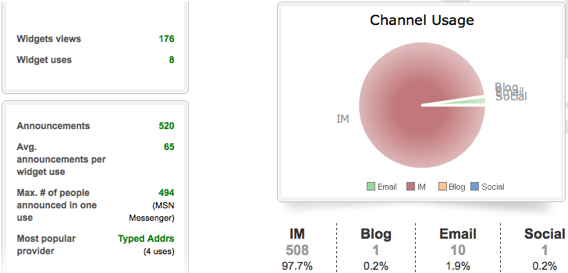
In a week, the widget has been used to tell 520 people about my blog. The number one method used to tell was instant messenger. While that looks great, a closer look shows that all this was done by only 8 users (thank you, whoever you are). Considering the number of unique readers this blog has, that’s a really adoption rate.
Since the widget is free and doesn’t take up much real estate, I’m going to leave it on the blog for now. Even though only 8 people used it in a week, those 8 people did tell 520 and that’s pretty good by any standard. If you’re running the Tell a Friend widget from Social Twist on your blog, I would love to know your results.