Every since starting John Chow dot Com, I have been progressively stepping up the number of posts the blog does each day. So far this month, I’m averaging almost five new posts per day and they’re spread out evenly thought out the day. Some people have asked if I stay at the computer all day long so I can write a new post every 3 to 4 hours. The answer is no. I do all my posts at once, then timestamp them.
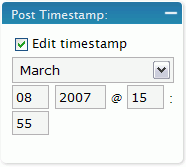
WordPress has a timestamp feature which shows when a post went live. Normally, the time posted is the time you hit the publish button, but timestamp is user adjustable. Therefore, I can write a bunch of blog posts in advance and timestamp them to show up at different hours of the day.
Using the timestamp is extremely easy. Just write your post like normal but instead of hitting Publish, you edit the timestamp for the time you want to post to goes live, then hit publish. Your post won’t be on the blog front page until that time comes.
You’re reading this post now, but I actually wrote this over a day ago. I like to maintain a backlog of 3 to 4 posts in the timestamp queue. This way I know I have posts coming up if I enter a period of “OMG! I have nothing to write about!” Generally, by the time the last timestamped post hits, I’ll have something new to add to the queue.

The WordPress timestamp is just one of the tools I use to keep a constant flow of new articles on this blog. Try it and watch how it improves your productivity.
Did you enjoy this post? Get John Chow Dot Com updates via email...
Stay up to date with all of John Chow’s tips for making money online and blog posts by subscribing via email. Your email will be kept private and never shared with anyone.


One of the most common complaint (or excuse) I hear from potential new bloggers is they don’t know how to install WordPress. Terms like FTP and CPanel are like a foreign language and setting up a database might as well be setting up the space shuttle for a launch. Because of the technology barrier, many would-be bloggers never start their blogs...
{ 82 comments }
I’ve used this trick in the past, but it only works with WordPress. Sometimes I get motivated and write several articles at once and want them to go live at different times, like you mentioned.
In Blogger however, if you date something ahead of time it will stick to the top of your blog until that time comes.
This is why you should switch to Wordpress.
I use both, for different reasons, but the ability to “sticky” a post to the top of a blog is useful in some situations.
There’s plugins for that too
Here’s a random one
http://www.hongkiat.com/blog/adhesive-wordpress-sticky-plugin/
Thanks John for that plugin !
Sure thing, however, hiding posts is more useful I’d say. Personally I miss the feature to hide posts from the front page or/and RSS but do display them in the archives.
Every now and then there are simply occasions you don’t want some posts to show up on front – this basically is the feature Wordpress lacks to become anything even near a CMS.
I use it for that too, I never time post releases, not that I do that many, Im too anxious to see it on my blog
The bad points is that the posts are numbered already, and posting immediate posts together with the time posts much about jumble up the order.
The sticky option is a great idea. I usually just retro date mine new ones that I want to stay under the topdog on the page.
Thanks John, I THINK…
You just cleared up a little argument, ahem, discussion between Jennifer and me.
Unfortunately (and as always it seems) she’s right. Just yesterday she was saying this timestamping a post ahead of time would work in WordPress and I was telling her that it just doesn’t work that way. Yep.
Have an awesome day!
Dan
Arguing with your wife is like playing tennis with a wall. You’re going to lose!
You need to email this CareerRamblings for their Quote of the Week Segment! Wiser words have never been said! hahahaha
QFT!!
It is more like playing squash. Whatever you throw at the wall, it comes back hard at you.
Amen brotha, every time. Guaranteed.
Have an awesome day!
Dan
Excellent point! If I had read this 6 years ago I’d still be married!
Ive also been wondering about the reliability of the timestamping option
so yes
you have once again cleared up a matter of debate
I use this too… I love the idea of publishing posts while I sleep.
Ryan, I thought this was quite timely after I read the same post from your site that you had put up days earlier. Ah well.
Excellent feature for Wordpress, and any real blogger should always have a backlog of posts ready to go. Like you said, you don’t want to get into a brain fart and have nothing else.
How many do you keep in backlog?
I really agree with you Dave ! We should always have 4/5 post ready to go…Just in case !!!
Over at Highbrid Nation we’ve been doing this for a for weeks. We do about 10 posts a day so we are even able to update through the wee hours of the night. I love it!
Thanks for the tip John, I noticed that you could select the timestamp in wordpress, but never realized that it holds on to the post until then before publishing it.
It will definitely improve my blogging.
I never noticed that either, it’s a smart idea
Does using that time stamp feature automatically ping the servers like weblogs.com, technorati, feedburner etc. whenever a backlog post goes live?
That’s a really good question. Does WordPress ping servers based on timestamp or when you publish the post?
When it is finally published, otherwise they can’t see it.
I’m pretty sure it does, as far as I know it’s ran when a post is published, which is what will happen when it’s said to be ‘published’ later on – you can try it out as well of course
Wordpress pings when the posts gets published.
Cool tip. I haven’t used this trick myself yet – but I’ll probably do this if I think I won’t be able to access the blog for a few days…
Time stamping is the way to go. Even though I don’t have a very large queue of posts, I have several types of posts that I like to postdate. For example my “Sunday’s Speedlinking” posts appears only Sunday, but when I find 5 posts I really like for the week I timestamp it. Also my current posting rate is about 1/day so when I get something new I put it for the following day.
This will be extra useful when I go on vacations this summer. I’ll sit down a day before vaca and fill the queue up nicely.
Cool, I didn’t know there was that feature. Something to look into as I do make several posts a day.
I’ve used this feature before, it is pretty handy, for me because sometimes i write 2 or 3 posts at once, but I will have them displayed one every day.
I want ask John or anybody if they have had any experience setting the timestamp using 3rd party client software to write the post instead of using the web front end for wordpress?
Cool Post John……Wordpress rule
the only down side i would see with this is i would feel like im a day behind with news/etc instead of a day ahead
Breaking news you would post right away. The timestamp is great for your normal stuff.
So how far behind are we
well not necessarily ‘breaking news’ but just regular stuff I guess. I notice bloggers post about things all at once. Such as the review me “bug”
Yea, it is best to space out what you write evenly. Even with the “bug”.
I just recently started using this feature as I disovered it by accident. I was doing some testing on my test blog and wanted to move a post so it was the oldest post and thought thats what the timestamp feature was for.
When I tried to put in a future date, I was surprised to see that it was added to a “scheduled posts” queue. They should promote this feature more as I would never have known (well, I guess until today as I would have read it on your blog)
And now if you could please let me know how to limit the number of recent posts on the sidebar I would be greatful, its pissing me off at http://www.mubinahmed.com
But John you come to comment on the post anyway! The myth is still not busted – you must spend every living moment of your life on the computer.
Unless, you timestamp your comments based on future knowlegde..
It’s a comment bot. It spiders the comments and tries to give the best reply possible.
why none of my comment show up
I guess the time when you are ‘really’ at your computer is when you do comment posts.
No bot would be able to ‘read’ and ‘understand’ what we are saying.
lol
I always wondered what the timestamp was for
Thanks for the information!
OK that’s just freaky Master Chow – I was just wondering this afternoon how to achieve delayed postings on my blog. Thanks
Grasshopper
I’ve been wondering about this for the longest!…Glad I’ve made the switch to wordpress one of the best blog hosting around with tons of tutorials and themes…I had no website skills when I first started and put together my site…I think it looks pretty good!
Yes I agree this is one of the best features of Wordpress. Of course I don’t write enough to really use it like you would.
It is just to keep your posts regularly posted at the regular time.
Just in case something crops up during the day..
Dareen Rowse wrote an article about how 2-3 posts is the optimal amount to post a day (for one-writer operations). This WP Feature is the best way to spread your work evenly throughout the week. I’m trying to get into the habit of creating a game plan of content at the beginning of each week and then timestamp accordingly to maximize my exposure.
I agree with you, Gary. Sometimes we might have alot of ideas to write, and at other times, hardpressed for even one. I believe the longer term writers have ample experience dealing with this. I guess it is pretty important NOT to rush with publishing many articles at one time.
Common mistake that newer writers commit.
I’m trying to timestamp my posts to maximize my exposure too, give each post an equal chance at the top of the front page…
I feel very stupid for not knowing about this, and now that I do know about it, I’m definitely going to use it.
Thanks John!
I never would have thought about posting this little trick…great idea John! Thanks for being so involved in the JCDC community. You’re a great blogger.
Ha, I thought everyone did this! I’m definitely not actually posting live 90% of the time myself and I have a huge queue as I have time to write. Definitely a must with the little guy & the business, helps me look productive even when I’m swamped with other things!
Why is it so important to post regularly, is it just to try and keep people interested?
You would want to retain your visitors and attract more people if you are ‘monetizing’ your blog. It is less so important in a way if you are updating solely for yourself or family and friends to read/ keep in contact with you.
The idea is not ‘new’, but it is definitely one to keep your posts regular and appearing at the expected time for your readers. Readers dislike not knowing when to expect your blog to be updated, so it is a good move to counter that.
Holy moly… I’m gonna use this when I can!
Gotta love WordPress!
Thanks John
I was told about the timestamp ‘trick’ or feature when i first started and still have yet to really implement it
Well, it is never too late to implement. Why not start now?
I use this feature all of the time…although I don’t post as often as you do, John.
thanks John…!!
I’m laughing right now (like hell)…!
I never knew this before and now, I can give a concrete reason to my “darling” (she will believe that I’m at home…. but I go for a fishing..!!!)
hah…!!! hah…!!! hah….!!!!
thanks again John..!!!!
Time stamping new posts is great, but I’ve seen people move the time stamp on older posts just to try to keep something on the front page.
The problem hits if your blog uses the /YEAR/MONTH/DAY/post-slug format, in which case you just changed the link to your post and broke any incoming links.
Again, not a problem with time stamps on new posts… only a problem if editing time stamps on old posts.
Hey Engtech,
Great point, that actually happened to us once when we were op Typepad a while back – only because editing a previous post always updates the timestamp, and it DEFAULTS TO TODAY’S DATE/TIME!!!!!
ON Wordpress however – for SEO purposes, the year/month/daty default date path has little value, only takes up space. you’re much better served going straight with the post title in the path, or maybe /category-name/post-title/
Have an awesome day!
Dan
Personally I like using the Drupal method of having a node id for each post. It gives you some flexibility if you ever have t move your site or change your urls.
It is bad if the URL of the old posts does not keep up with the current date. Iguess some people did not realize the error that they are making in the process as well.
is there anyway to timestamp in blogger…?
i would find it useful it i can get something like this…
Yes, there is.
“In Blogger however, if you date something ahead of time it will stick to the top of your blog until that time comes.”
yeah it’s pretty useful, Combined with stacked posts (http://oscarsito.com/?p=28) it’s an easy way to maintain a blog
I knew about the time stamp…but never thought of editing the time stamp to the future…Good idea!!
I though the time-stamp was always meant for future posts. Now that I know, it alters the past, present and the future.
We have.. post manipulation.
Hm… Tried this last night in my WP blog to publish an article for this morning and it didn’t show up
Did you check the “Edit Timestamp” box ? If you go your “manage” window on Wordpress, does the article appears with the date you chose ? Does it appear at all ?? Give us some details so we can help you !!
I think I found the answer. I had it set for 9.08 this morning, So I’m looking at 9.30am to see where it is – I never changed the DST of by blog so it thought it was only 8.30am. After changing the time in WP and republishing the post, it showed up. I have another blog post that is supposed to go at 12.08pm today, we’ll see if it does or not.
Wait and see !!!
Why would anyone use anything other than Wordpress?
this would be a good idea for when you have to go away for a long period of time
This tip is golden! I can write days in advance and just let the post come as needed. Thanks so much for letting us know about this!