Get 20,000+ FREE LINKS. Rank #1 in Google


Get Reviewed by this Blog for only $500
DealDotComTTZ MediaGoogle Adsense
Pepperjam NetworkBidvertiser
Text Link AdsKonterra

Since writing about my photo session with BC Business Magazine, I’ve received a bunch of comments and emails asking how I run two monitors at the same time and what monitors I was using.

Coming from a tech background, I was quite taken back by this. I figured everyone knows that Windows can support more than one monitor. Most video cards today have two video outputs, which allow you to hook up two monitors. To enable the seconds monitor, you just go into your display properties and turn it on. There are several options to run your dual setup. For example, you can have monitor two display the same information as monitor one. This is good if you’re giving a presentation - you work on monitor one and the customers watches from monitor two.

You can also span your desktop across the two monitors so it becomes one big monitor. This will allow you to drag windows from one monitor to the other. Having a big desktop and running multiple windows at the same time really improves your productivity. Many people think that dual monitors are just for showing off but once you’ve gone dual, you will never go back to a single monitor setup.

The LCD Monitors I Use


The monitors I use are from Dell. They are 20.1″ wide screen units that offer 1680 x 1050 resolution. When combined together, they create a 3360 x 1050 desktop. That is enough to put four 800×600 windows side by side. While most people run their dual setup like my BC Business photo session, I have tried it this way.
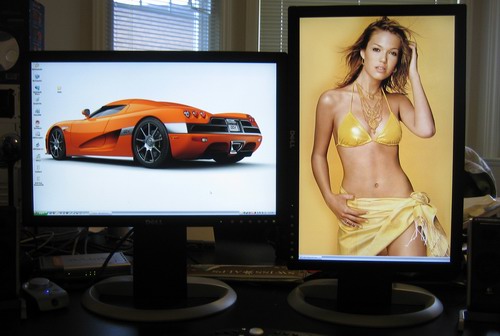
Dual Dell LCD

The above actually works very well. The screen on the left can still be used for viewing movies or playing computer games, while the screen on the right is great for reading web pages and working with MS Word files. Another nice advantage of right screen is it allows for a much better view of certain types of wallpaper. :twisted:

Find out what I am doing right now by following me on Twitter! If you like this post then please consider subscribing to my full feed RSS. You can also subscribe by Email and have new posts sent directly to your inbox.

Make Money Online with John Chow's Ad Network - Join TTZ Media Now!
1 Star2 Stars3 Stars4 Stars5 Stars (14 votes, average: 3.29 out of 5)
Loading ... Loading ...

Here's A Few More Related Posts

  • Who Wants A Dual Monitor Video Card?
  • TTZ Media Affiliate Winners
  • Redefining High Resolution With Dual Widescreens
  • Well This Beats My Dual Setup
  • The Winner of the Rich Dad CD

    RSS feed | Trackback URI

    110 Comments »

    Comment by Glenn Wolsey
    2007-05-08 21:37:56
    MyAvatars 0.2

    I’ll be going a similar route when I purchase my Mac Pro later this year, using Dual 24″ Dell displays.

    Comment by Don Wilson
    2007-05-09 08:09:30
    MyAvatars 0.2

    The 2407WFP (24″) from Dell is the best monitor I’ve ever used.

    Comment by Learn to Blog
    2007-05-09 13:25:55
    MyAvatars 0.2

    yeah, I bet…it might be a little too much for me, I doubt I need that big of dual monitors

    Comment by Eric
    2007-05-09 15:50:11
    MyAvatars 0.2

    Why not just use one really big monitor?

    Hmm…

    (Comments wont nest below this level)
    Comment by John Chow
    2007-05-09 18:28:59
    MyAvatars 0.2

    Why not use two really big monitors? :twisted:

     
    Comment by Entrepreneur
    2007-05-09 20:39:41
    MyAvatars 0.2

    My partner uses a 32″ widescreen HD TV as his monitor, it works great for him.


    2007-05-08 21:40:43
    MyAvatars 0.2

    I’ve been seriously considering this kind of set-up in my own workspace; thanks for the little intro there, John. Mandy Moore as a desktop background though…I’m not to sure about that LOL.

    Comment by Law of Attraction
    2007-05-09 10:33:55
    MyAvatars 0.2

    yeah me too….it would be nice to have two 20 inch wide screen..i do not know if I need it, but it looks nice .. :grin:

     
    Comment by Eric
    2007-05-09 15:51:53
    MyAvatars 0.2

    Yeah… should probably be Scarlett Johanneson.

    haha


    Comment by Atul Karmarkar
    2007-05-08 21:50:28
    MyAvatars 0.2

    Pretty neat setup, John.. and yes, I can certainly appreciate the advantages of the screen on the right :lol:

    Comment by Entrepreneur
    2007-05-09 20:40:43
    MyAvatars 0.2

    Oh what will we do with John and his uh…wallpaper? :)


    Comment by Hanson So
    2007-05-08 21:50:41
    MyAvatars 0.2

    Haha! :D That last part made me laugh. Yes I was also wondering about the monitor thing. I guess I’ll have to really try it out myself.

    You should add that to the 8th habits of highly successful people.

    Comment by Law of Attraction
    2007-05-09 10:34:55
    MyAvatars 0.2

    ya 8th habit should be wall paper of a beautiful girl for increasing prodictivity lol

    Comment by Learn to Blog
    2007-05-09 13:26:49
    MyAvatars 0.2

    or guy depending on who’s doing the work on the computer :wink:

     
    Comment by Entrepreneur
    2007-05-09 20:41:19
    MyAvatars 0.2

    I don’t think that’s going to increase productivity guys.


    Comment by iCatchUp
    2007-05-08 21:53:37
    MyAvatars 0.2

    Having bigger monitor makes it so easy and efficient to work on a PC, but if you have dual monitor I can imagine it must be awesome. I will try to have a setup like yours one day!.

     
    Comment by kuanhoong
    2007-05-08 21:54:29
    MyAvatars 0.2

    Yup, I am working with two monitors too. As the saying goes “The more the merrier” :razz:

    Comment by Jeff Kee
    2007-05-08 22:11:10
    MyAvatars 0.2

    3 makes company.

    Comment by Kumiko
    2007-05-09 00:37:54
    MyAvatars 0.2

    I use a one monitor setup that utilizes two mouses and three keyboards. :grin:

    2007-05-09 04:31:51
    MyAvatars 0.2

    Coincidentally, that’s sorta what I have right now, but it’s all going to change soon. I really want to get my hands on a second monitor — and ultimately a bigger table.

    (Comments wont nest below this level)
     
    Comment by Law of Attraction
    2007-05-09 10:36:12
    MyAvatars 0.2

    one monitor , 2 mouse and 3 keyboards…wow how many cpus are you running Kumika? Thats overkill of the monitor:)

    (Comments wont nest below this level)
     
    Comment by Learn to Blog
    2007-05-09 13:27:36
    MyAvatars 0.2

    how many hands you got over there Kumiko?

    (Comments wont nest below this level)
     
     
    Comment by GOLD
    2007-05-09 07:30:50
    MyAvatars 0.2

    I Use 4 19″ (mostly for trading) :evil:

     
    Comment by Learn to Blog
    2007-05-09 13:55:32
    MyAvatars 0.2

    Jeff…you mean you don’t have your entire wall made of screens… :?:


    Comment by
    2007-05-08 22:01:48
    MyAvatars 0.2

    Matrox as been selling triplehead for some time now

    http://www.matrox.com/graphics/en/gxm/products/th2go/digital/home.php

    :mrgreen:

    (disclaimer : I used to work for one of there card maker sub contractor in CANADA )

     
    Comment by
    2007-05-08 22:03:36
    MyAvatars 0.2

    Bill Gates is like John Chow and he too use dual head systems :

    http://money.cnn.com/2006/03/30/news/newsmakers/gates_howiwork_fortune/index.htm

    Comment by John Chow
    2007-05-09 07:03:48
    MyAvatars 0.2

    Bill has three monitors. He’s special. :twisted:

    Comment by
    2007-05-09 09:04:55
    MyAvatars 0.2

    1) For Mail system
    2) To do work / answer mail / browse web
    3) Bill Gate fortune clock ( like the US or CANADA debt clock ) to see how much money and interest he made today by the seconds :twisted:

    You should ask him about that direct link to the bank windows plugin :wink: , the article is titled *How I Work* and the picture cut out one of the monitor. Its probably in the upgrade picture serial pack 3 … :cool:

    :mrgreen:

     
    Comment by Learn to Blog
    2007-05-09 13:56:24
    MyAvatars 0.2

    I’m surprised it’s only 3 he has

    Comment by Eric
    2007-05-09 15:53:50
    MyAvatars 0.2

    Hmm… Eric’s Fortune Clock… I like the sound of that

    One day

    (Comments wont nest below this level)


    Comment by Jeff Kee
    2007-05-08 22:10:49
    MyAvatars 0.2

    I wish i had the space for that…

     
    Comment by Paul.
    2007-05-08 22:19:14
    MyAvatars 0.2

    I upgraded to dual 20″ Dells last month. It’s the best money I’ve ever spend on a computer related product.

    My only regret is that I didn’t cough up the extra money to get 22’s.

    Comment by Law of Attraction
    2007-05-09 10:37:48
    MyAvatars 0.2

    i think its an obsession, after a while 32 inch will seem smaller :D


    Comment by Matt
    2007-05-08 22:20:30
    MyAvatars 0.2

    Speaking of which… Does anyone wanna buy my Dell 2405 fpw? I bought it for $1100 US about 1 year ago. works great, nothing wrong with it. I would sell for about $550 US.

     
    Comment by Monetize Your Blog
    2007-05-08 22:26:58
    MyAvatars 0.2

    john you’re a true evil, you take every oppotunity to make money online. i’ve got to say, this is clever: giving helpful advice while earning commission as well as promoting your own company ttzmedia…

    Comment by James
    2007-05-09 10:35:06
    MyAvatars 0.2

    Notice how he didn’t even say buy this. Just a this is what I do type recommendation. Well done.

    Comment by Learn to Blog
    2007-05-09 13:57:30
    MyAvatars 0.2

    that’s why Chow is the man! :-)

     
    Comment by Entrepreneur
    2007-05-09 20:43:25
    MyAvatars 0.2

    Well the dual monitor setup is awesome anyway. Really helps productivity.


    Comment by green
    2007-05-08 22:43:09
    MyAvatars 0.2

    I have 20 inc Samsung 205BW, and i would like to have a second lcd like the right one.
    I also have 17 inc flat but its becoming old day by day :mrgreen:

     
    Comment by santosh p
    2007-05-08 23:06:22
    MyAvatars 0.2

    Well, For me 2 moniters was a boon a year back. especially for designers where you can run Photoshop or graphic tool, and webpages hunting for stock pics on other. and And also testing images full screen.

    My setup works with 2 moniters a cpu, and a laptop. Works great espcially when you want a large version of your data in ur laptop :)

    For people who want to test the dual setup, is if you have a laptop, just connect your existing moniter to your laptop display output, and on properties select extended display and experience the dual view setup.

     
    Comment by MotorsportBabesAU
    2007-05-08 23:11:30
    MyAvatars 0.2

    Mandy Moore FTW!!!!!

    2 times 20.1″ 1600×1200 monitors running Fedora for me BTW!

    No Mandy Moore though! That would be pushing my Engineer vs IT relations just a little too far. Just got banned from visiting Myspace and YouTube today!

     
    Comment by Best CD Rates
    2007-05-08 23:13:48
    MyAvatars 0.2

    wow, the dell lcds are only 400$ now?

    back when i got my viewsonic 20″ they were 700 each…

     
    Comment by Best CD Rates
    2007-05-08 23:19:51
    MyAvatars 0.2

    wow they are only 400 dollars now? back when i got my 20 inch viewsonic it was 700 each.. :(

     
    Comment by Highest CD Rates
    2007-05-08 23:21:28
    MyAvatars 0.2

    hm my comments dont seem to be showing up, strange… testing

     
    Comment by Merija
    2007-05-09 01:43:03
    MyAvatars 0.2

    Not bad wallper on the right monitor :wink:
    I am using just one monitor so far…

     
    Comment by Pallab
    2007-05-09 01:46:25
    MyAvatars 0.2

    In somewhat related news Microsoft India is researching on a software that would split one monitor into two sections thus functioning as dual monitors.
    This is mainly intended for small business.
    More Info

    Comment by Matthew
    2007-05-09 04:14:32
    MyAvatars 0.2

    Is that mainly so that 2 users can share 1 monitor?

    Comment by Matthew
    2007-05-09 04:15:51
    MyAvatars 0.2

    I re read the article and thats exactly what it means. Its a nice idea for parts of the world where technology is still out of reach for people.


    Comment by green
    2007-05-09 23:46:12
    MyAvatars 0.2

    Ya i heard it, i tried to simulate this project with a virtual machine but no success :(


    Comment by ricardo Subscribed to comments via email
    2007-05-09 02:02:07
    MyAvatars 0.2

    Hi John,

    I use 3 Tft’s :)

    2×20″ Acer’s at 1600×1200 and 1x a 17″ widescreen (from my laptop) … I need it for web developing :).

    The only problem is, that it doesnt work very well on linux with XGL :(… that would make 12 desktops (3×4 cubes) :)

    greetz

     
    Comment by Wes Mahler
    2007-05-09 02:03:18
    MyAvatars 0.2

    lol at last comment john!

     
    Comment by Ali
    2007-05-09 02:48:39
    MyAvatars 0.2

    What do you do when your wife walks in to see a bikini clad women as your desktop, my wife certainly wouldn’t appreciate that.

    I’m conservative anyway.

    Comment by Pallab
    2007-05-09 03:40:11
    MyAvatars 0.2

    Well, that your husband likes a bikini clad woman shouldn’t really be disturb any wife. If anything it would be reassuring :lol: .

     
    Comment by Entrepreneur
    2007-05-09 20:45:20
    MyAvatars 0.2

    I don’t know, I doubt my fiancee would be very understanding :)


    Comment by hem acharya
    2007-05-09 04:11:48
    MyAvatars 0.2

    JohnChow.com has 4444 feed readers today… lets celebrate… … congrats…. john

    from hem