Vote It! Wordpress Plugin
I’ve received an email from Maik Schindler of ZauberPage.de about his new Vote It! WordPress Plugin. Think of it as the Digg This button taken to the next level. Instead of just placing a Digg This button on your blog posts, Vote It! can place any social media button into your articles.
Social media sites like Digg are a great way to get traffic to your blog. Hitting the front page generally means thousands of new visitors checking out your article. Many webmasters dismiss the value of social media traffic because it’s very hard to convert. However, any traffic can be monetized if you know what you’re doing. Getting John Chow dot Com on the front page of Digg over and over again was how I built my initial reader base. I made good use of that Digg This button to help me get those Diggs. However, had Vote It! been around back then, I would have used it for sure.
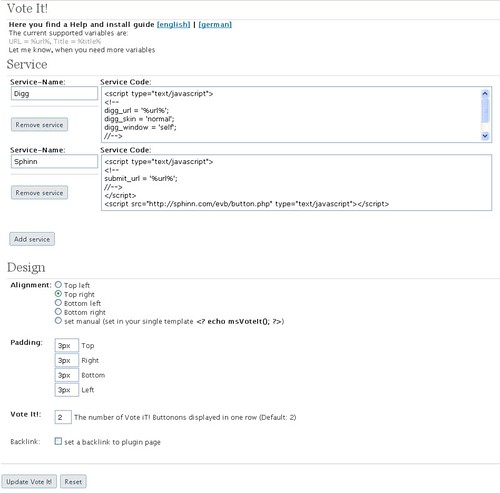
The plugin is very easy to install – just upload to your WordPress plugins folder and activate. The setup is pretty self explanatory. You enter the codes for the various social media buttons and then tell the Plugin where to place the buttons on your blog posts.
The only downside I can see is if you’re using too many social media sites. Your posts would be full of buttons and that’s bound to lower its effectiveness. I recommend you use no more than three buttons at any one time.
Tweet This Post!
- Posted in Blogging, The Net, Wordpress
- 56 comments what's your take?
![]() | ![]() | ![]() | ![]() | ![]() | ![]() | ![]() | ![]() | ![]() | ![]() | ![]() | ![]() | ![]() | ![]() | ![]() | ![]() | ![]() | ![]() | ![]() | ![]() | ![]() | ![]() | ![]() | ![]() | ![]() | ![]() | ![]() | ![]() | ![]() | ![]() | ![]() | ![]() | ![]() | ![]() | ![]() |
Trackbacks
- VoteIt!: E-Mails versenden zum vermarkten | SEO, Affiliate und Marketing Blog - JKW-Media - November 11, 2008 at 5:12 am
- [Plugin Mod] aSocial - .wired - November 11, 2008 at 10:54 am


NIce plugin. Will try it.
Very useful. I’ll give this a try.
yeah looks great
I definitely should try it
What is the bookmarking plugin you are using, John?
It seems nice and neat, I love it!
john has set the code in the script
Awesome plugin and easy to add
Thanks for sharing.
Great plugin. I actually made a post about limiting the number of options below your blog posts recently.
You should check it out here John. Let me know what you think of my thoughts on limiting options.
http://www.steven-sanders.com/what-to-include-below-your-blog-posts/
will need to look into this – but looks promising.
Hey John, with all of the others like socialmarker and add This and a host of others. I don’t see this one being any much more different.
not sure if add this or share it converts well
I’m with you on how this application is different from the slew of others reviewed on this site. Any clarification John?
yeah i like the way you have your buttons set up. personally i think it’d be a lot easier to just add the code to the php yourself though so you can get it exactly how you want it
I actually prefer the 5 buttons on your bottom right of the post better than the plug-in itself
Yup I agree
it looks better anyway
converts better…gets more diggss
I agree with you.
It looks simple to use, I’ll try it on one of my sites.. see what it’s all about
Having too many buttons can be an overkill.
There are three things I would like to add to posts but don’t want them cluttered. Bookmark this, send this, and vote this. Use a addthis button. Use Tell a Friend (thank you John Chow). But like many here, seems buttons would be better way to go than a plugin, especially as I am considering just using one social site for now to learn the in and outs. That means just one button.
Sorry John, but where is the Vote It! button in this post?
He’s not using it & to be quite honest, he shouldn’t. The buttons he has set up now look way better.
Yes. Such sites are very powerful. Talk about the digg effect!
They need to come out with a drigg like plugin Drupal has that is what I thought this was and came running to check it out for wordpress
thanks
Great plugin,thanks
Will try this plugin, Looks great
Yeah.. I totally agreed on that. Too many social buttons could make the page look messy and confusing sometimes.. I don’t know.. I just don’t like crowded look page.
I’m not seeing it on your blog?
He never said he was going to use it though. And why would he with the way he has the buttons set up now?
John, everything I learn from you here and try to implement to my Blogger site always fails… like yesterday with LinkXL, they don’t work on Blogger platform. FRUSTRATING!
Still love to read your ideas though… somehow… some way… I’m going to make this work!
Its because is a blogger site. Moce to wordpress and your problems should be fixed hun!
get onto wordress
OOps! One more thing, your Social Twist thing… the TeLL your Friends? It worked but stopped loading once it was clicked on the site (wouldn’t click through). Is that a Blogger glitch too?
I’m running into dead ends all over from the stuff you’re promoting!
Anything to get more traffic is worth giving a try. You’re right you just have to kow how to convert that social traffic.
I wish someone could come up with a plugin that automatically inserts the button of any service as soon as your post is submitter…
John, it would be really great if you could write up a post or two explaining how you continuously landed on the front page of Digg over and over again.
i agree , I sure need some diggsss for my blog
I could’ve sworn he already did this ages ago. You have to look back at the previous posts, but I’m pretty sure he did.
Great plugin,thanks John
I’ll definitely try this one. Looks good. Tnx John!
John, have you been noticing a problem trying to edit pages in wordpress. I have been trying to edit pages in my site but the editor is all screwed up. I updated to the latest version of WP.
this will be worth checkin , i need some diggssss
frustrating not being able to get this stuff to work on blogger
If you are serious about your business, get away from Blogger and get your own host.
John,
Thanks for the tip. However, the version for this plug-in is v0.3. I just installed it on my blog, and it does NOT work! My blog is a standard Wordpress installation. It uses the popular cutline theme.
I think the author might have rushed a little bit. There was no documentation on system requirements.
Also, based on what I’ve seen on the administrative UI, it only provides “Digg It” code by default. You still need to copy and paste codes for other social bookmarking sites yourself.
The only benefit you gain from installing this plugin is instead of editing the html/javascript code, it lets you copy and paste code to a text box. And, it lets you specify location of the plug-in.
This plugin needs more testing and documentation before wide adoption. Not ready for prime time.
GeekMBA360
http://www.GeekMBA360.com
Beat Recession. Grow Career. Build Wealth.
@GeekMBA360 Vote It! set not automatic Voting-Buttons after install in your Blogposts. This function is coming soon…
great plugin, really nice!
nice plugin, really! good for use
Great One
You should try it, so we could all see how it works.
-Mike
Interesting plugin, but it’s not for me. I prefer the way I have my buttons set up now.
will there be a blogger plugin?
Does look great
not the most tech savvy, guess im just conformtable with the easy blogger style