START SEARCHING FOR LOGISTICS & SUPPLY CHAIN JOBS AT LOGJOBS


Get Reviewed by this Blog for only $500
DealDotComTTZ MediaGoogle Adsense
Pepperjam NetworkBidvertiser
Text Link AdsKonterra

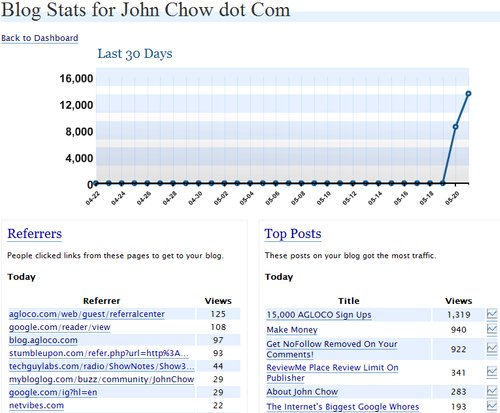
Because I have never hosted my blog on the free Wordpress blog hosting service I never knew that Wordpress comes with cool stats system. However, it looks like the Wordpress team has decided to offer their Wordpress stats service to any self-hosted Wordpress blogs. All you need to do is download and install this plugin.

There are hundreds of plugins and services which can provide statistics about your visitors. However I found that even though something like Google Analytics provides an incredible depth of information, it can be overwhelming and doesn’t really highlight what’s most interesting to me as a writer. That’s why Automattic created its own stats system, to focus on just the most popular metrics a blogger wants to track and provide them in a clear and concise interface.

To use the Stats plugin, you’ll need a Wordpress account and a Wordpress API key. You can either use the key from Akismet or get a new key from Wordpress.

wordpress-stats.jpg

Once installed and running the plugin will begin collecting information about your pageviews, which posts and pages are the most popular, where your traffic is coming from, and what people click on when they leave (I really like that one). You access your stats right from the Wordpress Dashboard, where a blog stats tab has been added.

Find out what I am doing right now by following me on Twitter! If you like this post then please consider subscribing to my full feed RSS. You can also subscribe by Email and have new posts sent directly to your inbox.

Make Money Online with John Chow's Ad Network - Join TTZ Media Now!
1 Star2 Stars3 Stars4 Stars5 Stars (12 votes, average: 2.42 out of 5)
Loading ... Loading ...

Here's A Few More Related Posts

  • New Wordpress 2.0.6
  • Wordpress 2.3.1 Available for Download
  • A Few Tickets Left for Wordpress Camp
  • Hello, Our Name Is FeedBurner
  • I Am Loving Wordpress 2.5

    RSS feed | Trackback URI

    60 Comments »

    Comment by Dave
    2007-05-21 17:07:01
    MyAvatars 0.2

    You use Google Analytics as well….do you think that you will be using both? Or one or the other mostly?

    Comment by John Chow
    2007-05-21 17:34:16
    MyAvatars 0.2

    I use this and Analytics and Sitemeter.

    Comment by Eric
    2007-05-21 19:42:20
    MyAvatars 0.2

    John,
    Maybe you could write a post with the pro’s and con’s of each, or how they complement each other, something like that.

    The Million Dollar Homepage?

    Comment by website copywriter
    2007-05-22 01:59:10
    MyAvatars 0.2

    That’s not a bad idea. It would be pretty helpful, I think.

    (Comments wont nest below this level)
     
    Comment by Monetize Your Blog
    2007-05-22 03:15:38
    MyAvatars 0.2

    another cool plugin

    thanks john

    (Comments wont nest below this level)
     
     
    Comment by Nomar
    2007-05-30 03:01:45
    MyAvatars 0.2

    hmm… maybe I should sign up for sitemeter to.. analytics is sometimes weird


    Comment by Gdog
    2007-05-21 17:12:19
    MyAvatars 0.2

    This is off topic, but did anyone notice that http://www.stephenfung.net has been hacked?! :shock:

    Comment by Eric
    2007-05-21 19:44:13
    MyAvatars 0.2

    Wow, that sucks…

    Free Online advertising

     
    Comment by Wahlau.NET
     
    Comment by John Chow
    2007-05-21 20:06:42
    MyAvatars 0.2

    I called him. He went away on a trip and his laptop is missing some files to completely fix it. But he should have the blog back up tonight.

     
    Comment by InvestorBlogger
    2007-05-22 07:51:08
    MyAvatars 0.2

    I wouldn’t suggest visiting that blog! It tried to load something in my FF! I don’t know what it was…. Wait till it’s cleaned up!


    Comment by Jiang
    2007-05-21 17:25:05
    MyAvatars 0.2

    This plugins look like useful.

     
    Comment by Steve's Tech Blog
    2007-05-21 17:40:01
    MyAvatars 0.2

    Thanks!

    Just installed it. Now, I have to wait 20 minutes before it start working. But I will check later because 24 is on(I like the pause on my PVR)

     
    2007-05-21 17:57:33
    MyAvatars 0.2

    Hahaa. It’s useful if you are lazy like me =P. But Analytics is better with the “Keyword” refering from the search engines :wink: .

    2007-05-21 18:12:51
    MyAvatars 0.2

    I stand corrected: It’s NOT better than Analytics, in fact, you still have to login to WordPress.com (which is stupid?). I thought we can see in OUR own self-hosted blog interface. What kind of …I’d rather use Analytics, since it has more features.

    *I also use MyBlogLog to check/compare the stats between Analytics (you can’t just have one stats tool).

    Comment by Steve's Tech Blog
    2007-05-21 18:42:33
    MyAvatars 0.2

    I don’t like that either(login in wp) but the stats are updated every 3 minutes unlike Analytics(few hours).

    Also, the new version of Analytics does do a view of stats(hits and page views) for the current the day like the old version.

    Nothing is stopping you of using both for the time being. That’s what I will do.

    Comment by Steve's Tech Blog
    2007-05-21 19:48:24
    MyAvatars 0.2

    Add the “not”
    “the new version of Analytics does NOT do a view of stats(hits and ”

    They said it’s coming when I emailed them. Until that feature is out, I guest it will be in beta longer.

    (Comments wont nest below this level)
     
     
    Comment by Monetize Your Blog
    2007-05-22 03:18:59
    MyAvatars 0.2

    good point


    2007-05-21 18:41:26
    MyAvatars 0.2

    Nice tip, John. The “big guns” like G-Analytics have their usefulness … the new Analytics dashboard is orders of magnitude better, but an “on blog” stat tool like this one can be very sueful, especially when fine tuning the blog itself … but there’s no aff link or AGLOCO tie-in? Your “evilness meter” is getting close to “E” *smile*

     
    Comment by Pallab
    2007-05-21 19:22:05
    MyAvatars 0.2

    I am using Feedburner Free, Firestats ( http://www.firestats.cc) and Statcounter (www.statcounter.com).

     
    Comment by Douglas Karr
    2007-05-21 19:29:30
    MyAvatars 0.2

    Some neat stuff there… they exclude your visits (nice), keep track of your comments on other WordPress blogs, and they have a nice tag search (and more) inside the interface. I’m pretty impressed!

    Not only is this not a great way to raise awareness to WP, it’s also a great way to take advantage of the WP community that seems to be evolving. Notice this interface has avatars? I’m curious when those will be incorporated in a future version of WP.

    Neat stuff!

     
    Comment by Hari
    2007-05-21 19:53:09
    MyAvatars 0.2

    Thanks for telling us.
    I am installing this.
    At last, one useful post on John Chow dot com. :mrgreen:

     
    Comment by Wahlau.NET
    2007-05-21 19:53:36
    MyAvatars 0.2

    this is great, nothing to lose to install it.

    Too bad it is not integrated with my blog, maybe someone could do this.

    Comment by Monetize Your Blog
    2007-05-22 03:21:54
    MyAvatars 0.2

    definitely, we need an upgrade


    Comment by InvestorBlogger
    2007-05-21 20:08:48
    MyAvatars 0.2

    I tried it a few days ago, I’m using WP.com’s stats… Neat interface!

    Kenneth

     
    Comment by Success Online
    2007-05-21 20:27:29
    MyAvatars 0.2

    It’s something I think we can use alongside other methods of measurement. It’s good to experiment to see which one you like the best. Google is great no doubt. The myblog log I agree is also good.

    Comment by Monetize Your Blog
    2007-05-22 03:22:49
    MyAvatars 0.2

    true, but unless you pay, you wouldn’t get the real time stats though


    Comment by
    2007-05-21 20:31:45
    MyAvatars 0.2

    I love the graphs !!!

    Comment by Monetize Your Blog
    2007-05-22 03:23:17
    MyAvatars 0.2

    yes, it looks pro


    Comment by Ankur
    2007-05-21 20:32:40
    MyAvatars 0.2

    Is it only me or others also have the name missing when there is no link?

     
    Comment by Chris
    2007-05-21 20:39:12
    MyAvatars 0.2

    Can I use the same API key for 4 different blogs?

    Or do I have to register 3 more new accounts with wordpress.com for each blog in order to see the stats?

    Comment by John Chow
    2007-05-21 21:12:40
    MyAvatars 0.2

    Try the same key and see what happens. I would assume it will work since my Akismet key worked.

     
    Comment by Monetize Your Blog
    2007-05-22 03:25:01
    MyAvatars 0.2

    it’d work, i think


    Comment by Chicago 2016
    2007-05-21 21:21:05
    MyAvatars 0.2

    Whoa, thanks for pointing this out.

     
    Comment by Chicago 2016
    2007-05-21 21:21:55
    MyAvatars 0.2

    It’s quite useful. Unfortunately, my personal blog - which is run on Vox - can’t run any stats trackers. How accurate is its Technorati rank?

     
    Comment by Taste of life
    2007-05-21 23:33:21
    MyAvatars 0.2

    Good feature…

     
    Comment by Wolf Stone
    2007-05-21 23:46:48
    MyAvatars 0.2

    if only i used wordpress….this plugin appears to have some useful features !!

    Comment by Monetize Your Blog
    2007-05-22 03:26:06
    MyAvatars 0.2

    definitely, it’s undoubtly the best blogging platform


    Comment by Adam Dempsey
    2007-05-22 01:07:41
    MyAvatars 0.2

    I’ve installed it but hasn’t been running long enough to get any useful stats yet, but looks like it might be useful :D

     
    Comment by FinancialJungle.com
    2007-05-22 01:08:44
    MyAvatars 0.2

    I’m using stats from iceRocket which is quite basic. Will check out the wordpress plugin. Thanks for the tips.

     
    Comment by Matt Huggins
    2007-05-22 01:31:40
    MyAvatars 0.2

    John, you should check out WP-SlimStat. It’s a really convenient basic stats package that you can view through the WordPress Dashboard. You don’t need to log into WordPress.com or anything, just log into your site’s back-end like you normally do.

    I use WP-SlimStat on my blog, and it offers a nice overview to what’s going on when I don’t feel like digging through the somewhat overwhelming Analytics data.

    Comment by Monetize Your Blog
    2007-05-22 03:26:47
    MyAvatars 0.2

    thanks matt, will try that out


    Comment by Sourav Sharma
    2007-05-22 01:40:17
    MyAvatars 0.2

    I think, its too late for WP now.

    GA is free and is beyond exceptional. And BTW, why we would want to add a presure of one more analytics on our server….or why to look at several places for your data when everything is there in GA. I am a huge proponent of GA and I dont think I would be using that plugin..

    Sv

     
    Comment by website copywriter
    2007-05-22 02:16:48
    MyAvatars 0.2

    It should be up-to-par with the others, or at least serve as a good additional stats plugin.

     
    Comment by Rhys
    2007-05-22 02:43:06
    MyAvatars 0.2

    I wonder. I run the Wordpress Stat Tracker on one of my blogs. Can I still use the same API key to run it on one of my other ones?

    Comment by Monetize Your Blog
    2007-05-22 03:27:41
    MyAvatars 0.2

    i think so, try it first


    Comment by IngaOz Subscribed to comments via email
    2007-05-22 03:39:49
    MyAvatars 0.2

    I installed this plugin yesterday on my newest blog, so far - I am really happy with how I can track stats with it :)

     
    Comment by Markk
    2007-05-22 04:55:56
    MyAvatars 0.2

    I went from a Wordpress.com blog to a self-hosted blog, and as soon as I found out about the plugin I installed it straight away.

    I still don’t have stats for the RSS feed though.

     
    Comment by Richard
    2007-05-22 07:24:29
    MyAvatars 0.2

    No love for the GoStats review? :sad:

     
    Comment by Mike Panic
    2007-05-22 07:36:56
    MyAvatars 0.2

    It’s nice I guess, but won’t take my API key… o well.

     
    Comment by InvestorBlogger
    2007-05-22 07:48:00
    MyAvatars 0.2

    It looks nice, has some interesti :razz: primarily! I have an account with them, but don’t really see the extra value yet! What does it get them?
    I signed up to support Wordpress.org! Man, that’s some good software!
    :razz:
    Kenneth

     
    Comment by
    2007-05-22 14:19:53
    MyAvatars 0.2

    I get this error when inserting my WordPress.com API key:

    “parse error. not well formed”

    Any ideas?

     
    Comment by ScottHayne
    2007-05-23 08:04:58
    MyAvatars 0.2

    My stats look a lot like that… MoL…

     
    2007-05-23 21:00:54
    MyAvatars 0.2

    John please let me know how you get the shots of the screen like that…I need it so that I can post some shots of screens from a program…please? thanks

    Comment by John Chow
    2007-05-23 21:15:54
    MyAvatars 0.2

    You just hit the “Print Screen” key and paste it to MS Paint or any other image editing program to edit it.

    2007-05-24 15:53:46
    MyAvatars 0.2

    Thanks good looking…you’re are the best! :mrgreen:

     
    2007-05-24 15:57:25