Watch John Chow on the latest episode of MarketLeverageTV!
 

Wordpress Tiger Administration Plugin

written by John Chow on June 25th, 2007

I’ve been fooling around with a new plugin call Wordpress Tiger Administration. The plugin changes the entire look and feel of the backend Wordpress administration area without touching any of the XHTML framework.

The current default WordPress administration area is functional, but I felt it could be improved. For several reasons, I didn’t want to touch the XHTML framework of the admin, but instead relied on the power of CSS2 to manipulate the presentation. The whole package has been wrapped up into a single plugin. Just install and activate. The new design will be immediately visible.

Currently the Tiger is compatible with Safari and Firefox. Until Internet Explorer complies with CSS2 specifications, this plugin will default back to the original WordPress administration design. The plugin does this automatically, without the need for browser sniffing. If the browser is incapable of displaying CSS2, it will not display the updated design. So if you don’t like the new look, switch to IE (or turn off the plugin).

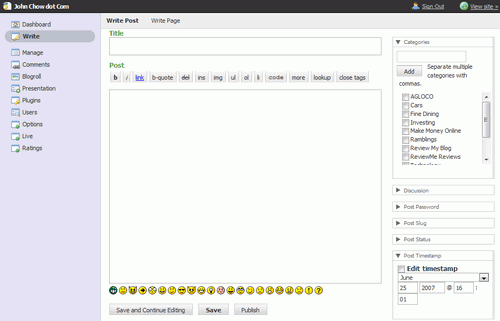
The new admin layout is certainly different than the old one. It’s cleaner and more functional. The colors are also more eye pleasing as well. Here are some screen shots.
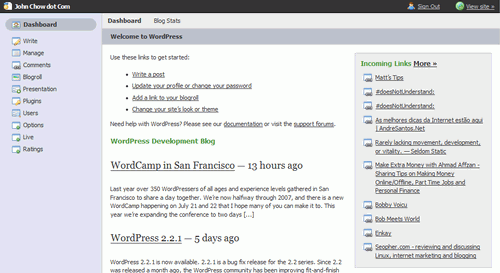
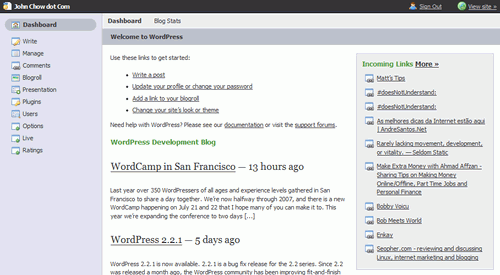
tiger1.png

tiger2.png

tiger3.png

You can download the plugin here.

webd360 said on June 25th, 2007 at 4:20 pm

hmmm… I actually really like the default admin page, but I might check this out later just to compare

Reply to this comment
A video a day said on June 25th, 2007 at 4:34 pm
DIY PR Builder said on June 25th, 2007 at 7:33 pm

Looks like it might be time to switch away from Blogger! Thanks for the link John.

Reply to this comment
Charles Lau said on June 25th, 2007 at 8:15 pm

actually the default admin is not that bad afterall. But at least, there is an alternative when i get really bored with this default admin.. :)

Reply to this comment
website copywriter said on June 26th, 2007 at 6:24 am

Yeah, it’s always good to have options — even when there’s no need for it.

Reply to this comment
ritchie said on June 26th, 2007 at 2:30 am

>hmmm… I actually really like the default
>admin page, but I might check this out
>later just to compare

I really dig WP, but the admin interface gives me eyecancer. I’ve been using spotmilk for some time now… but this one looks pretty nice too. Will try it out.

Reply to this comment
Glenn Wolsey said on June 25th, 2007 at 4:25 pm

This isn’t actually “that” new, although I love this theme and have been using it since release.

Reply to this comment
shaun said on June 25th, 2007 at 4:26 pm

I have seen this before , I think the original interface is better.

Reply to this comment
website copywriter said on June 26th, 2007 at 6:27 am

I have seen the older version, and I thought it was pretty good to begin with.

Reply to this comment
A video a day said on June 25th, 2007 at 4:33 pm

nice review, will give the plugin a go

Reply to this comment
Jeff said on June 25th, 2007 at 4:42 pm

Hmm it looks pretty cool, I might give it a try.

Reply to this comment
website copywriter said on June 26th, 2007 at 6:35 am

It is very clean and simple, isn’t it. Nothing beats simple dashboard layouts.

Reply to this comment
Ryan said on June 25th, 2007 at 5:53 pm

Glenn above is right. It’s really not that new (although I guess to you it is). Steve did a great job on the plugin but if you’re not a Mac guy it takes some getting used to.

Reply to this comment
Terra Andersen said on June 25th, 2007 at 6:00 pm

I’ve been thinking about getting this… it looks great! :mrgreen:

Reply to this comment
ms danielle said on June 25th, 2007 at 6:07 pm

i’ll try it out, too. anyone run into any problems with it? from the screen shots, it looks like it’s probably better for people like me with ADD :D

Reply to this comment
Suzie Cheel said on June 25th, 2007 at 6:14 pm

Great Plugin, I like the look and feel and it’s simpler to use, works in Flock too

Reply to this comment
Thomas said on June 25th, 2007 at 6:26 pm

Looks better than the default Wordpress admin. I’m going to give this a try on my new blog which should go online tomorrow :P

Reply to this comment
DIY PR Builder said on June 25th, 2007 at 7:34 pm

Good luck with the new blog!

Reply to this comment
Win an Ipod Shuffle EASY said on June 25th, 2007 at 7:12 pm

What I hate about the default admin is the write a post page. I’d like a wider and bigger screen. It’s also glitchy when you insert images (seems to add them all at the front of the post no matter where the cursor is).

Reply to this comment
Austin Overton said on June 25th, 2007 at 7:42 pm

How do plugins handle the new admin panel?

Reply to this comment
MrGPT said on June 26th, 2007 at 12:29 am

They all work fine. All of mine that I use are not affected at all.

Reply to this comment
ritchie said on June 26th, 2007 at 2:30 am

It’s just a different CSS formatting, the actual markup stays completely unchanged.

Reply to this comment
simon said on June 25th, 2007 at 7:43 pm

It’s a great WordPress Plugin but I like the default admin page.

Thanks John.

Reply to this comment
Walt said on June 25th, 2007 at 7:44 pm

Tried it…not a big fan.

Interesting idea, but this is the classic case of fixing something that isn’t broken.

Reply to this comment
website copywriter said on June 26th, 2007 at 6:40 am

I noticed WordPress just loves to provide extras and alternatives. That’s probably a good thing for WordPress users.

Reply to this comment
Pallab said on June 25th, 2007 at 8:07 pm

Firstly this isnt a new plugin. This has been there for ages.
And I dont really find this plugin to be of any use. Instead I would recomend Wp DropDown Menus.The navigation system in Wordpress Admin Control Panel is sloppy. Most of the pages are two clicks and hence two page loads away. If you want to save yourself from some frustration install this plugin.

Reply to this comment
H:H said on June 25th, 2007 at 8:25 pm

Nice plugin.. so now we’ll see backend themes allover?

Reply to this comment
Investorblogger said on June 25th, 2007 at 8:35 pm

Yep. I was using this way back with version 2.0.4.

It worked okay. But I reverted back to the original.

Kenneth

Reply to this comment
devtrench said on June 25th, 2007 at 8:50 pm

I’ve seen this plugin before I saw this post also, so it’s been around a while. I’ve never had the need to install it since the default WP backend is nice looking and so easy to use. It is cool that you can do this kind of thing with WP, however, I wonder how it will scale when new versions are installed. That is an issue with any plugin, of course, but it would be a real pain to have the backend break when you did an upgrade.

Reply to this comment
Asela said on June 25th, 2007 at 9:50 pm
Jarle said on June 26th, 2007 at 4:00 pm

Looks like an ok Theme.

Reply to this comment
Agloco Signup said on June 25th, 2007 at 10:17 pm

I also was using this before back with version 2.0.4..I also came back to the original interface..
old habits are hard to break i guess….

:smile:

Reply to this comment
Uway said on June 25th, 2007 at 11:07 pm
Moses Francis said on June 25th, 2007 at 11:07 pm

Yeah, i’m a spotmilk plugin fan as well

Reply to this comment
Bob said on June 26th, 2007 at 12:10 am

Thanks for the screenshot linklove :D

Reply to this comment
MrGPT said on June 26th, 2007 at 12:28 am

I use this on a few of my blogs, but most of the main ones I just use the default. It’s good to get away from the old WP admin theme when I am posting on my different blogs, so I enjoy the plugin.

Reply to this comment
Cifra said on June 26th, 2007 at 1:44 am

Man, this is useful! :)

Reply to this comment
Goddess Carlie said on June 26th, 2007 at 2:48 am

Thanks, I’ll check it out :)

Reply to this comment
donalyza said on June 26th, 2007 at 4:12 am

The Tiger Admin plugin is the best among the others…

Reply to this comment
Jarle said on June 26th, 2007 at 4:32 am

I think I’ll just stick to the default admin page for now.

Reply to this comment
Chris said on June 26th, 2007 at 5:14 am

It’s not exactly new as I’ve been using it for 6 months ;-)

I do prefer Spotmilk, and especially the ‘Blackmilk’ version of that. I actually use all 3, as I have 3 blogs, it helps me remember which blog I’m writing for :lol:

Reply to this comment
Vijay Teach Me said on June 26th, 2007 at 5:39 am

Johny,
I sure will use the new admin plugin to know the difference myself.

Vijay

Reply to this comment
website copywriter said on June 26th, 2007 at 6:44 am

All in all, it looks great — it’s always easy to go back to the default page if you don’t like the new one anyway.

Reply to this comment
Casey said on June 26th, 2007 at 7:41 am

I saw a review of this plugin on Ades Blog a week ago. It looks to be more organized, so I will try it out later.

Reply to this comment
Rob Schultz said on June 26th, 2007 at 8:40 am

This has been around for quite some time. This plugin brings a nice refreshing look to something that you see everyday if you’re John Chow.

Reply to this comment
shman said on June 26th, 2007 at 8:51 am

Great plugin, I will try it on my blog My first million dollars

Reply to this comment
Alex Mielus said on June 26th, 2007 at 8:58 am

If you really want a great WP admin plugin which helps you skip some clicks to your different admin areas … I suggest you all search for a plugin named “Admin Drop Menus”. It works with 2.x versions and above ;)

Reply to this comment
Nirmal said on June 26th, 2007 at 9:59 am

I had used this plugin when it was released, but then I removed it after a days use. I love the default WP Admin Panel :smile:

Reply to this comment
EngineerTiat said on June 26th, 2007 at 10:52 am

Thanks, John.

I have just installed the plug-in and I love it!

Something different from what I see everyday and it looks neat.

Warm regards
Tiat
P.S: Can success be accelerated? http://www.AbundanceLaw.com

Reply to this comment
Goob said on June 26th, 2007 at 11:18 am

Pretty nifty looking! I’ve actually started growing bored with the current default look of the WP admin panel, so I’ll be giving this a spin later on today. Thanks mate.

Reply to this comment
WordPress Web 2.0 Guide said on June 26th, 2007 at 1:54 pm

Hey John,

I was just thinking about creating a post on my blog on this plugin :) Although I do have to say that while it provides different looks I still ended up going back to the old, default WordPress backend.

To me it seem to be more fit for the task or perhaps I’m a bigger creature of the habit then I have realized :)

Reply to this comment
AsiaSalary said on June 26th, 2007 at 11:59 pm

I installed it since i know about WP. hehe. nice interface.

Reply to this comment
A Tentative Personal Finance Blog said on June 27th, 2007 at 11:39 am

I love the sleek new look. It’s a winner.

Reply to this comment
Russell Wagner said on June 27th, 2007 at 10:31 pm

Thanks for the link john. I like this skin.

Reply to this comment
John said on June 28th, 2007 at 4:14 am

Wp’s default admin panel layout really sucks, and this is a cool plugin : )

Reply to this comment
Jaypee said on June 30th, 2007 at 8:15 pm

Like what Glenn Wolsey said, this plugin isn’t new. The first verion was released in 2005 and I started using it early 2006. The new version is really cool and it’s what I’m using right now.

For those who are looking for another alternative to the default WP admin, there’s also SpotMilk.

Reply to this comment
John Cow said on July 4th, 2007 at 10:19 am

Does this make you play better golf?

Reply to this comment

Sorry, the comment form is closed at this time.